Skip to content
For media buyers

Prove lead quality to your clients: report qualified leads and sales, not leads

When a client says the leads are junk, lead count and CPL cannot prove otherwise: the answer sits in the CRM. CAPI Platform (capip.uz) connects Meta ads to your client’s CRM — Bitrix24, amoCRM (Kommo) or capiCRM. The report puts qualified leads, sales and cost per customer next to every creative; the CRM outcome goes back to Meta as a signal; the summary reaches the client in Telegram by itself.

  • Qualified leads and their cost (CPQL), not lead count
  • Which creative sold, by sales in the CRM
  • A qualified-lead signal goes to Meta, and the campaign is optimised for it
  • The report reaches the client in Telegram by itself
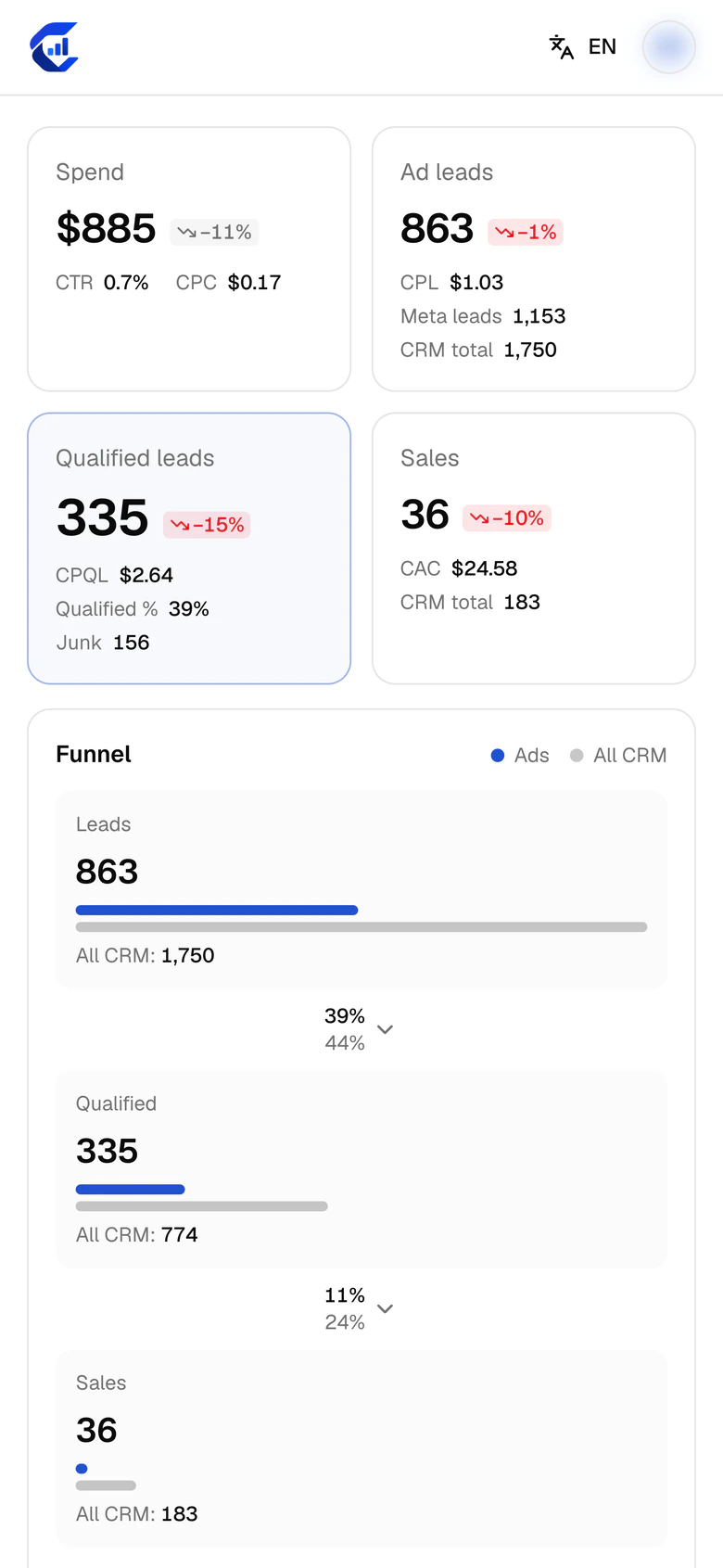
The report on a phone screen: spend $885, ad leads 863, qualified leads 335, sales 36, and the funnel from leads to qualified leads to sales.
Qualified leads335
CPQL$2.64
A familiar argument

The client says the leads are junk. How do you prove lead quality?

The argument always starts the same way: you hold the Ads Manager numbers, the client holds what the sales team said.

The chat is an illustration; the numbers are from a real report (a driving school, 2–8 October 2026). For that same week the report shows 335 qualified leads and 36 sales. The number existed — in the CRM, not in the media buyer’s hands. Below: what a client wants to see in a report, and the four moves that put those numbers in front of you.

Client
  • Plenty of leads, but they are junk. Sales say nobody picks up the phone.
  • 863 leads this week at $1.03 each. The ad account looks fine.
  • I don’t need leads, I need sales. How many sales did these ads bring?
  • That is in the CRM. I don’t have that number.
What goes in the report

What should a media buyer’s client report contain?

Besides spend and cost per lead, a client report should show qualified leads, cost per qualified lead (CPQL), sales, customer acquisition cost (CAC) and the revenue recorded in the CRM — per creative. A report that ends at cost per lead answers one of the client’s five questions.

The client’s questionThe number that answers itDriving school, 2–8 October 2026
Are the ads working?Spend, leads, CPL — cost per lead$885 · 863 leads · $1.03
Are the leads any good?Qualified leads, their share, CPQL335 (39%) · $2.64
How many sales?Leads that reached the sale stage in the CRM36
What did one customer cost?CAC = spend ÷ sales$24.58
Did the ads pay off?Revenue recorded in the CRM and ROAS$5,297 · 5.99×

Revenue is what managers entered in the CRM: a sale with no amount lowers revenue and ROAS, and the report shows how many sales have none. Cost metrics count only leads tied to an ad. Formulas: CPL, CPQL, CAC, ROAS.

Move 1

Report qualified leads, not leads

When a client says “junk”, they mean the two or three bad calls a sales manager described. You show the whole week: at the driving school, 2–8 October 2026, 335 of 863 ad leads turned out qualified — 39%. A lead cost $1.03, a qualified lead (CPQL) $2.64. “Qualified” is not your opinion: it is a stage in the CRM, and the client’s own manager moves the lead there.

  • You and the client decide once which stage means a qualified lead. After that the argument is about a number, not a definition.
  • A low qualified share is a question for the ads: who is the creative bringing in?
  • Many qualified leads and few sales is a question for the sales team.
  • At the learning centre the same week, 330 of 685 leads were qualified (48%) and 134 were junk: junk leads are counted too, not hidden.
More about the report
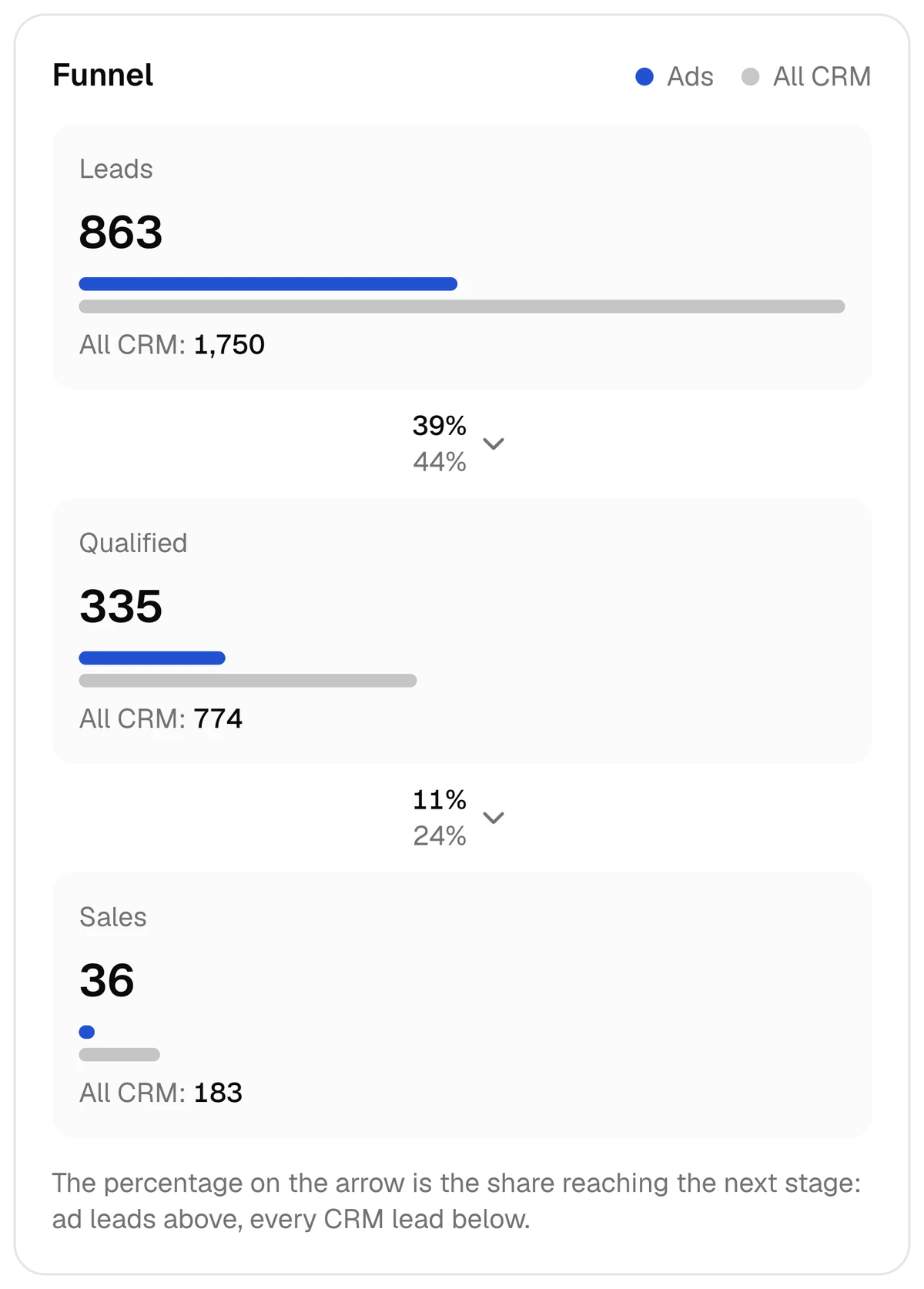
The report's funnel: 863 ad leads, 335 of them qualified (39%) and 36 sales (11% of the qualified), with the CRM-wide total beside each step.
Driving school, 2–8 October 2026: lead → qualified lead → sale, with the conversion between steps. A screen from the product.
Move 2

Show which creative sold

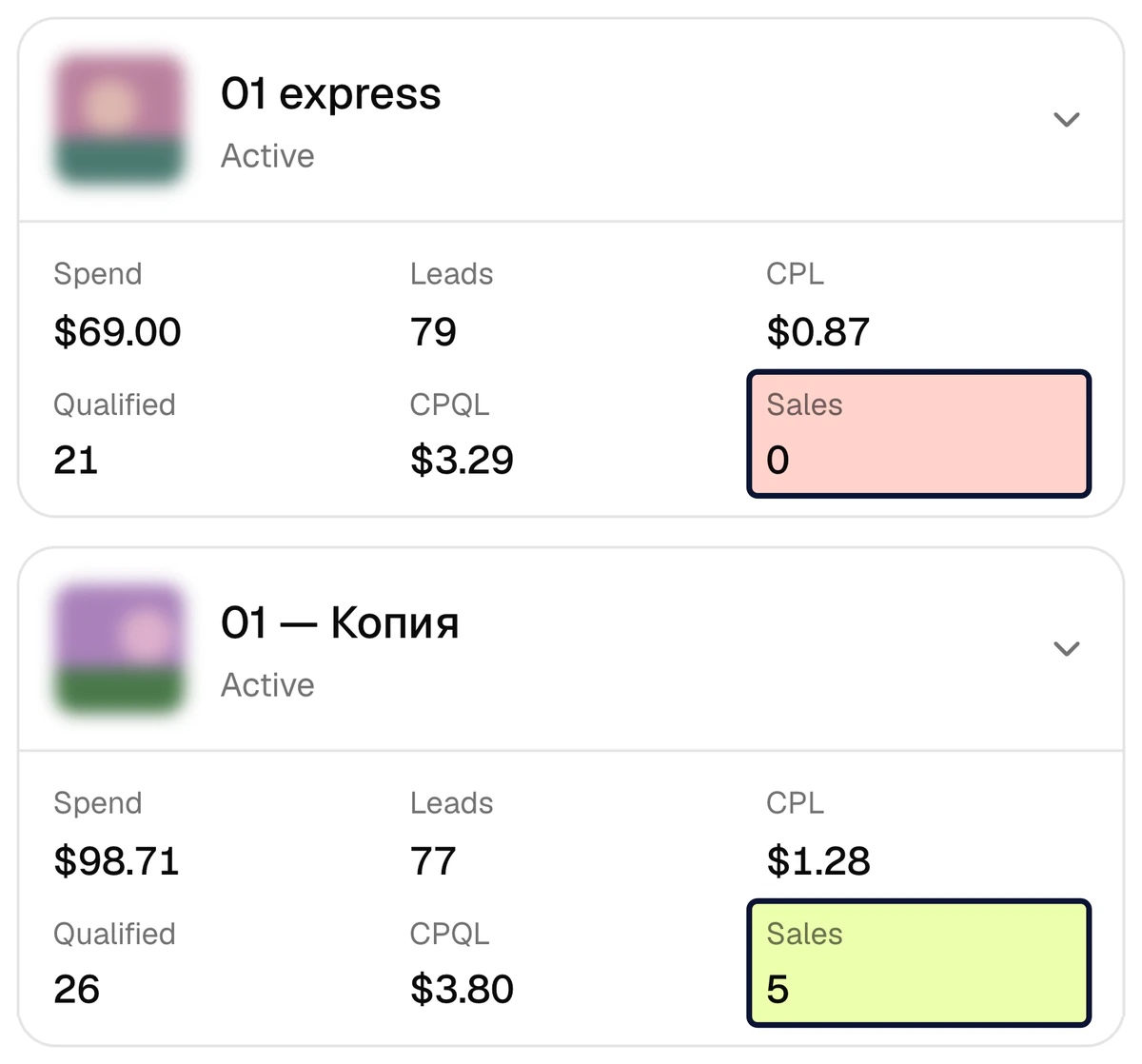
In Ads Manager the best creative is the one with the cheapest lead. The CRM can say otherwise. At the driving school one creative brought 79 leads at $0.87 each and 0 sales. Another paid $1.28 a lead, 47% more: 77 leads, 26 qualified, 5 sales. Going by cost per lead you would have moved budget to the first; in the report both sit in one table, and the client can see the decision for themselves.

  • Views: creative, ad, ad set and campaign, each with leads, qualified leads, sales and CAC.
  • Ads with the same name are merged into one creative, even when it runs in several ad sets.
  • You pause an ad, an ad set or a campaign from the table itself. This is open to the owner and admins; the Meta token needs the ads_management permission.
Article: which creative sells
Two creatives in the report: one with 79 leads at $0.87 each and 0 sales, the other with 77 leads at $1.28 each and 5 sales.
Two creatives, one week: 79 leads and 0 sales, 77 leads and 5 sales. A screen from the product.
For the client conversation

Four numbers Ads Manager does not show

Two projects, one week: 2–8 October 2026. None of these is visible when you look at cost per lead.

went to 23 creatives with no saledriving school · 44% of the week’s budget
$386
dearer lead — and 5 salesdriving school · the creative with $0.87 leads had 0 sales
47%
gap in the cost of a qualified leadlearning centre · $2.20 in one creative, $71.40 in another
32×
qualified leads from two creatives with almost the same cost per leadlearning centre · 14 leads at $2.79 and 24 leads at $2.97
0 vs 18

This is one week of two projects, not a promised result. Not every creative without sales is bad: a new creative’s leads may not have reached payment yet. So judge a new creative by qualified leads and CPQL first. More: cheap leads, no sales.

Move 3

Teach Meta on qualified leads, not on leads

A lead campaign looks for people who fill in forms, because that is all Meta sees. At the driving school Meta on its own saw 863 leads in the week and none of the 36 sales. With CAPI Platform connected, the moment a lead enters the qualified stage in the CRM a QualifiedLead signal goes to Meta through the Conversions API; a sale sends Purchase.

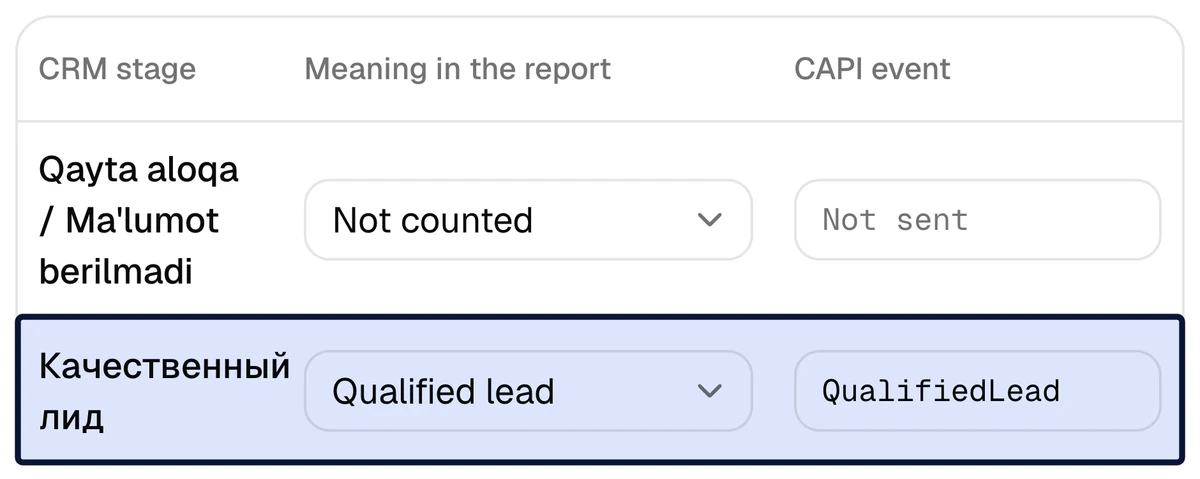
Funnel settings: the CRM stage for a qualified lead is mapped to "Qualified lead" and sends the QualifiedLead event to Meta.
Funnel settings: the qualified-lead stage sends the QualifiedLead event to Meta. A screen from the product.
  1. 1

    Tie the stage to a signal

    On the Funnel page the qualified-lead stage of the client’s CRM gets QualifiedLead and the sale stage gets Purchase. What each stage means is decided together with the client.

  2. 2

    Check that the signal goes out

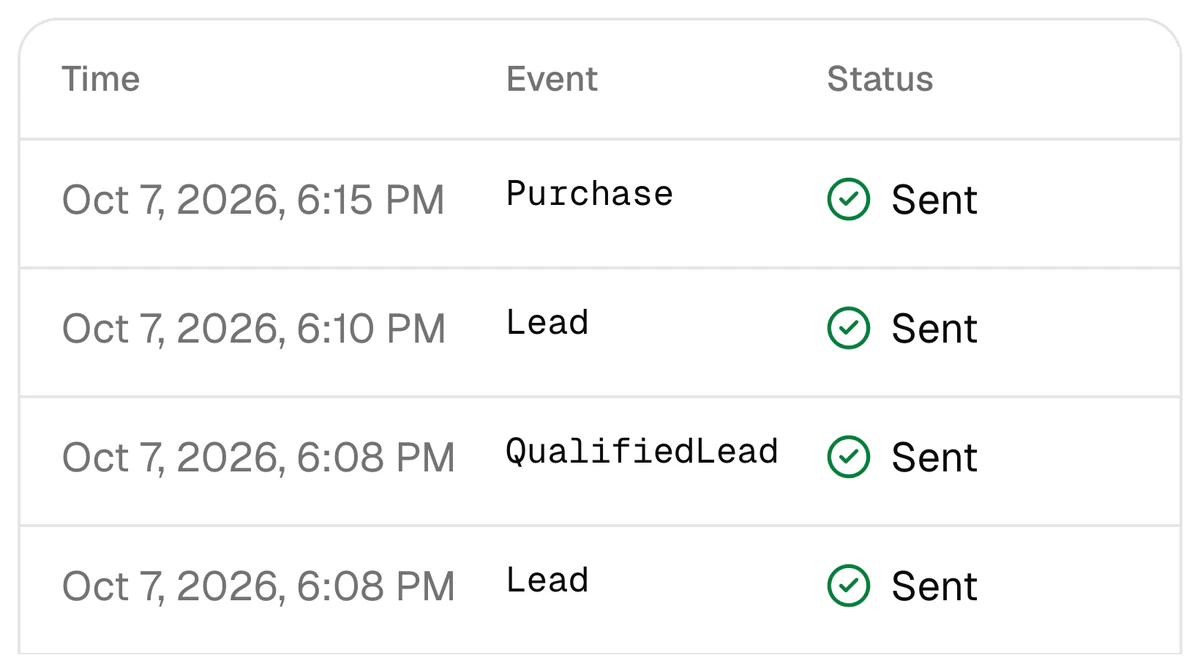
    The “Send a test event” button checks the token, the dataset and the path with one harmless event. After that every signal is in the CAPI events log with its time, name and status.

  3. 3

    Create a custom conversion in Ads Manager

    QualifiedLead is not a Meta standard event: the platform sends it as a custom event under this name. So a custom conversion is created from it.

  4. 4

    Optimise the campaign for that conversion

    The campaign’s goal is no longer the number of leads but the qualified lead. Step by step: optimising for qualified leads.

  5. 5

    Measure the result by CPQL

    Cost per lead may go up; the decision is made on cost per qualified lead and CAC in the report. Compare the week with the one before: the comparison is built into the report.

The CAPI event log: Purchase, Lead and QualifiedLead events sent to Meta, each with the status "Sent".
The CAPI events log: time, event and status — Purchase, Lead, QualifiedLead. A screen from the product.
Move 4

The report reaches the client in Telegram by itself

You link the client’s group chat to the project once. From then on the report arrives at the set hour: daily, weekly or monthly; in Uzbek, Russian or English. It carries spend, leads, qualified leads and sales, the best creatives and the creatives that spent money without a qualified lead. The chat beside this text is an illustration; the numbers are from the driving school’s real report.

  • No Monday screenshots: spend comes from Meta, the outcome from the CRM.
  • One project can have several chats: the weekly report in the client’s language to their group, the daily one to you.
  • Alerts are switched on separately: a connection error, leads stuck on the way to the CRM, money spent with no leads.
  • A chat is linked once: add the bot to the group and send /connect CODE in that chat (the code is valid for 15 minutes).
Telegram reports
Group with the client
  • CAPI PlatformDriving school · Weekly report · 2 — 8 October
  • Spend — $885
  • Leads — 863 · CPL $1.03
  • Qualified — 335 · 39% · CPQL $2.64
  • Sales — 36 · CAC $24.58
  • ClientSeen. Do we pause the creatives with no sales?
  • Yes. The list is in the report — I’ll pause them today.
Several clients

Every client is a separate project

You run several clients from one account. Projects do not mix.

  • A project per client

    One business, one project: its own ad accounts, CRM, report, CAPI signals and Telegram chats. One CRM is connected per project: Bitrix24, amoCRM (Kommo) or capiCRM.

  • A client sees only their own project

    You invite the client or their staff by link and grant access to their project only. The Viewer role sees the report and changes nothing; a Sales manager opens capiCRM only.

  • One Meta token for several projects

    An agency’s system user token can serve several projects inside one organisation and never leaves it. If you work as a team, see the page for agencies.

  • In the client’s language

    The interface and the Telegram reports come in Uzbek, Russian and English. The report opens in a browser, on a computer or a phone.

Price

What it costs your client

Connecting one business is $159, once. Then $40 a month. With several clients, each is connected as a separate project.

Set-up

$159once

Ready in 3 days. Lead integration included as a bonus.

  • The client’s CRM is connected: Bitrix24, amoCRM (Kommo) or capiCRM
  • Stages are tied to Meta signals: Lead, QualifiedLead, Purchase
  • Checked with a test signal
  • The last 30 days of history load into the report
  • Bonus: leads from Meta lead forms land in the CRM by themselves
Sign up

Every month

$40a month

After the set-up, every month.

  • CAPI signals: the CRM outcome goes to Meta
  • The report: spend, leads, qualified leads and sales per creative
  • Telegram reports and alerts
  • Lead integration for up to 4,000 leads a month
Leave a request

The client provides three things: access to the CRM, access to the Meta ad account, and 3 days. Day 1 the CRM is connected, day 2 stages are tied to signals (together with the client), day 3 a test signal. For comparison: at the driving school $386 went to creatives with no sale in a single week. More: pricing.

Questions media buyers ask

How do I prove lead quality to a client?

Do not argue about lead count. First agree with the client which CRM stage means a qualified lead. Then show the qualified share and the cost per qualified lead (CPQL) per creative, and pause the creatives with low quality. If qualified leads are many and sales are few, that is a question for the sales team. More: marketing vs sales on lead quality.

What do I need to connect a client’s CRM?

The client gives two kinds of access: to the CRM and to the Meta ad account. For Bitrix24 that is an inbound webhook URL, for amoCRM (Kommo) a long-lived token. If the client has no CRM, the platform has its own: capiCRM. You connect it yourself, or leave a request and we set it up in 3 days.

Can I run several clients from one account?

Yes. Each client is a separate project with its own ad accounts, CRM, report and Telegram chats. An invited client sees only their own project. The price is quoted per business: $159 once, then $40 a month.

My client has few leads. Will optimising for qualified leads work?

Signals and the report work at any volume. Meta’s optimisation needs volume: its developer documentation asks for at least 200 leads a month and a target stage that 1–40% of leads reach within 28 days; Meta’s newer “Conversions API for CRM” page says there is no minimum and 200 or more leads are a recommendation. No result is promised in advance.

Do leads from Instagram Direct, WhatsApp or phone calls show in the report?

They do, but by channel: the platform does not tie them to a specific ad automatically. Leads from Meta lead forms are tied exactly; website leads through the UTM tags in the ad link (the ad ID). The report states what share of leads is tied to an ad. The only ad platform is Meta: Facebook and Instagram.

Will the report match the numbers in the client’s CRM?

The “Events in the period” method matches the CRM’s weekly numbers. One difference is possible: the report counts people, not rows, so repeat leads of one person are merged by phone. A Bitrix24 Lead that becomes a Deal is also one lead.

Is my client’s customer data safe?

Phone and e-mail go to Meta only as SHA-256 hashes; a name is never sent. Contacts read from Bitrix24 and amoCRM are stored only as a hash and a partly masked number; connection keys and capiCRM contacts are stored encrypted. Full text: privacy policy.

What does it cost?

Set-up is $159, once: in 3 days the CRM is connected, stages are tied to signals and a test signal is sent; lead integration is included in that price as a bonus. Then $40 a month: CAPI, the report, Telegram reports and lead integration for up to 4,000 leads a month. More: pricing.

Sources

The driving school’s and the learning centre’s numbers are from the CAPI Platform report for the week of 2–8 October 2026; project names are withheld. Facts about Meta come from the pages below.

  1. 1Conversions API for CRM — Meta
  2. 2Conversion Leads integration — Meta for Developers

Don’t let your next report end at cost per lead

Sign up with Google and connect your first client’s project yourself, or leave a request and we will set it up in 3 days. Set-up is $159 once, then $40 a month.