Meta ads CRM attribution platform
CAPI Platform (capip.uz) is a Meta ads CRM attribution platform: it connects Facebook and Instagram ads with Bitrix24, amoCRM (Kommo) or its own capiCRM. A lead-form lead lands in the CRM by itself, CRM outcomes — qualified leads and sales — go back to Meta through the Conversions API, and the report shows spend, leads, qualified leads and sales per creative. For businesses with a sales team, media buyers and agencies.
- Every Meta lead-form lead in the CRM, with the ad it came from
- A stage changes in the CRM, and Meta gets a signal: Lead, QualifiedLead, Purchase
- Per creative: spend → lead → qualified lead → sale, with a summary in Telegram
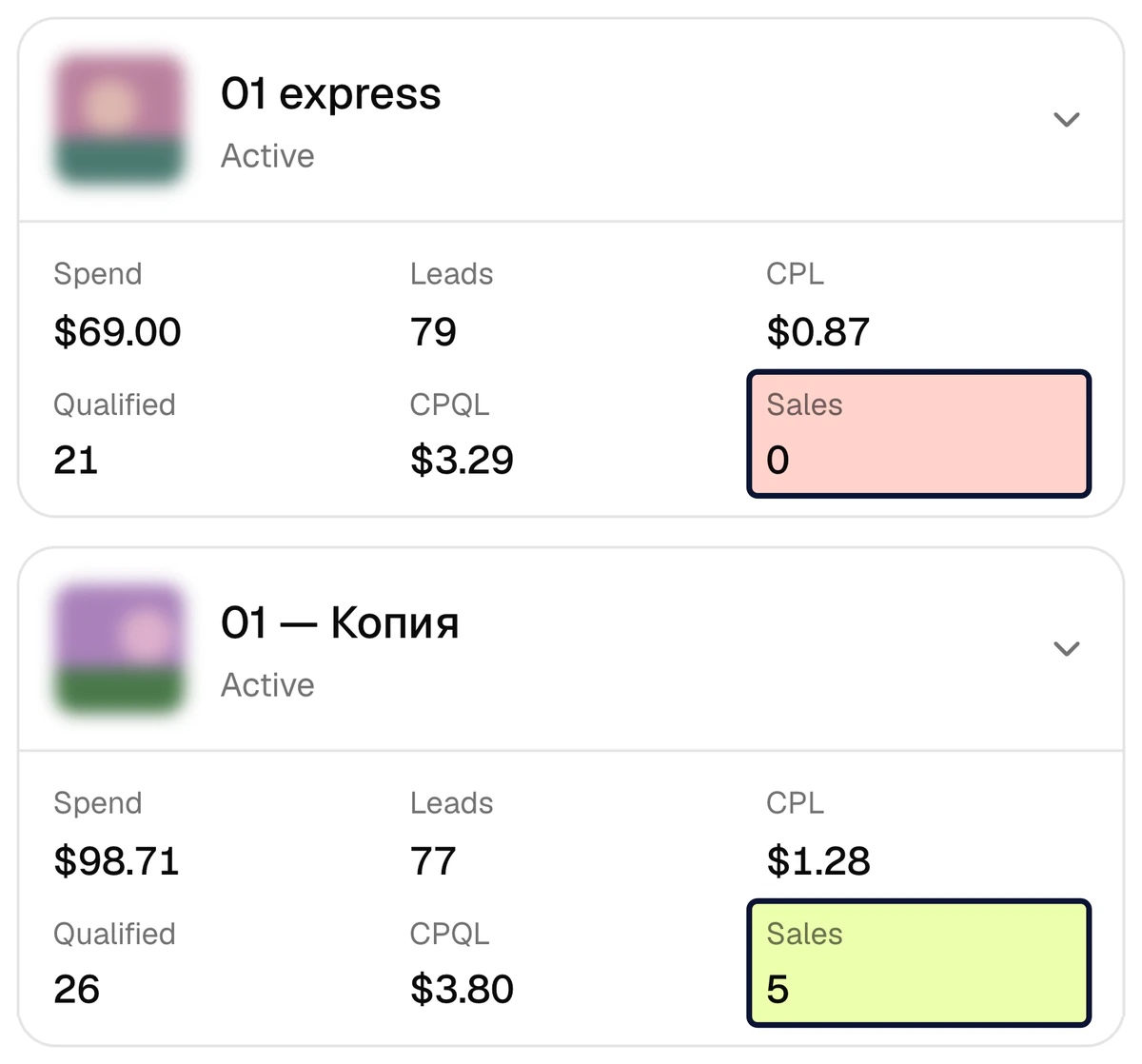
What the platform does
Six parts of one chain: the lead reaches the CRM, the CRM outcome goes back to Meta, and the report joins both ends per creative.
CRM outcomes go back to Meta
When a lead is marked qualified or a deal is won in the CRM, the platform sends a QualifiedLead or Purchase signal to Meta through the Conversions API. With no signal Meta looks for people who fill in forms; with one, for people like those who bought.
Learn moreA report from spend to sale
Spend, leads, qualified leads, sales, CPL, CPQL, CAC and ROAS for every campaign, ad set and creative. Repeat requests from one person are merged by phone number, so the report counts people, not rows.
Learn moreLeads delivered to the CRM
A Meta lead-form lead lands in the CRM with the name, the phone number and every answer, and with the ad it came from. One lead is written once; if a write fails, it is retried for up to 24 hours.
Learn moreReports and alerts in Telegram
A daily, weekly or monthly summary arrives in a group or a private chat: the totals, the best creatives and the ones spending without qualified leads. A separate alert comes when a connection breaks or leads get stuck on the way to the CRM.
Learn morecapiCRM, the CRM inside CAPI Platform
No CRM yet? Lead and deal boards, tasks, comments and call outcomes live on the platform itself. A stage change reaches both the report and Meta at once.
Learn moreBitrix24 and amoCRM integration
Bitrix24 connects with an inbound webhook, amoCRM (Kommo) with a long-lived token. On connection the last 30 days of history load into the report; old leads are not sent to Meta.
Learn more
From a lead to Meta in five steps
The road of one lead: from the form to the CRM, from the CRM to Meta and into the report.
- 1
A person fills in a lead form
In an ad on Facebook or Instagram. A form on your website joins the same road: its requests reach Bitrix24 or capiCRM.
- 2
The lead lands in the CRM
The platform picks the lead up as soon as Meta reports it, and checks the forms itself every minute as a backup. The lead opens in Bitrix24, amoCRM or capiCRM with the name, the phone number, the answers and its ad.
- 3
A manager moves the lead through the stages
The sales team works in the CRM as usual. Which stage means a qualified lead and which one means a sale is something you mark once, in the funnel settings.
- 4
The platform sends a signal to Meta
The moment the lead enters a marked stage,
Lead,QualifiedLeadorPurchasegoes out through the Conversions API. Phone numbers and e-mails go only as SHA-256 hashes; a sale carries its amount and currency. - 5
The result shows in the report and in Meta
The report ties the spend, the lead, the qualified lead and the sale to the creative the lead came from. Meta now knows who became a qualified lead and a buyer: in Ads Manager you create a custom conversion from that signal and optimise the ads for it.
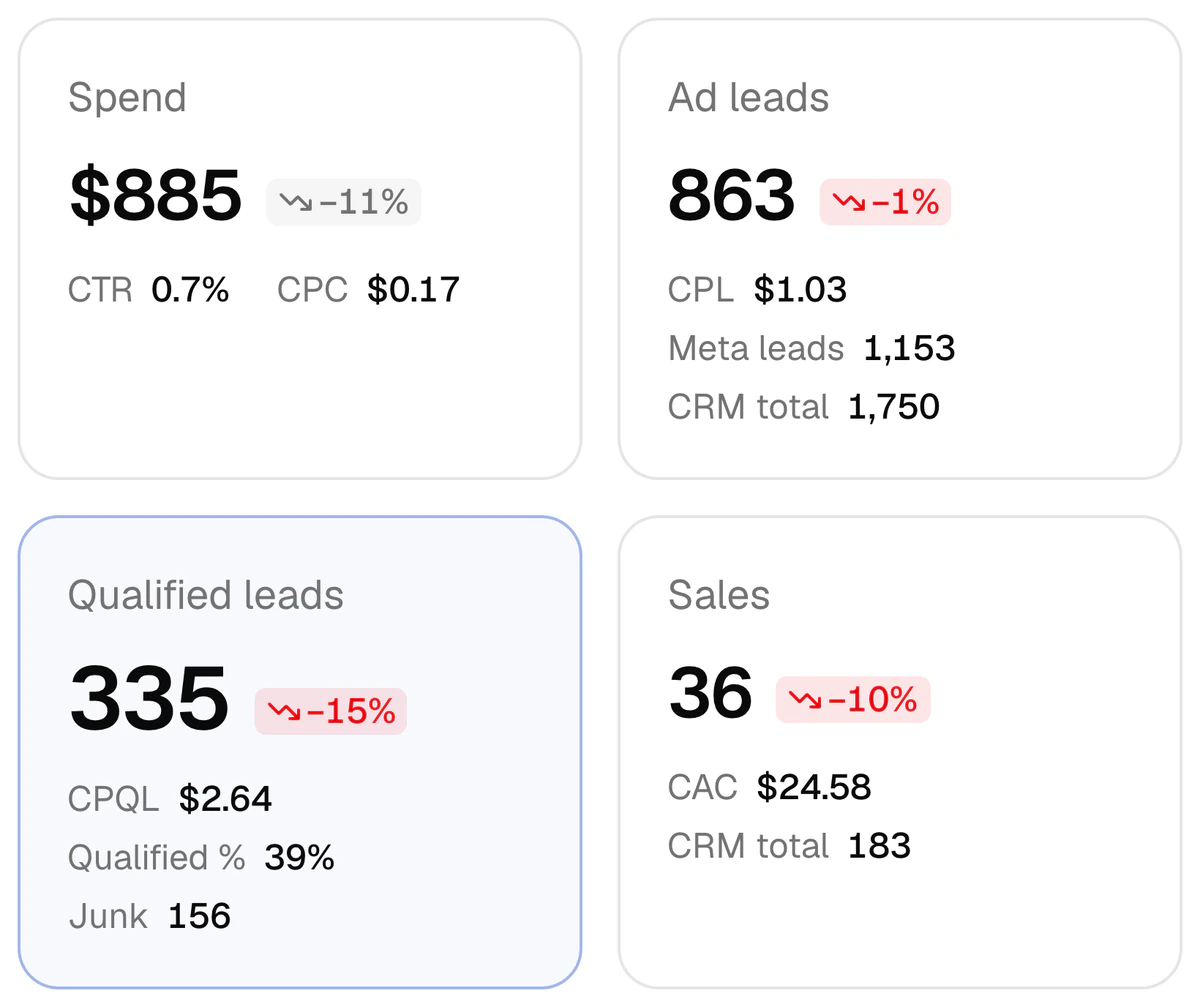
You see the cost of a customer, not just the cost of a lead
A driving school, one week (2–8 October 2026): $885 of spend, 863 ad leads, 335 qualified leads, 36 sales. A lead cost $1.03, a qualified lead $2.64, a customer $24.58. All three prices sit on one screen, and separately for every creative. In the same week 23 creatives spent $386 — 44% of the budget — without a single sale.
- Group by campaign, ad set, ad or creative name; ads that share a name are merged
- Periods: today, yesterday, 7 or 30 days, a week, a month or your own dates, compared with the previous period
- The “Worth a look” block lists creatives that spent 5% of the budget or more without one qualified lead
- Leads not tied to an ad are not dropped: they are listed apart, with their channel and the reason
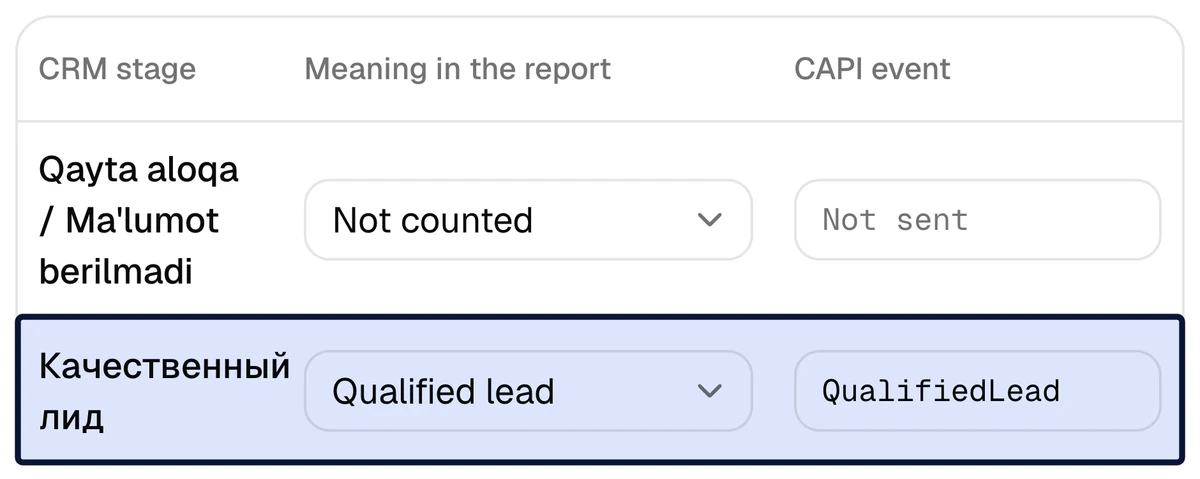
You decide what a qualified lead is
On the Funnel page every CRM stage gets a meaning: new lead, qualified lead, sale, junk lead or not counted. The stage that matters gets a Meta signal — the qualified-lead stage, for example, gets QualifiedLead. You set it once; in a done-for-you setup we mark the stages together with you on day two.
- Three signals:
Lead,Purchaseand a custom event namedQualifiedLead - For one lead each signal is sent once, even if the stage moves back and forth
- A deal closed straight to a sale also sends
QualifiedLead Purchasecarries the deal’s amount, when one is entered, converted to the ad account’s currency
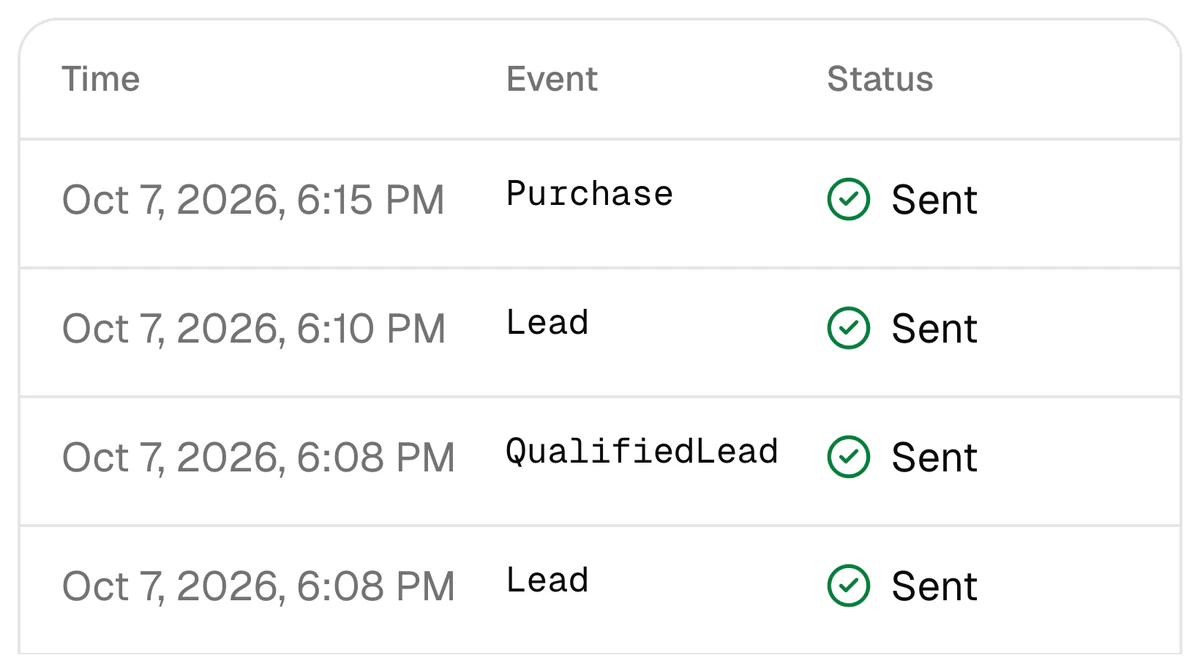
Every signal is in plain sight
Every signal sent to Meta stays in a log: the time, the event, the lead, the status and the number of attempts. There are four statuses: queued, sent, failed and skipped — with the reason. A failed signal is sent again at intervals from 1 minute up to 24 hours.
- The “Send a test event” button checks the token, the dataset and the whole path with one harmless signal
- Incoming CRM webhooks are logged too: when leads stop coming, this is the first place to look
- Phone numbers and e-mails reach Meta only as SHA-256 hashes; a name never does
30 days, two projects
A driving school and a learning centre, 9 September – 8 October 2026. Names are hidden; the figures are from the platform’s report.
- ad spend in the reportdriving school $4,528 + learning centre $9,085
- $13,613
- CRM leads in the report
- 15,613
- qualified leads1,840 + 1,138
- 2,978
- Meta leads delivered into the CRM0 lost, 0 queued, 0 errors
- 2,103
Delivered leads are counted from 25 September 2026 at the driving school (1,790) and from 5 October 2026 at the learning centre (313). “0 lost” is a measurement for those dates, not a guarantee. More in the cases.
What else is inside the platform
Campaign creation
A Meta lead-form campaign is built on the platform itself: ad account, Page, form, audience, daily budget and up to 5 ads per campaign. Everything is created paused: nothing is spent until you press “Launch”. Optimise for leads or, with CAPI switched on, for quality leads. Limit: ad accounts in USD or EUR only.
Team and roles
One business, one project: its own ad account, CRM and Telegram chats. Roles: owner, admin, member, viewer and sales manager. The owner sees every project; everyone else, admins included, sees all of them or only the ones they were granted; a sales manager sees capiCRM only, with no ads or reports. People join by an invite link. More for agencies.
Tracking code for your website
One script on your site keeps UTM tags,
fbclid,_fbcand_fbpin the visitor’s browser for 90 days and adds them to every form as hidden fields. It reads no personal data and sends nothing anywhere. A website request reaches Bitrix24 or capiCRM with its ad, when the UTM tags name it.
What works with which CRM
There is one ad platform: Meta (Facebook and Instagram). One project connects one CRM. The interface is in Uzbek, Russian and English.
| Feature | Bitrix24 | amoCRM | capiCRM |
|---|---|---|---|
CRM stage → Meta signal (Lead, QualifiedLead, Purchase) | Yes | Yes | Yes |
| Report per creative: spend → lead → qualified lead → sale | Yes | Yes | Yes |
| Delivery of Meta lead-form leads into the CRM | Yes | Yes | Yes |
| Requests from forms on your website | Yes | No | Yes |
| Reports and alerts in Telegram | Yes | Yes | Yes |
| How it connects | Inbound webhook (crm scope) | Long-lived token | Nothing to connect: it is inside the platform |
Who needs the platform
Business owners
You run Meta ads and a sales team works the leads. You see which creative brings sales and what one customer costs.
Media buyers
You show a client the cost of a qualified lead and of a sale, not the cost of a lead, and optimise the ads for a signal from the CRM.
Agencies
A separate project for each client and roles for the staff: a client sees only their own project.
Frequently asked questions
Which CRMs and ad platforms does CAPI Platform work with?
On the ad side, Meta only: Facebook and Instagram. Google Ads, TikTok and Yandex are not connected. On the CRM side, Bitrix24, amoCRM (Kommo) or the platform’s own CRM, capiCRM; one project connects one of them. Meta lead-form leads are delivered to all three CRMs, requests from website forms to Bitrix24 and capiCRM. More: integrations.
I have no website, only lead forms. Will the platform work for me?
Yes. Neither a website nor the Pixel is required: a lead-form lead lands in the CRM with its Meta lead ID, and the outcome signal goes to Meta with that ID and the hashed phone number. More: the Conversions API without a website.
Do I connect it myself or do you? How long does it take and what does it cost?
Both ways exist. Sign-up is open through Google: you add a project and connect Meta and the CRM yourself — that takes a Meta system user token and a CRM key. Or we connect it for you in 3 days: on day one the CRM is connected, on day two the stages are tied to signals, on day three a test signal goes out. The price is $159 once, then $40 a month for CAPI, the report, Telegram reports and lead integration up to 4,000 leads a month. You give access to the CRM and to the Meta ad account. More: pricing.
Are leads and sales from before the connection sent to Meta?
No. When a CRM is connected, the last 30 days of history load into the report only. Meta gets what happens after the connection: a lead the platform first sees more than 24 hours after it was created sends no signal, and neither does an event older than 7 days.
Where do my customers’ phone numbers and names go?
Meta receives phone numbers and e-mails only as SHA-256 hashes, and never a name. Contacts read from Bitrix24 or amoCRM are kept on the platform only as a hash and a partly masked phone number (+99890•••••67); CRM keys and capiCRM contacts are kept encrypted. Lead-form answers are kept encrypted for 7 days, for delivery retries, and then erased. More: the privacy policy.
Two ways forward: look inside or hand it to us
Sign up with your Google account and see the platform from the inside. Or leave your name and phone number — we will get in touch and connect it in 3 days: $159 once, then $40 a month.