capiCRM: a simple CRM for Meta lead ads
capiCRM, the CRM inside CAPI Platform (capip.uz), is a simple CRM for Meta lead ads, for businesses with no CRM yet. A lead-form lead or a website request opens as a lead with its ad, a qualified lead becomes a deal in one click, and tasks remind managers to call back. A stage change updates the ad report and, at a stage you mark, sends a signal to Meta through the Conversions API.
- Leads, then deals: on a board or in a list
- Meta lead-form leads and website requests arrive by themselves, each with its ad
- Every new lead gets a task: call within 15 minutes
- A sales manager sees the CRM only, at crm.capip.uz
- to call a new lead: the task it opens witha Telegram reminder when the task falls due
- 15 min
- turns a qualified lead into a dealthe contact, ad, answers and tasks move with it
- 1 click
- go to Meta: Lead, QualifiedLead, Purchaseon a stage change, through the Conversions API
- 3 signals
What is a CRM, and who needs one?
A CRM (customer relationship management) system is where a business works with its customers. Every request opens as a card of its own, holding the contact, where the request came from, who owns it, the next task and the deal’s stage.
It has two jobs: no request goes unanswered, and every sale is traced to where it came from. A spreadsheet or a Telegram group stores a request, but neither reminds anyone to call back, and neither ties a sale to an ad.
You need a CRM if any of this sounds familiar:
- Requests live in a spreadsheet, a notebook or a Telegram group, and nobody can see who called whom.
- A customer said “I’ll think about it” and was forgotten: nothing reminded anyone.
- A sale happened, but nobody knows which ad the customer came from.
- Two managers call the same customer, or nobody does.
- At the end of the month you cannot count how many requests became sales.
The terms: a lead is a person who left a request; a qualified lead is a lead the sales team confirmed as a possible customer; a sales funnel is the stages a lead passes on the way to a sale.
A request came in. Who called?
Without a CRM, the answer is spread over three places.
The chat is an illustration. In capiCRM every request opens with an owner and a task, a task that falls due is posted to the Telegram chat, and a sale from a Meta lead-form lead is written against its ad in the report.
- Did we call everyone who left a request yesterday?
- ManagerThe ones in the spreadsheet, yes. The ones in the Telegram group went to the other manager. I don’t know.
- And the customer who said “I’ll think about it”? Someone was meant to call back.
- ManagerI didn’t write it down. It slipped my mind.
- How many requests became sales this month, and from which ad?
- ManagerI can’t say exactly. I’d have to count.
How does a request move through capiCRM?
The order follows Bitrix24: Leads first, then Deals, each with a pipeline of its own.
- 1
The request opens as a lead
Meta lead-form leads and requests from the form on your website arrive by themselves, with the name, the phone number, the form’s answers and the ad the person came from. A call or a request from Instagram or Telegram is added with “New lead”. More: lead delivery.
- 2
It gets an owner and a first task
The lead goes to the person chosen in its form’s settings or, when nobody is chosen, in turn to the managers you ticked. A task is set at once: call within 15 minutes. This automation can be switched off.
- 3
The manager calls and logs the outcome
One click records the call: talked, no answer, busy or wrong number. A note goes on the lead, and the next call becomes a task. The lead’s stages: New → Contacted → Call back.
- 4
A qualified lead becomes a deal
“Convert to deal” closes the lead as good and opens a deal. The contact, the ad, the form’s answers and the open tasks move to the deal, and the lead’s history stays visible in it. A junk lead goes to its own stage and never becomes a deal.
- 5
The deal moves to a sale
The default pipeline: New deal → Meeting → Proposal sent → Awaiting payment → Won or Lost. A lost deal gets a reason: too expensive, no answer, went elsewhere, not needed, later, or one in your own words.
What is inside capiCRM?
What a sales team uses every day, and no extra modules. The interface is in Uzbek, Russian and English.
A board and a list
Drag a lead or a deal from stage to stage, or open the same records as a table. A card shows the customer, the masked phone number, the ad or the source, and the next task. Search by name, phone or number; filter to “Mine” or “Unassigned”.
Tasks and reminders
Every lead and deal carries tasks: what to do, when and for whom. The Tasks page lists the overdue ones, today’s and the coming days’. A task that falls due is posted to the project’s Telegram chat.
Learn moreCall outcomes and notes
A card’s history keeps every call with its outcome, the notes and the stage changes. The Call, Telegram and WhatsApp buttons open the customer’s number in one tap; they are links, not telephony.
Leads assigned in turn, duplicates flagged
New leads go in turn to the managers you ticked. When you add a record by hand and an open lead or deal already has that number, capiCRM warns you and offers to open it.
Your own pipelines
Rename stages, reorder them, colour them and add new ones. You can keep several deal pipelines: one for each line of business, for example.
Contacts are stored encrypted
Names, phone numbers, e-mails, form answers, notes and task texts are kept encrypted on the platform. The Viewer role sees a masked phone number: +99890*67.
Learn more
Who sees what?
A sales team has no need for the ad budget. The Sales manager role opens capiCRM only, at its own address: crm.capip.uz. People join the team by an invite link.
| Role | Leads and deals | Full phone, answers, notes | Ads and reports | capiCRM settings |
|---|---|---|---|---|
| Owner, admin | Works with them | Yes | Yes | Changes them |
| Member | Works with them | Yes | Yes | Changes them |
| Sales manager | Works with them | Yes | No | No |
| Viewer | Reads only | No: the phone is masked (+99890*67) | Yes | No |
The owner sees every project; everyone else, admins included, sees all of them or only the ones they were granted. crm.capip.uz is the same platform and the same sign-in: only capiCRM’s pages open there, and everything else lives at the main address, capip.uz.
A stage changes, and both the report and Meta know
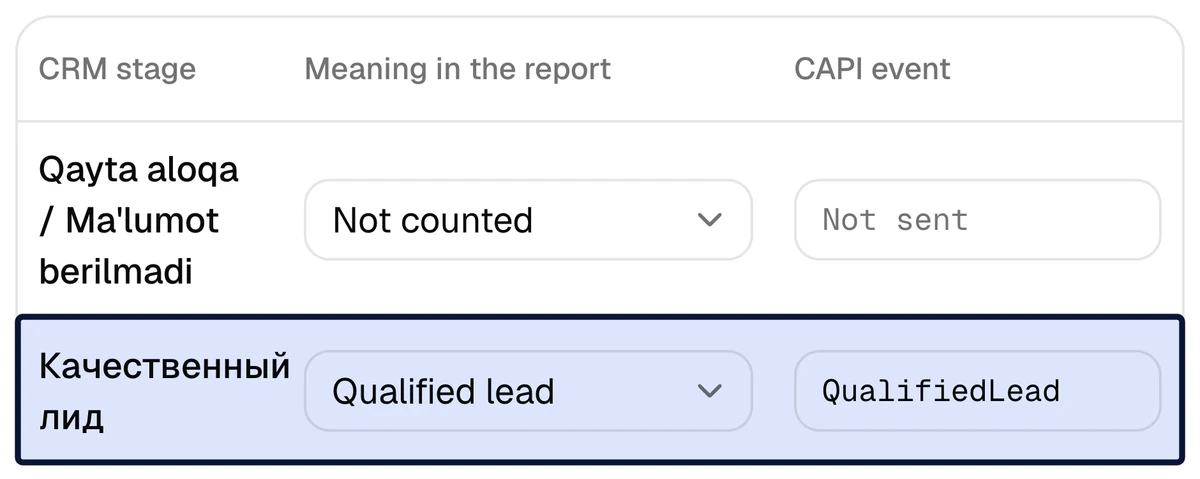
capiCRM runs inside the platform, so it needs no token and no webhook. The moment a manager moves a lead to the next stage, the report updates, and at a marked stage a signal goes to Meta through the Conversions API, provided a Meta ad account is connected to the project. Which stage means a qualified lead and which one means a sale is marked on the Funnel page.
- By default a new lead sends
Lead, a lead converted into a deal sends a custom event namedQualifiedLead, and the Won stage sendsPurchase - For one lead each signal is sent once, even if the stage moves back and forth
- When the deal has an amount,
Purchasecarries it - A lead and the deal opened from it count as one person in the report
- Phone numbers and e-mails reach Meta only as SHA-256 hashes; a name never does
capiCRM or Bitrix24 / amoCRM: which one fits?
What CAPI Platform is for — the report, the CAPI signals and lead delivery — works the same with all three CRMs. The difference is in the CRM itself.
| Your situation | Choose | Why |
|---|---|---|
| No CRM: requests live in a spreadsheet, a notebook or a Telegram group | capiCRM | There is nothing to connect: you pick capiCRM in the project, and the lead and deal pipelines open ready-made. |
| Requests come from Meta lead forms and your website, and you sell by phone | capiCRM | Both sources arrive by themselves, and every lead gets a task to call. |
| Bitrix24 or amoCRM (Kommo) already runs, and the team is used to it | Stay in your CRM | No move is needed: the platform connects to it and reads the stages from there — Bitrix24, amoCRM. |
| You need telephony and call recording, or WhatsApp and Instagram Direct chats inside the CRM | A CRM that has them | capiCRM has none of these: a call’s outcome is logged by hand, and Telegram and WhatsApp are link buttons only. A Direct request is added by hand and stands in the report by channel, not by ad. |
| You need invoices, stock, documents or complex automation | A CRM that has them | capiCRM keeps leads, deals and tasks only. It has one automation: the task to call a new lead. |
| Website requests must reach the CRM too | capiCRM or Bitrix24 | The platform does not send website form requests to amoCRM. |
One project connects one CRM; the platform works with Bitrix24 and amoCRM as well. Records do not move from capiCRM to another CRM by themselves, so if you know you will need a bigger CRM soon, start there.
Where to go next
Lead delivery
How a Meta lead-form lead reaches the CRM: the webhook, a check every minute, no duplicates.
Report by creative
Spend, leads, qualified leads and sales for every ad.
Integrations
Already have a CRM? Bitrix24 and amoCRM connect to the same platform.
Marketing vs sales
“The leads are bad” or “sales is not working”: settle it with numbers from the CRM.
Questions and answers
Does capiCRM replace Bitrix24 or amoCRM?
For keeping leads, deals and tasks, yes. If you need telephony with call recording, messenger chats inside the CRM, invoices or stock, no: capiCRM has none of them. CAPI Platform also works with Bitrix24 and amoCRM, so the report and the signals to Meta do not depend on which CRM you choose.
How do I switch capiCRM on?
In the project’s Connections, pick capiCRM as the CRM. It needs no token and no webhook: the lead and deal pipelines open with the default stages. Then connect the Meta ad account, invite your managers with the Sales manager role, switch the lead forms on and, if you have a website, add its form. When we do the setup, all of this is part of the same 3 days.
How do Meta lead-form leads and website requests reach capiCRM?
A lead form is switched on on the Lead forms page: from that moment its leads open in capiCRM through Meta’s webhook, and as a backup the platform checks the forms itself every minute. For a website, capiCRM gives a form address: the site posts the name, the phone number and the other fields to it, and the tracking code adds the UTM tags and fbclid. More: lead delivery.
Can I add a customer who called or wrote in Direct?
Yes, with “New lead” or “Quick add”: a name, a phone number and a source — call, Instagram, Telegram, WhatsApp, website, referral or walk-in. Such a lead stands in the report by channel: only Meta lead-form leads, and website requests whose UTM tags name the ad, are tied to an ad automatically.
Does a sales manager see ad spend and reports?
No. The Sales manager role opens capiCRM only: leads, deals and tasks. Ads, reports, connections and settings are not shown to them. They usually work at crm.capip.uz.
How are customers’ phone numbers stored?
capiCRM’s contacts — names, phone numbers, e-mails, form answers, notes and task texts — are stored encrypted on the platform. The Viewer role sees a masked phone number (+99890*67) and no answers or notes. Meta receives phone numbers and e-mails only as SHA-256 hashes, and never a name. More: the privacy policy.
How much does capiCRM cost?
capiCRM has no price of its own: it is part of CAPI Platform, one of the three CRMs a project can work with. The platform costs $159 once (setup in 3 days), then $40 a month for CAPI, the report, Telegram reports and lead integration up to 4,000 leads a month. The terms are on the pricing page.
Can I move to Bitrix24 or amoCRM later?
Yes. A project connects one CRM: you disconnect the current one and connect the new one. capiCRM’s leads, deals, notes and tasks are kept when it is disconnected and come back if it is switched on again, but they do not move into another CRM by themselves.
No CRM yet? Start with capiCRM
Sign up with your Google account, add a project and pick capiCRM as its CRM. Or leave your name and phone number: we connect Meta, capiCRM and the signals in 3 days — $159 once, then $40 a month.