Meta Conversions API for your CRM: questions and answers
CAPI Platform (capip.uz) connects Meta ads with a CRM — Bitrix24, amoCRM or its own capiCRM. It sends qualified leads and sales back to Meta through the Conversions API, shows a spend-to-sale report for every creative and delivers lead-form leads into the CRM. Set-up takes 3 days: $159 once, then $40 a month. Below are short answers about the product, connection, price and data safety.
- The product and CAPI
- Connection
- Price
- Data and safety
- set-up time
- 3 days
- set-up · once
- $159
- then · a month
- $40
- phones and e-mails reach Meta only as hashes
- SHA-256
CAPI Platform and the Conversions API
What is CAPI Platform?
CAPI Platform (capip.uz) is a service that connects Meta (Facebook and Instagram) ads with a CRM. It sends CRM outcomes — a lead, a qualified lead, a sale — back to Meta through the Conversions API and shows a report of spend → lead → qualified lead → sale for every creative. It also delivers Meta lead-form leads into the CRM and sends reports to Telegram. Everything it does is on the features page.
What is the Conversions API (CAPI)?
The Conversions API is Meta’s server-side channel: an advertiser sends outcomes straight from a server or a CRM instead of through the visitor’s browser. With no signal Meta looks for people who fill in forms; with a signal, for people like those who bought. Meta knows only what you tell it: if nobody reports the sale recorded in the CRM, the story ends at the lead as far as Meta can see. More on the Conversions API page.
What is the difference between the Pixel and the Conversions API? Do I need CAPI if I have a Pixel?
The Pixel runs in the browser and sees actions on a website: a page was opened, a form was sent. The Conversions API runs on a server and sends the outcome from the CRM: the lead qualified, the customer paid. They do not replace each other, they work together: the Pixel cannot see a sale that happened after a call and a meeting. Full comparison: Pixel vs Conversions API.
I have no website, only lead forms. Can I still use the Conversions API?
Yes, a website is not required. Every lead from a Meta lead form has its own Meta lead ID, and the CRM outcome is sent to Meta with that ID. You need a Meta ad account, a Dataset (Pixel) ID and a CRM. Step by step: Conversions API without a website.
Which signals are sent to Meta, and when?
Three: Lead for a new lead, QualifiedLead for a qualified lead (a custom event name, not a Meta standard event) and Purchase for a sale. Each is tied to a CRM stage: when a lead enters that stage, the signal goes to Meta. Each signal is sent only once per lead; Purchase carries the deal’s amount and currency when the CRM has an amount. Which stage means what is decided together with you during set-up.
Does it work with Google Ads, TikTok or Yandex?
No. There is one ad platform: Meta, which is Facebook and Instagram. Spend, creatives and signals are Meta’s only; a lead from another source that sits in the CRM shows in the report by channel, but other platforms’ spend and ads are not in the report.
Are leads from Instagram Direct, WhatsApp or phone calls counted?
They are in the report, but by channel, under “Leads not attributed to an ad”, each with the reason. The platform does not tie them to an ad automatically: it has no integration with Direct, WhatsApp or telephony. One exception: if the same person filled in a Meta lead form earlier, the phone number puts them on that ad. Meta lead-form leads are attributed for certain, and website leads through the UTM tag in the ad’s link.
Pixel vs Conversions API in one table
| Meta Pixel | Conversions API | |
|---|---|---|
| Where it runs | In the visitor’s browser, on your website | On a server — the CRM’s or the platform’s side |
| What it sees | Actions on the site: a page opened, a form sent | Outcomes in the CRM: a new lead, a qualified lead, a sale |
| Needs a website | Yes | No — a lead form and a CRM are enough |
| A sale after a phone call | Does not see it | Sends it as Purchase, with the amount recorded in the CRM |
| In CAPI Platform | If the site’s Pixel has already sent Lead, the platform sends its own under the same event ID — Meta counts one | Lead, QualifiedLead, Purchase — when the stage changes in the CRM |
They work together: the Pixel for actions on the site, the Conversions API for outcomes in the CRM. More: Pixel vs Conversions API.
Connection: CRMs, timing and what you provide
Which CRMs does it work with? What if I have no CRM?
Three: Bitrix24, amoCRM and the platform’s own CRM, capiCRM. One CRM is connected per project. If you have no CRM yet, you can start in capiCRM: leads, deals, tasks and the signals to Meta in one place.
How long does set-up take?
3 days. On day 1 the CRM is connected and the last 30 days of history load into the report. On day 2 we decide together with you which stage means a qualified lead and which means a sale. On day 3 a test signal is sent; once Meta has accepted it, signals flow on their own.
What do you need from me to set it up?
Two things: access to your CRM and access to your Meta ad account. Technically that is an inbound webhook in Bitrix24 or a long-lived token in amoCRM, and on Meta’s side a System User token and the Dataset (Pixel) ID. On day 2 we need some of your time to go through the funnel stages together; the rest is on us.
Are old leads sent to Meta?
No. On connection the last 30 days of history load into the report only, so that there is something to compare with from day one. Meta receives only outcomes that appear after the connection; the loaded history and events older than 7 days are not sent.
My leads reach the CRM through another connector (Albato, for example). How do I move?
Form by form: every lead form has its own switch. First you stop that form in the old integration, then you switch it on in the platform — if both run, leads double in the CRM. Leads are delivered from the moment of switching on; if some arrived in between, you pick one of the form’s leads from the last 3 days as the starting point. The procedure: lead delivery to the CRM.
How fast does a lead-form lead reach the CRM? Can it get lost?
In about a minute: as soon as Meta notifies the platform, and where no notice comes the platform checks the forms itself every minute. If the CRM does not answer, delivery is retried from 1 minute up to 24 hours; a lead that has waited 15 minutes raises an alert in Telegram. As of 8 October 2026 two projects had 2,103 leads delivered and none lost — a measurement, not a guarantee.
Do requests from my website’s forms reach the CRM too?
Yes — capiCRM and Bitrix24. The site’s form posts the request to the platform, and the platform writes it into the CRM; a tracking snippet on the site keeps the ad tags (UTM, fbclid) from getting lost. Website requests are not passed into amoCRM through the platform: for amoCRM, Meta lead forms and the CAPI signals work.
Set-up, day by day
You provide access to the CRM and to the Meta ad account. The rest goes in this order.
- 1
Day 1. The CRM is connected
Bitrix24, amoCRM or capiCRM is connected to the platform. The last 30 days of history load into the report; old leads are not sent to Meta.
- 2
Day 2. Stages are tied to signals
Together with you we decide which stage means a qualified lead and which means a sale: a qualified lead is
QualifiedLead, a sale isPurchase. - 3
Day 3. A test signal
We send a test signal and check that Meta accepted it. After that signals flow on their own: each one shows in the log with its status, and a failed one is retried from 1 minute up to 24 hours.
Price, the lead limit and payment
How much does CAPI Platform cost?
Two payments: set-up is $159 once, then $40 a month. The $159 covers the 3-day set-up: the CRM is connected, stages are tied to Meta signals and a test signal checks the result. Lead integration is a bonus included in that price. Details: pricing.
What does the $40 a month include?
Everything that has to keep running: the CAPI signals, the report for every creative (spend, leads, qualified leads, sales), Telegram reports and lead integration up to 4,000 leads a month. The monthly fee starts after set-up.
What does the limit of 4,000 leads a month mean?
The limit belongs to lead integration: it is the number of leads the platform delivers into the CRM in a month — up to 4,000 within the $40. If your forms bring more than that, write to us before set-up and we will discuss it separately.
Is there a free trial?
No, a trial period is not offered. There is no guarantee of results either: sales also depend on the ads, the offer and the sales team. What you can verify is the connection itself: a test signal is sent on day 3, and from then on every signal and its status shows in the CAPI events log.
How do I pay? Is there online payment in the app?
Payment is arranged with us directly: you leave a request, we get in touch and agree on the payment method and the paperwork. The app itself has no online payment and no plans to choose from. The price has two parts: $159 once and $40 a month.
What went to Meta is in the log
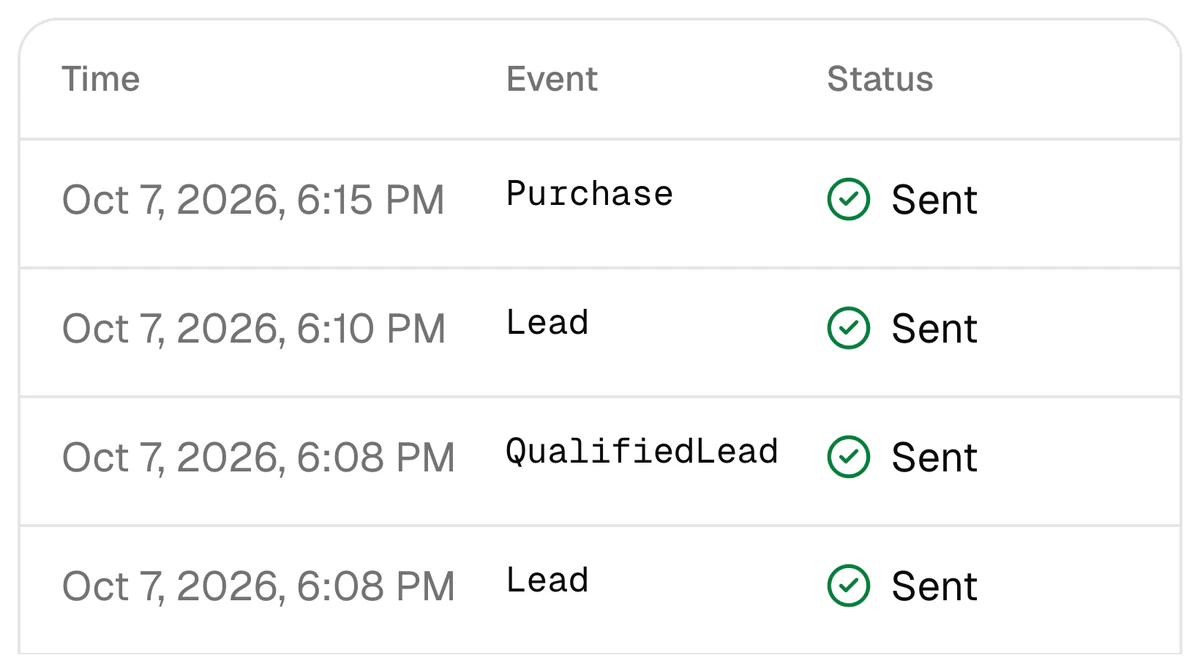
Every signal sent to Meta is written to the CAPI events log: the time, the event and its status. A signal carries no customer name; phones and e-mails go only as SHA-256 hashes.
- Each signal has a status: queued, sent, failed or skipped — with the reason.
- A failed signal is retried from 1 minute up to 24 hours.
- A test event checks the token, the Dataset and the whole path with one harmless signal.
Data: what is sent, what is stored and who sees what
What is sent to Meta about my customers?
Phones and e-mails only as SHA-256 hashes; a name is never sent. With them go the Meta lead ID, Meta’s click identifiers (_fbc, _fbp), a hashed internal ID, the event’s name and time and, for a sale, the amount and currency. A hash is a one-way fingerprint of the number: Meta matches it against its own hashes and does not receive the number itself.
Which of my customers’ data is stored on the platform?
From Bitrix24 or amoCRM: lead and deal names, stages, amounts, dates and UTM tags; phones and e-mails only as a SHA-256 hash and a partly masked phone number. In capiCRM, contacts, answers and comments are stored encrypted. A copy of lead-form answers is kept encrypted for 7 days for retries and then erased; data is not sold.
Who on the team sees what?
Access is given per project. The owner sees every project; an admin, a member and a viewer see all projects or only those opened to them. A sales manager sees capiCRM only, with no ads or reports; a viewer in capiCRM sees phone numbers masked. How agencies set this up: for agencies.
How are my Meta and CRM keys (tokens) stored?
Meta, CRM and Telegram keys are stored encrypted with AES-256-GCM. Sign-up is through Google: the platform takes only your name, e-mail and Google’s account ID — no picture and no Google tokens are kept, and there is no password to invent. A sign-in records no IP address and no browser name.
How do I get my data deleted?
You can disconnect Meta yourself at any time under “Connections”: the access key and the list of ad accounts and Pages are deleted at once. To have personal data, your account or a whole project deleted, write to the address given in the privacy policy — such requests are carried out within 30 days. The copy of lead-form answers erases itself after 7 days.
Need more than a short answer? Pages by topic
Conversions API
How a CRM outcome goes back to Meta: Lead, QualifiedLead, Purchase.
Lead delivery to the CRM
From a Meta lead form into the CRM: switching on, settings, moving from another connector.
Integrations
Bitrix24, amoCRM and capiCRM: what is connected in each.
Pricing
$159 once, then $40 a month — what is included.
Glossary
CPL, CPQL, CAC, ROAS and other terms, each with a definition and a formula.
Privacy policy
What data is taken, who receives it and how it is deleted.
Is your question not here?
Write to the support bot in Telegram or call — we will answer. If you want us to do the set-up, leave a request: a name and a phone number are enough.
If that answers it, let’s start
Sign up with Google and connect Meta and your CRM yourself — or leave a request: we get in touch and set it up in 3 days. Set-up is $159 once, then $40 a month.