How to optimize Meta lead ads for qualified leads, not lead volume
Sardor Rakhmonkulov8 min read
A Meta campaign multiplies the outcome it is told about. With lead forms that is a submitted form, so the algorithm finds form-fillers. To optimize for qualified leads, send the CRM’s “qualified lead” stage to Meta through the Conversions API as a QualifiedLead event, build a custom conversion from it and make it the campaign’s goal. Judge results by cost per qualified lead (CPQL), not cost per lead.
In short
- Meta learns only from the outcome that reaches it: if that is a submitted form, it finds people who submit forms.
- The signal stage has to be frequent and early: Meta’s documentation names 1–40% of leads, within 28 days of the lead.
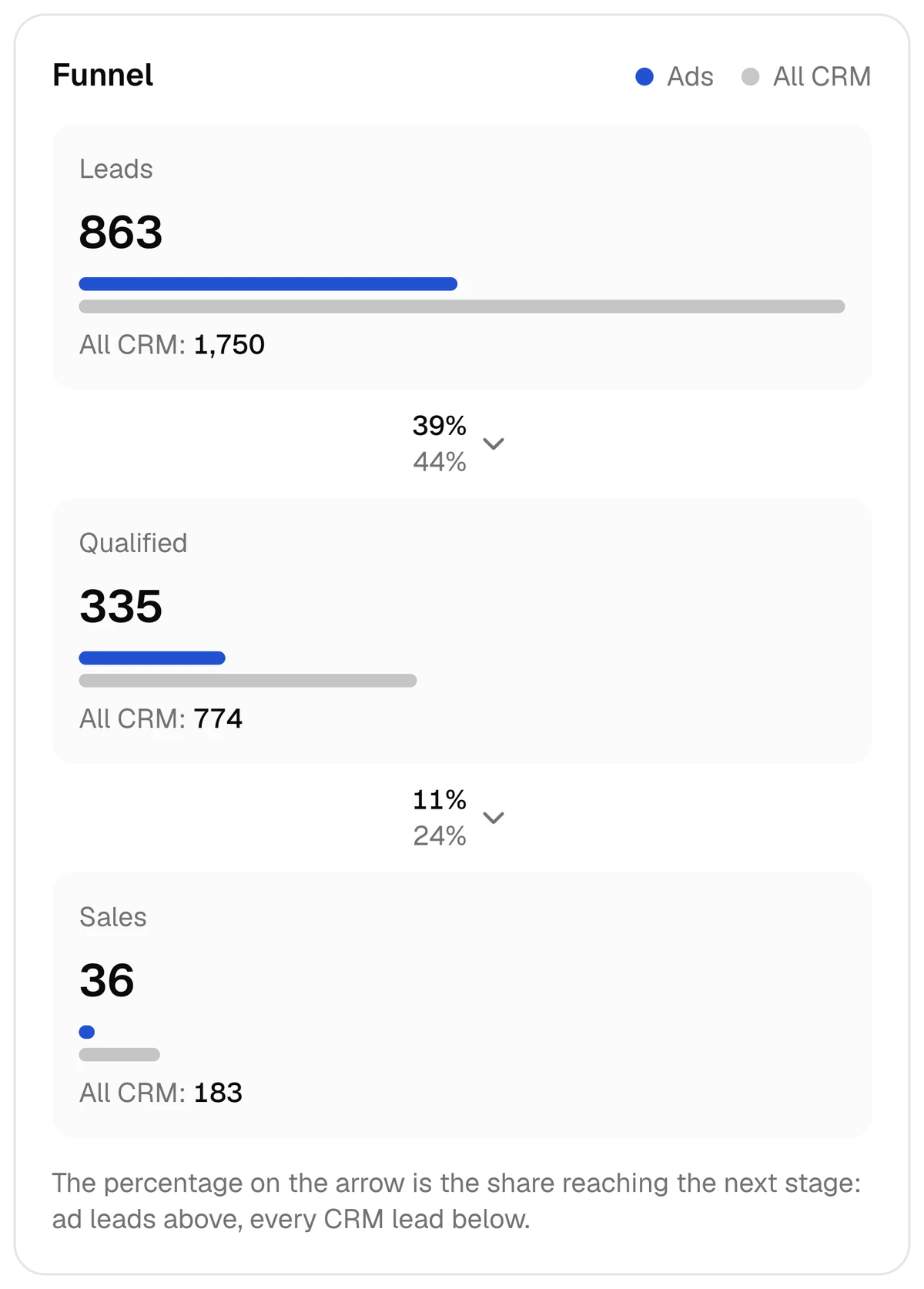
- Driving school, 2–8 October 2026: 335 of 863 leads qualified (39%) and 36 sales — the qualified-lead stage gives 9 times more signals.
QualifiedLeadis not a standard event: you build a custom conversion from it and optimize the campaign for that.- After the switch, read the qualified share, CPQL and CAC — not cost per lead.
Optimizing Meta lead ads for qualified leads means giving a campaign on Facebook and Instagram a different job: not “bring a lead” but “bring a lead that sales will confirm”. Meta’s name for it is conversion leads optimization. Below: what the algorithm learns from, which CRM stage to send, how many events are enough, the set-up and the numbers to read. The examples come from a real report: a driving school, 2–8 October 2026.
What does Meta’s algorithm learn from?
Only from the outcome that reaches it. In a lead-form campaign there is one such outcome: the form was submitted. The algorithm multiplies it and makes it cheaper — it finds people who fill in forms easily. Whether they pick up the phone or buy becomes known in the CRM, and never reaches Meta by itself.
In one week at the driving school Meta counted 863 leads. That week’s 36 sales were closed in the CRM, and Meta learns of a sale only if the CRM tells it. Without that signal all 863 leads are the same “result” to the algorithm, and it looks for people who fill in forms; with it, for people like those who turned out qualified and bought. The Conversions API carries that signal from the CRM to Meta.
Optimizing for qualified leads means choosing, as the campaign’s goal, not the number of leads but the leads the CRM has confirmed as qualified. A stage change in the CRM goes back to Meta as a signal through the Conversions API. Meta calls the approach Conversion Leads.
Which CRM stage should count as a “qualified lead”?
The stage has to meet two conditions: it happens often, and it happens early. The guideline in Meta’s developer documentation is a stage that 1–40% of leads reach, within 28 days of the lead. The logic is simple: a stage nearly everyone reaches tells the algorithm nothing, and a rare one gives it too few examples.
| CRM stage | As a signal | Why |
|---|---|---|
| New lead, “called” | Too early | Nearly every lead reaches it — to Meta it repeats the plain lead |
| Qualified lead: a manager has spoken to the person and confirmed a buyer | Fits | Happens often and early: 335 of 863 leads (39%) |
| Meeting, proposal, awaiting payment | Fits if there is enough volume | Separates buyers more precisely, but happens less often |
| Sale | Usually too late and too few | 36 in the week: 9 times fewer signals than the qualified-lead stage |
The driving school’s qualified share for the week is 39% — at the top edge of Meta’s guideline; over 30 days (9 September – 8 October 2026) it was 44%, and 48% at a learning centre. If the share stays above 40%, consider moving the signal one stage later: in CAPI Platform any stage can carry an event under a name you choose.
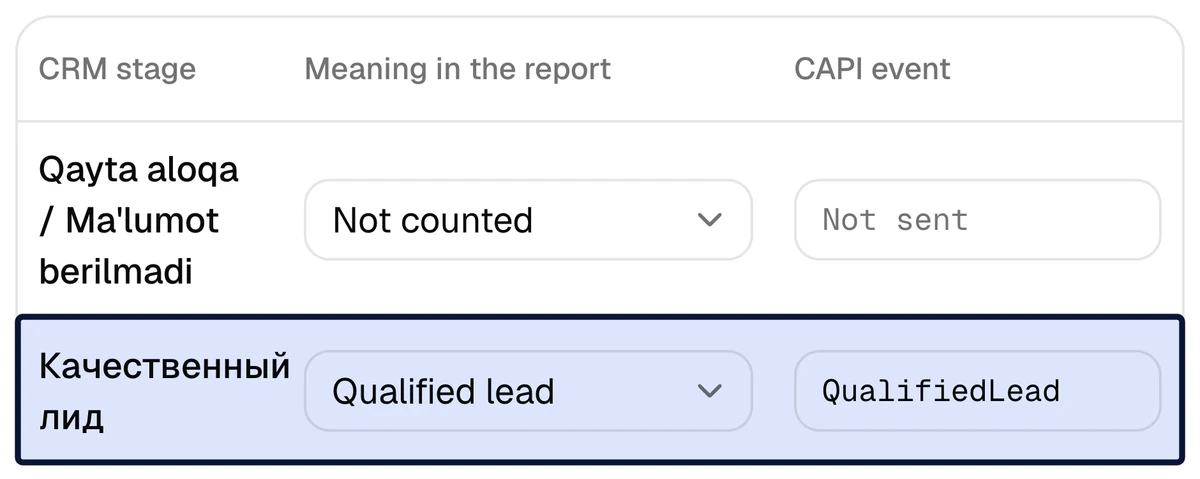
The sale signal goes out either way: Purchase carries the amount and currency when the deal has an amount. The only question is which event the campaign optimizes for.
How many events are enough?
Two Meta pages answer differently. The developer documentation asks for at least 200 leads a month and signals sent at least daily. The newer marketing page says there is no minimum volume, 200+ is only a recommendation, and a single conversion event can be optimized for. In practice: treat 200 as the target, but start sending signals below it.
The same arithmetic helps to choose the stage. At the driving school the qualified-lead stage can give 335 signals a week — about 48 a day; the sale stage 36, about 5 a day. With a small flow of leads, a late stage gives too few examples.
On timing: Meta’s documentation speaks of a learning phase of 2–4 weeks. Do not judge by the first days’ numbers.
How do you switch a campaign to qualified leads?
- 1
Tie the CRM stage to a signal
On CAPI Platform’s Funnel page the qualified-lead stage is given
QualifiedLead, the sale stagePurchase. When a lead enters the stage, the event goes to Meta by itself. It works with Bitrix24, amoCRM (Kommo) or capiCRM. - 2
Check that the signal goes out
The “Send a test event” button checks the token, the dataset and the whole path. Then every signal is in the CAPI events log with its time, name and status. Let signals accumulate first.
- 3
Create a custom conversion
QualifiedLeadis not a standard Meta event; the platform sends it under that name. So in Ads Manager (Events Manager → Custom conversions) you build one from it: source — your dataset, event —QualifiedLead. - 4
Change the goal in a new ad set
As the performance goal, choose qualified leads rather than the number of leads — Meta’s own page words it “maximize number of qualified leads” — and select the custom conversion you created. The dataset must be connected to that ad account.
- 5
Test it beside the old ad set
Same creatives, form and audience; only the goal differs. Leave the running ad set unedited, or there is nothing to compare with.
- 6
Read the result by CPQL
Once the learning phase has passed, compare the two ad sets in the report: qualified share, CPQL and sales.
A lead-form campaign can also be created on CAPI Platform’s Launch campaigns page, with the goal “Quality leads (CAPI)”. The condition is the same: CAPI switched on and the dataset connected to the ad account.
What changes in the numbers, and how do you read them?
Leads may become fewer and the cost per lead may rise. That is expected: the algorithm now looks for a person who will turn out qualified, not for the cheapest form-filler. So after the goal changes, decisions are not made on cost per lead.
CPQL = ad spend ÷ qualified leads
Example: Driving school, 2–8 October 2026: $885 ÷ 335 = $2.64. Cost per lead that week was $1.03 and the cost of one customer (CAC) $24.58. Write down these numbers for your own week before changing the goal: you will compare against them. Four metrics on one funnel: CPL, CPQL, CAC and ROAS.
- Qualified share moves first. In the driving school’s week it is 39%: 335 of 863 leads.
- CPQL is the main measure. If the lead got dearer but the qualified lead got cheaper, the optimization is working.
- CAC has the last word, but it lags: do not conclude before a sales cycle has passed. At the driving school sales are 11% of the qualified leads.
- Cohort mode. Switch the report to “Cohort (by lead creation date)”: it shows how many of that period’s own leads became qualified and bought.
What have published tests shown?
Three public sources. None is a CAPI Platform result or a promise: the figures are given as published.
| Who | What was compared | Reported result |
|---|---|---|
| TECOBI (US, marketing for car dealers) | A/B test: lead-volume optimization against conversion-leads optimization with the CRM connected through the Conversions API; same creative, format and targeting | 68% higher conversion rate, 8% lower cost per qualified lead (Meta Blueprint lesson, 2022) |
| Univo (India, online degrees) | CRM events through the Conversions API with Conversion Leads optimization, against business as usual | About 3× higher lead-to-enrolment rate, about 2× lower cost per enrolment (Datahash; metrics for 8–30 May 2024) |
| Meta, 567 advertisers | Budget-controlled A/B test: Conversions API for CRM with the qualified-leads goal on instant forms | 19% lower cost per quality lead on average (13–27 January 2025) |
Read TECOBI’s two figures together: the conversion rate was 68% higher, while the cost per qualified lead was only 8% lower. The gain is in who the leads are, not in a cheaper lead. Univo’s figures rest on metrics the client shared with Meta.
Which mistakes spoil the result?
- The stage is too broad. If everyone who answers the phone becomes “qualified”, the signal is no different from a plain lead.
- The stage is too late. A handful of sales a week does not give the algorithm enough examples.
- Cards are not moved. The signal goes out when the stage changes: while a lead sits still for a week, Meta knows nothing for a week.
- Every manager has their own “qualified”. Agree on one written criterion.
- Expecting old leads to count. The 30 days of history loaded on connection go into the report only, not to Meta. The algorithm learns from the day signals start.
- Edits during learning. Change the stage, the goal and the budget every day and there is no period left to compare.
We set up the qualified-lead signal in 3 days
Day 1: the CRM is connected. Day 2: stages are tied to signals together with you. Day 3: a test signal, then signals flow. Set-up is $159 once, then $40 a month.
FAQ
Can I optimize for qualified leads with fewer than 200 leads a month?
Meta’s developer documentation names at least 200 leads a month; its newer marketing page says there is no minimum volume and 200+ is only a recommendation. So you can switch it on, but the fewer the signals, the slower the algorithm learns. With a small flow, pick an early stage: the qualified lead, not the sale.
Why not optimize straight for sales (Purchase)?
You can, if sales are frequent and fast. Meta’s guideline: the stage happens within 28 days of the lead and 1–40% of leads reach it. In the driving school’s week there were 36 sales against 335 qualified leads: 9 times fewer sale signals. Purchase is sent either way; the question is only which event the campaign is trained on.
Cost per lead went up after the switch. Is that bad?
No, if cost per qualified lead (CPQL) fell or the same cost brought more sales. After the goal changes, cost per lead stops being the main measure: the algorithm looks for a person who will turn out qualified, not for a cheap form-filler. Watch the qualified share, CPQL and CAC.
Does this work only with lead-form campaigns?
Meta’s developer documentation describes Conversion Leads for instant forms. Meta’s page on the leads objective says lead-quality optimization is available for instant forms and website forms. In CAPI Platform, website form requests reach capiCRM and Bitrix24.
How soon will the result show?
Meta’s documentation speaks of a learning phase of 2–4 weeks. The qualified share moves first; sales and CAC lag by the length of your sales cycle. Nobody can promise an exact result: it also depends on the creatives, the form and the sales team.
Are old leads sent to Meta as well?
No. When the CRM is connected, the last 30 days of history are loaded into the report only. Signals go out after connection, at the moment a lead enters a mapped stage. Phone and e-mail go to Meta only as SHA-256 hashes; names are never sent.
Sources
- 1Conversion Leads integration — Meta for Developers
- 2Conversions API for CRM — Meta
- 3Generate high-quality leads (TECOBI case study) — Meta Blueprint
- 4Univo case study — Datahash
- 5Lead generation ad objective — Meta
Read next
- Lead quality
Cheap Facebook leads but no sales: why low-quality leads happen and how to fix them
Why a cheap lead does not sell: two creatives from a real report, causes on three sides and a seven-step fix.
7 min read
- Metrics
CPL vs CPQL vs CAC vs ROAS: four formulas, one funnel, a worked example
Four metrics, four formulas and one real week: $885 of spend → 863 leads → 335 qualified leads → 36 sales.
7 min read
- CAPI
Meta Pixel vs Conversions API: what’s the difference, and do you need both?
The Pixel sees actions on a website; the Conversions API sends the sale from the CRM. A comparison table, one driving school’s week in numbers, and the steps to add CAPI when you have a CRM.
7 min read