What is the Meta Conversions API (CAPI)?
The Conversions API (CAPI) is Meta’s server-side interface. A business uses it to send results from its CRM — a new lead, a qualified lead, a sale — straight to Facebook and Instagram ads, with no browser involved. The Pixel sees only the website; the sale closes later, in the CRM. With that signal Meta looks for people like those who bought, not people who fill in forms.
- Three signals: Lead, QualifiedLead, Purchase
- Phone and e-mail go only as SHA-256 hashes; a name is never sent
- Connected to Bitrix24, amoCRM or capiCRM in three days
- leads Meta countedDriving school, 2–8 October 2026
- 863
- sales in the CRM that week
- 36
- sales a Pixel could seepayment is taken in the sales department, not on a website
- 0
The Conversions API in plain words
The Conversions API is Meta’s server-side interface: a business sends events from its website, app or CRM — a lead, a qualified lead, a sale — from its own server straight to Meta, with no browser involved. Meta uses them to measure and optimise ads on Facebook and Instagram.
An ad brings a lead: a person fills in a form, Meta sees it and records a “result”. The sale comes later — after a call, a meeting and a payment — and closes in the CRM. That part happens outside the ad, so Meta does not see it.
CAPI is the bridge between the two. A stage changes in the CRM and a signal goes to Meta: “this lead is qualified”, “this person bought”. With no signal Meta looks for people who fill in forms; with a signal, for people like those who bought.
On its own, “CAPI” means Meta’s Conversions API (the glossary entry). CAPI Platform (capip.uz) is a Meta Conversions API and CRM attribution platform for Bitrix24, amoCRM (Kommo) and its own capiCRM, built in Uzbekistan: it sends CRM outcomes to Meta and shows the path from spend to sale for every creative.
863 leads, 36 sales: why the Pixel alone is not enough
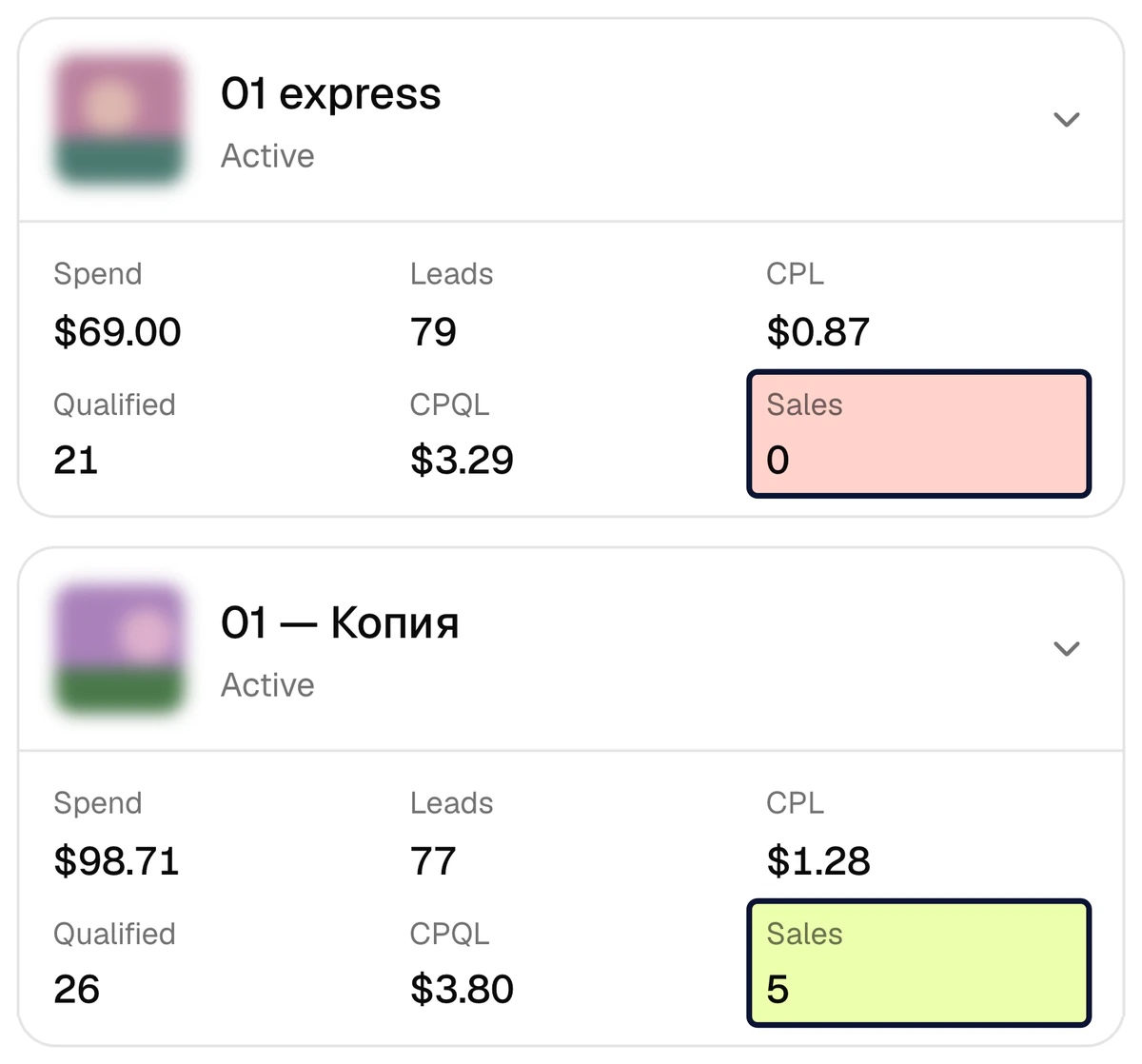
A driving school, the week of 2–8 October 2026: $885 went into ads and Meta counted 863 leads, $1.03 each. The CRM closed 36 sales that week, and on its own Meta saw none of them: the payment happens in the sales department, not on a website, and there is no Pixel there. Meta knows only what it is told, so without the CRM’s signal it treats the creative with the cheapest lead as the best one.
- 335 of the 863 leads were qualified — 39%. A qualified lead (CPQL) cost $2.64: 2.6 times the lead price (CPL).
- 79 leads at $0.87 — 0 sales. In Ads Manager this is the best creative.
- 77 leads at $1.28 — 5 sales. The lead is 47% dearer, but 26 of the 77 were qualified.
- 23 creatives spent $386 — 44% of the budget — and brought no sale.
Meta Pixel vs Conversions API: the difference
The Pixel is in the browser and sees actions on a website. CAPI is on the server and sends the result from the CRM. Neither replaces the other — they work together.
| Criterion | Meta Pixel | Conversions API (for a CRM) |
|---|---|---|
| Where it runs | In the customer’s browser, on a web page | On a server, between the CRM and Meta |
| What it sees | A page view, a button click, a form sent on the website | A CRM stage: new lead, qualified lead, sale and its amount |
| Needs a website | Yes — no website, no Pixel | No — a lead form and a CRM are enough |
| Sees a sale made by phone or in the office | No | Yes — when the manager moves the deal to the sale stage |
| How it recognises the person | Browser cookies: _fbp, _fbc | The Meta lead ID and SHA-256 hashes of phone and e-mail |
| What gets in its way | Ad blockers and browser cookie limits | A messy CRM: no stage marked, no signal |
| The signal Meta gets | “A form was filled in” | “This lead is qualified”, “this person bought” |
The browser signal also thins out by itself: Safari caps cookies set through JavaScript at seven days (WebKit, 2019), and 29.5% of internet users use an ad blocker at least sometimes, according to GWI (Q2 2025). The full comparison: Pixel vs Conversions API.
Three signals: Lead, QualifiedLead, Purchase
CAPI Platform sends three events from the CRM funnel to Meta. Each is tied to one CRM stage: the lead enters the stage and the signal goes at once.
Lead — a new lead
The lead has landed in the CRM. Usually this is the first open stage of the pipeline. If the Pixel on your website already sends
Lead, the event is switched off on the CRM side — otherwise the lead is counted twice.QualifiedLead — a qualified lead
A manager has talked to the person and the lead is a fit. This is not a Meta standard event: the platform sends it as a custom event under this name. To optimise ads for quality, a custom conversion is created from it in Ads Manager.
Purchase — a sale
The deal has moved to the sale stage. If the deal has an amount, the signal carries it with its currency: Meta learns both that a sale happened and what it was worth.
How a CRM stage becomes a signal
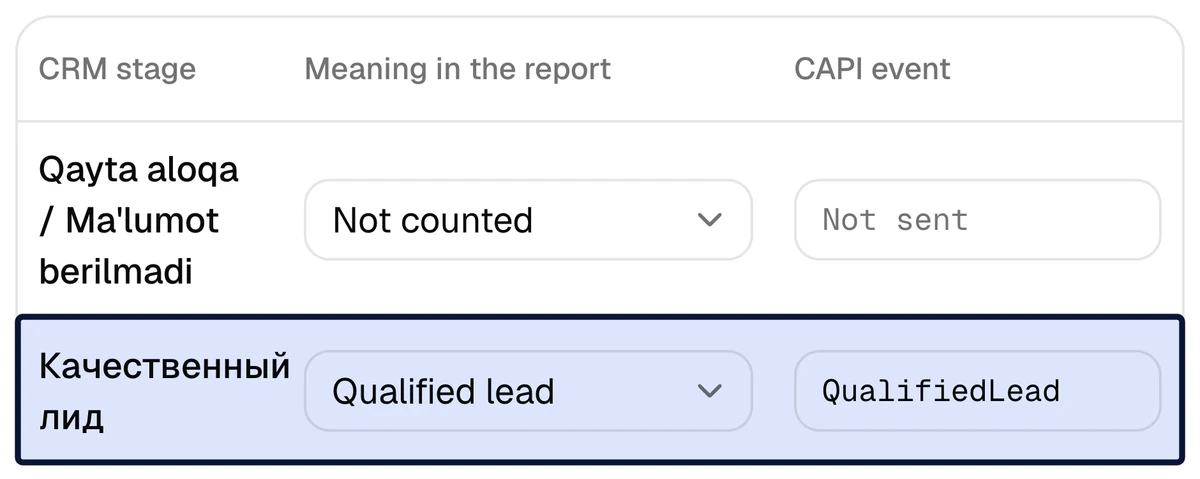
On the Funnel page every CRM stage gets two things: its meaning in the report — new lead, qualified lead, sale or junk lead — and, where needed, a CAPI event. Only the business knows which stage means a qualified lead, so it is set together with you, once.
- The qualified-lead stage →
QualifiedLead. - Every working stage after it is marked “Qualified” as well: the lead is counted correctly even if it skips a stage.
- In Bitrix24 the Lead → Deal chain is tracked as one person: when a lead is converted into a deal, no second lead appears in the report.
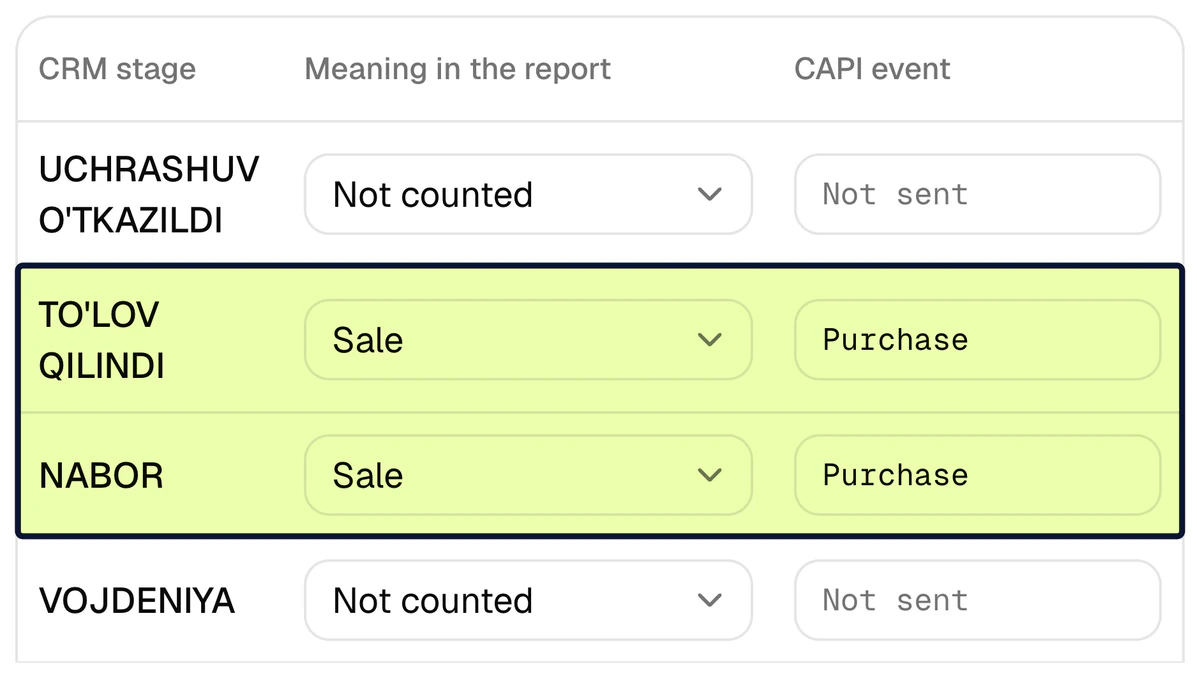
The sale stage becomes Purchase, with its amount
When a deal moves to a stage marked as a sale, Purchase goes to Meta. If the deal has an amount, the signal carries the value and the currency; if not, the fact of the sale goes on its own.
- The amount is converted to the ad account’s currency.
- A deal closed straight to a sale also sends
QualifiedLead— Meta sees both steps of the funnel. - One event name is sent once per lead — even if the stage is moved back and forth.
When a signal is sent and when it is not
As soon as the CRM reports that a lead has entered a mapped stage, the event is queued and sent. Every signal is listed in the “CAPI events” log: time, event, lead, attempts and status — Queued, Sent, Failed or Skipped.
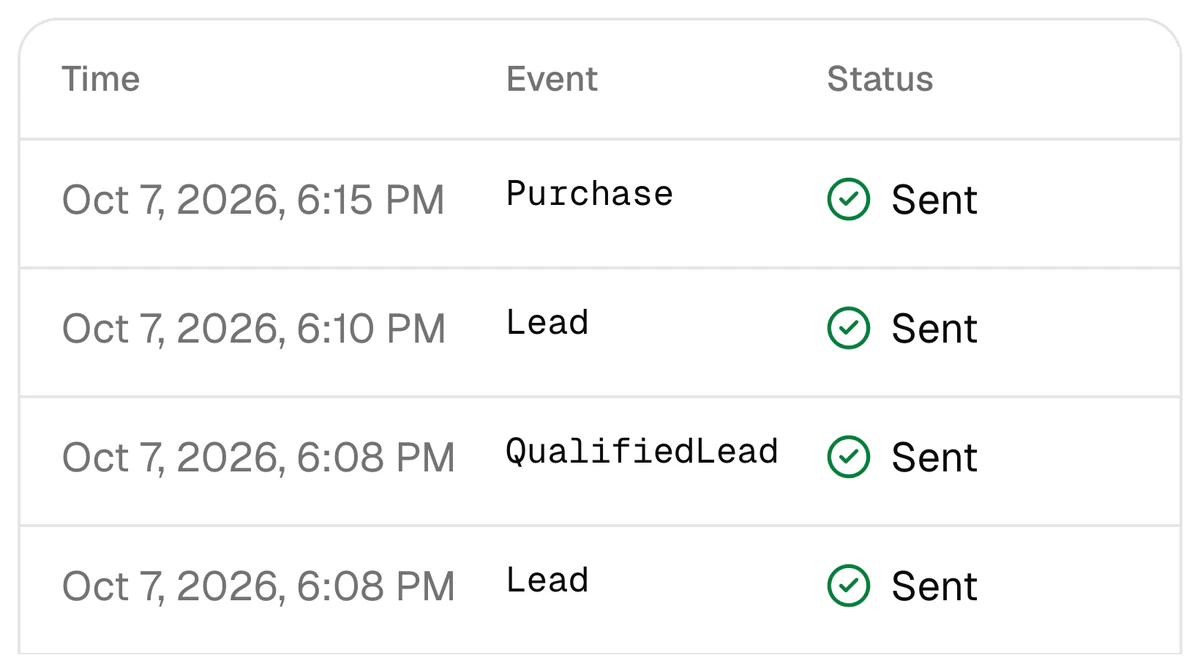
- No repeats. One lead and one event name — once.
- History is not sent. The 30 days of history loaded on connection go into the report only. A lead the platform first sees more than 24 hours after it was created sends nothing either.
- An event older than 7 days is not sent — Meta does not accept them.
- A lead with no key is skipped. With no phone, e-mail, Meta lead ID or fbclid, Meta cannot match the person; the reason is written in the log.
- A failure is retried: after 1, 5 and 30 minutes, then after 2, 6, 12 and 24 hours.
The technical side: the event follows the shape of Meta’s CRM integration — action_source: system_generated, event_source: crm.
What is sent to Meta and what never is
To tie a signal to a person Meta needs a key: the Meta lead ID, a phone number or an e-mail. The platform never sends a phone or an e-mail in the clear — only its SHA-256 hash. A hash is one-way: Meta compares it with its own hashes and does not receive the number itself.
| Data | Sent to Meta? | In what form |
|---|---|---|
| Phone number | Yes | Only as a SHA-256 hash. A 9-digit Uzbek number gets the 998 prefix before hashing |
| Yes | Only as a SHA-256 hash | |
| Meta lead ID | Yes | The number Meta itself gave the lead from a lead form |
_fbc, _fbp | If present | Meta’s click cookies, for a lead that came through a website |
| Event name and time | Yes | Lead, QualifiedLead or Purchase |
| Sale amount and currency | Only with Purchase | If the deal has an amount |
| Internal identifier | Yes | Hashed |
| Name | Never | — |
| Form answers, comments, task texts | Never | — |
Storage: phones and e-mails read from Bitrix24 and amoCRM are kept only as a hash and a partly masked number; connection keys and capiCRM’s contacts are kept encrypted. Meta scores how well the keys matched as Event Match Quality. The full text is in the privacy policy.
What Meta itself reports about CAPI for CRM
These are test results published by Meta. They were measured on other advertisers: they are not CAPI Platform’s results and not a guarantee.
- lower cost per quality lead, on averageConversions API for CRM with optimisation for the number of qualified leads on instant forms. A budget-controlled A/B test, 567 advertisers, 13–27 January 2025.
- 19%
- higher lead-to-quality-lead rate, on averageA/B tests, 273 advertisers, 11–28 January 2024, 95% confidence; incentives were included, per Meta’s footnote.
- 44%
Source: Meta — Conversions API for CRM. The two figures come from two separate tests. In both, campaigns were optimised for qualified leads, not for the number of leads: sending the signal is not enough, the goal has to change too — optimising for qualified leads.
How CAPI Platform sets it up in three days
You give access to the CRM and to the Meta ad account; we do the rest. Set-up is $159 once, with lead integration included as a bonus; then $40 a month (pricing).
- 1
- 2
Day 2. Stages are tied to signals
Which stage means a qualified lead and which means a sale is decided together with you. Those two marks produce
QualifiedLeadandPurchase. - 3
Day 3. A test signal, then the real ones
First one test event checks the path. From then on every signal and its result is visible in the log; one that fails is retried, from 1 minute up to 24 hours.
Who needs it and who does not yet
You need it if
- Leads come from Meta lead forms or a website, and the sale closes in the CRM — after a call, a meeting and a payment.
- The sales team moves each lead through stages in a CRM: Bitrix24, amoCRM or capiCRM.
- Leads are cheap, yet the sales team says “the leads are junk” — and nobody knows for sure which creative sells.
- You are a media buyer or an agency and want to show results in qualified leads and sales, not in lead counts: for media buyers, for agencies.
You do not need it yet if
- No CRM is kept, or leads are not moved from stage to stage. CAPI sends only what the CRM knows: a silent CRM means no signal. CRM discipline first, CAPI second.
- The sale closes entirely on a website with online payment (an online shop). There the result is seen by the website’s Pixel and CAPI for the website; CAPI Platform is about the result in the CRM.
- Your ads are not on Meta. The platform works only with Facebook and Instagram ads.
- Most leads come from Direct, WhatsApp or phone calls. They appear in the report by channel, but attribution is not automatic for them: the lead is not tied to a specific ad.
Go deeper into the topic
Pixel vs Conversions API
What each one sees, when you need both and how not to count a lead twice.
Conversions API without a website
Lead forms and a CRM only: what the signal relies on and how to set it up.
Optimising for qualified leads
A custom conversion from QualifiedLead, and moving the campaign goal from lead count to quality.
Cheap leads, no sales
79 leads at $0.87 and 0 sales: why a cheap lead ends up expensive.
amoCRM and the Conversions API
How amoCRM pipeline stages become signals for Meta.
Glossary: Event Match Quality
The score for how precisely Meta tied a signal to a person.
Seven common questions about the Conversions API
Do I need the Conversions API if I already have the Pixel?
Yes. The Pixel runs in the browser and sees actions on a website; the Conversions API runs on a server and sends the result from the CRM — the qualified lead and the sale. The payment happens in the CRM, where there is no Pixel, so neither replaces the other: they work together. More: Pixel vs Conversions API.
I have no website, only lead forms. Does the Conversions API work?
Yes. CAPI for a CRM needs no website. The platform recognises a lead-form lead by its Meta lead ID or by the hash of its phone number; when the lead reaches the qualified-lead or the sale stage in the CRM, the signal goes with that key. The steps: Conversions API without a website.
Which CRMs does CAPI Platform work with?
Bitrix24, amoCRM (known internationally as Kommo) and the platform’s own CRM, capiCRM. One CRM is connected per project. The only ad platform is Meta: Facebook and Instagram.
Are old leads and old sales sent to Meta?
No. On connection the last 30 days of history load into the report only. Meta receives only new signals from the moment of connection: history is never replayed, and Meta itself does not accept events older than 7 days.
Which customer data goes to Meta, and is it safe?
Phone and e-mail go to Meta only as SHA-256 hashes; a name is never sent. With them go the Meta lead ID, the event name, the time and — for a sale — the amount. On the platform itself, contacts from an outside CRM are kept only as a hash and a partly masked phone, and connection keys and capiCRM’s contacts are kept encrypted; the full text is in the privacy policy.
How long does the Conversions API set-up take and what does it cost?
Three days: connecting the CRM, tying stages to signals, a test signal. Set-up is $159 once, with lead integration included as a bonus. Then $40 a month: CAPI, the report, Telegram reports and lead integration up to 4,000 leads a month. Details: pricing.
How many leads a month does CAPI need, and when do results show?
Sending signals has no minimum: every stage change goes on its own, and the report works at any volume. Meta’s optimisation for quality does need volume: its developer documentation names at least 200 leads a month and a target stage that 1–40% of leads reach within 28 days, while the newer FAQ on its “Conversions API for CRM” page says there is no minimum and 200 or more leads is a recommendation (both pages are in the sources). No result is promised in advance: the signal gives Meta material, and the campaign still has to be optimised for qualified leads.
Sources
The driving school’s figures come from the CAPI Platform report for the week of 2–8 October 2026; the project’s name is withheld. Outside facts were taken from these pages.
- 1Conversions API for CRM — Meta
- 2Conversion Leads integration — Meta for Developers
- 3Intelligent Tracking Prevention 2.1 — WebKit
- 4Ad blocker usage statistics (GWI, Q2 2025) — Backlinko
Connect the Conversions API yourself, or we set it up in three days
Sign up with Google and add a project yourself. Or leave a request — a name and a phone number are enough: we get in touch, connect your CRM and Meta account and tie the stages to signals. Set-up is $159 once, then $40 a month.