Meta ads report to Telegram: leads, qualified leads and sales in one message
CAPI Platform (capip.uz) sends your Meta ads report to Telegram automatically: to a group or a private chat, daily, weekly or monthly, at the hour you choose. Each message shows spend, leads, qualified leads, sales and revenue, with CPL, CPQL, CAC and ROAS. Spend comes from Meta, outcomes from your CRM: Bitrix24, amoCRM (Kommo) or capiCRM. Broken connections and undelivered leads are reported in the same chat.
- Daily, weekly or monthly, at the hour you choose, in English, Russian or Uzbek
- One message: spend, leads, qualified leads, sales and revenue, with CPL, CPQL, CAC and ROAS
- Top creatives, and the spend that brought no qualified lead
- Problems are reported when they start, daily while they last, and when they are fixed
- CAPI PlatformDriving school · Weekly report · 2 — 8 October
- Spend — $885
- Leads — 863 · CPL $1.03
- Qualified — 335 · 39% · CPQL $2.64
- Sales — 36 · CAC $24.58
- Revenue — $5,297 · ROAS 5.99×
“Send me yesterday’s numbers”
A report put together by hand comes from two places: spend and leads from Ads Manager, sales from the CRM.
The chat is an illustration. A screenshot report ends at cost per lead, and the sales sit somewhere else. CAPI Platform puts both sources into one message and sends it at the set hour, whether or not anyone asked.
- Post yesterday’s ad results in the group, please.
- On it. I’ll take a screenshot from Ads Manager.
- I don’t need the lead count. How many were qualified, and how many bought?
- That’s in the CRM. I’ll ask the sales team and send it by the evening.
Which numbers are in the report?
A Telegram report is the period’s result in one message: five numbers, with CPL, CPQL, CAC and ROAS beside them and the change against the previous period. Spend comes from the ad account; the other four numbers come from the CRM, which is why the report does not stop at the lead.
| Line | What it shows | Where it comes from | Driving school, 2–8 Oct 2026 |
|---|---|---|---|
| Spend | What Meta ads cost in the period | Meta ad account | $885 |
| Leads · CPL | Leads tied to an exact ad, and the cost of one lead | CRM and Meta | 863 · $1.03 |
| Qualified · CPQL | Leads that reached the CRM stage marked as a qualified lead, their share, and the cost of one | CRM stages | 335 · 39% · $2.64 |
| Sales · CAC | Leads that reached the sale stage, and the cost of one customer | CRM stages | 36 · $24.58 |
| Revenue · ROAS | Deal amounts recorded in the CRM, and their ratio to spend | Deal amounts in the CRM | $5,297 · 5.99× |
The real message has one more column on every line, ±%: the change against the previous period (the day before for a daily report, the week before for a weekly one, the month before for a monthly one). The sample leaves it out. Which stage counts as a qualified lead and which as a sale is set once, in the project’s funnel settings.
Which creative worked, and which spent the budget with no qualified lead
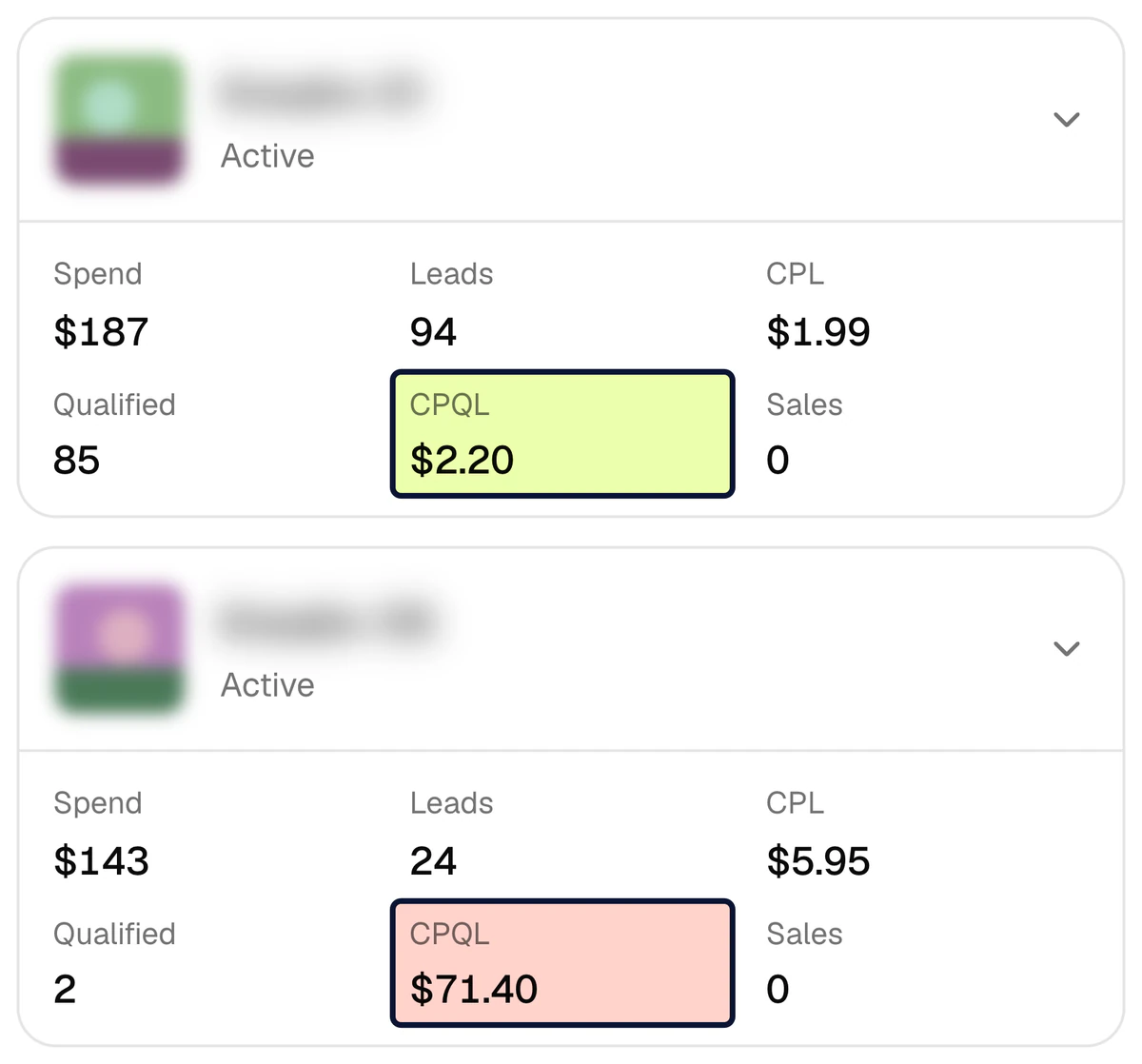
Under the five numbers the report names creatives. They are ranked by qualified leads, not by cost per lead: a lead can be cheap while a qualified lead is expensive. At the learning centre, in the week of 2–8 October 2026, a qualified lead cost $2.20 in one creative and $71.40 in another — 32 times more.
- Top creatives: up to three creatives with the most qualified leads (up to five in the table layout), each with its count and CPQL.
- Spend with no qualified leads: creatives that took 5% of the period’s spend or more and brought no qualified lead, with the money spent and the leads received.
- Leads in the CRM: every lead the CRM saw and how many are not tied to an ad, unfolded by channel: lead form, website, Direct / WhatsApp, Telegram, call.
- Sales without an amount in the CRM: how many sales have no deal amount, which is how far revenue and ROAS are understated.
- The “Full report” button opens the full report for the same period in the platform.
Who reads the report?
The business owner
One message in the morning: what was spent yesterday, how many leads came, how many were qualified and how many bought. No ad account to open and nobody to ask. When the detail matters, the button opens the full report.
The media buyer
No report to assemble by hand: no screenshots, no spreadsheets. Which creative brings qualified leads and which one eats the budget is in the message itself. With alerts switched on, news of an expired token or stuck leads comes from the chat, not from the client.
Learn moreAn agency’s client
Every client is a separate project with its own chat. The client’s group gets a weekly report in the client’s language; the agency’s internal chat gets the daily report and the alerts. The client sees sales, not only leads.
Learn more
When does the report arrive, and which period does it cover?
Every chat has its own schedule: how often, at what hour and in which language. Time is counted in the project’s time zone.
| Report | When it arrives | Period covered | Compared with |
|---|---|---|---|
| Daily | Every day at the chosen hour | Yesterday | The day before |
| Weekly | On the chosen weekday at the chosen hour | The 7 days that ended yesterday | The 7 days before them |
| Monthly | On the 1st of each month at the chosen hour | The whole previous month | The month before it |
For example, with a weekly report set to Friday, the message of 9 October 2026 covers 2–8 October 2026 — the very week in the sample above. If the period had neither spend nor leads, the report says so: “No spend and no leads in this period.”
How do you connect a Telegram chat?
Six steps. A chat is connected by someone whose role may change the project: an owner, an admin or a member.
- 1
Add the bot to the chat
The “Telegram reports” page in the platform shows the bot’s name. Add it to your group, or open it in a private chat.
- 2
Get a code
On the same page press “Get a code”. The code is valid for 15 minutes.
- 3
Send the code to that chat
Type the command
/connect CODEin the very chat the report should arrive in. The bot answers “Connected”. - 4
Set the schedule
How often (daily, weekly or monthly), the hour, the weekday and the report’s language: English, Russian or Uzbek. Keep the classic layout: every Telegram app opens it; the table layout is new and not every app shows it yet.
- 5
Switch on the messages you need
Two separate switches: “Post every new lead here” and “Tell about problems”. Both start switched off.
- 6
Send a test report
The “Send a test report” button sends a message with real numbers at once, so you check the look without waiting for the schedule.
What else arrives in the chat?
These messages go to a chat where “Post every new lead here” is switched on. Problem alerts have a switch of their own and are covered below.
A new lead
The moment a Meta lead-form lead reaches the CRM, the chat gets a message: name, phone, the form, the ad’s and the campaign’s names, the answers (folded) and an “Open in CRM” button. It can be switched on for website requests that go to Bitrix24 as well.
Learn moreA lead that did not reach the CRM
If a lead could not be written to the CRM, the chat gets “Lead did not reach the CRM” with the contact details and the reason. A manager calls the number in the message, and the lead does not wait for the integration to be repaired.
capiCRM task reminders
When a task in capiCRM comes due, a reminder lands in the same chat: the task’s text, the lead or deal, and who it is assigned to.
Learn moreWhich chat should get it
A new-lead message holds a name, a phone number and the answers. Switch it on in the sales team’s chat, not in a shared group with the client or contractors. Scheduled reports and problem alerts hold no customer data, only counts.
Which problems does the platform report?
A chat with “Tell about problems” switched on gets a message at three moments: when a problem starts, once a day while it lasts, and when it is fixed. The message holds only counts and the error’s text, no customer data. Under it is an “Open” button that leads to the page where the problem is fixed.
| Message | When it is sent | Where it is fixed |
|---|---|---|
| Meta connection error | A token or permission error lasts longer than 10 minutes | Connections |
| Meta statistics are not updating | No statistics have come from Meta for 6 hours | Connections |
| Meta access is running out | The access has an end date and fewer than 7 days are left | Connections |
| CRM connection error | A CRM key or connection error lasts longer than 10 minutes | Connections |
| The CRM went quiet | No change has come from the CRM for 24 hours | Connections |
| CAPI events are not reaching Meta | A signal has failed on its second attempt too, or has ended in an error | CAPI events |
| Leads are not reaching the CRM | A lead has waited longer than 15 minutes, or its delivery has ended in an error | Lead forms |
| Lead forms cannot be read from Meta | Meta refuses to let a switched-on form be read: new leads wait in Meta | Lead forms |
| Money going out, no leads | Ads have spent money today, and by 13:00 the CRM has no lead from today | Report |
| The platform’s background work has stopped | The platform’s own scheduled work — reports, syncs, the lead check — has stopped running | The platform’s team |
A blip is not news: a connection error is reported only once it has lasted 10 minutes, and the fix only after the problem has stayed away, as a rule, for 30 minutes (2 hours for the Meta connection). The lead’s road is described on the lead delivery page, the signals on the Conversions API page.
What stands behind the Telegram message
The full report
What Telegram summarises, in full: every creative from spend to sale.
Lead delivery
How a Meta lead-form lead reaches the CRM, and why it never lands twice.
Conversions API
The qualified leads and sales in the report also go back to Meta as signals.
capiCRM
No CRM yet? Leads, deals and tasks live in the platform’s own CRM.
How to check a media buyer
Which numbers to ask for in a report — an article.
Pricing
Set-up is $159 once, then $40 a month.
Questions about Telegram reports
Which numbers are in a Telegram report?
Five main ones: spend, leads, qualified leads, sales and revenue. Beside them are CPL, CPQL, CAC and ROAS and the change against the previous period. Below: the top creatives, the creatives that spent with no qualified lead, all leads in the CRM and the number of sales without an amount. The whole table is in the report.
Does the report go to a group or to a private chat?
Either. One project can have several chats, each with its own schedule, language and switches. For example: a daily report to the owner’s private chat, a weekly one to the client’s group, and new-lead messages to the sales team’s group. The report’s language is chosen per chat: English, Russian or Uzbek.
Which CRMs and ad platforms does it work with?
CRMs: Bitrix24, amoCRM (Kommo) or the platform’s own capiCRM; one CRM per project. The only ad platform is Meta (Facebook and Instagram). More: integrations.
Can Telegram tell me about every new lead?
Yes, when “Post every new lead here” is switched on for the chat. The moment a Meta lead-form lead reaches the CRM, the chat gets the name, phone, form, the ad’s and the campaign’s names, the answers and an “Open in CRM” button. This covers the leads the platform delivers into the CRM; leads from Direct, WhatsApp or phone calls bring no such message.
Do the reports contain customers’ names or phone numbers?
Scheduled reports and problem alerts do not: they hold only counts, creative names and the error’s text. A new-lead message holds a name, a phone number and the answers, and a capiCRM reminder holds the task’s text and the lead’s name. Send those two kinds to the sales team’s chat. More about data is in the privacy policy.
Can I write a question to the bot?
No. The reports bot understands one command, /connect CODE, which links a chat to a project. The rest of the time it only sends. For questions, write to the support bot listed on the contact page.
What if the report stops arriving?
The “Telegram reports” page shows, for every chat, when the last report was sent and the error’s text if there was one. If the bot was removed from the group, the platform switches that chat off: add the bot back and switch the chat on again. The “Send a test report” button checks delivery at once.
Is the report also sent by e-mail?
No. The platform sends no e-mail: reports and alerts go to Telegram only, and the full report opens in a browser, on a computer or a phone.
How much do Telegram reports cost?
They have no price of their own. Set-up is $159 once: in 3 days the CRM is connected, the stages are tied to signals and a test signal goes out. Then $40 a month for CAPI, the report, Telegram reports and lead integration up to 4,000 leads a month. More: pricing.
Get your ad report in Telegram, sales included
Sign up with Google and connect Meta, your CRM and a chat yourself, or leave a request and we will set it up in 3 days. Set-up is $159 once, then $40 a month; Telegram reports are part of that price.