Bitrix24, amoCRM (Kommo) and Meta integrations: what connects?
CAPI Platform (capip.uz) connects Meta ads — Facebook and Instagram — with a CRM: Bitrix24, amoCRM (Kommo) or capiCRM, the CRM inside CAPI Platform. On the Meta side it connects the ad account, the Page, its lead forms and the dataset (Pixel); a Telegram chat and your website’s form join them. One project connects one CRM. Meta is the only ad platform: Google Ads, TikTok and Yandex are not connected.
- CRM: Bitrix24, amoCRM (Kommo) or capiCRM — one per project
- Meta: ad account, Page, lead forms, dataset (Pixel)
- Telegram: reports, new-lead notices, problem alerts
- Website: form requests into Bitrix24 or capiCRM, plus a tracking code
- CRMsBitrix24, amoCRM (Kommo), capiCRM
- 3
- ad platformMeta: Facebook and Instagram
- 1
- to connectwhen we do the set-up
- 3 days
Which CRM can you connect?
One of three. The chain is the same in each: a lead-form lead lands in the CRM, a stage change sends a signal to Meta, and the report shows the road from spend to sale for every creative.
Bitrix24
Connects with an inbound webhook (crm scope). A Lead that becomes a Deal is counted as one lead. Lead-form leads and website requests are both written to the portal.
amoCRM (Kommo)
Connects with a long-lived token; Kommo accounts connect the same way. A lead-form lead arrives as a deal with a contact. Website forms are not supported.
capiCRM
No CRM yet? The CRM inside CAPI Platform is switched on with one button: lead and deal boards, tasks, and on every lead’s card the ad it came from.
What connects on the Meta side?
Meta is the platform’s only ad source. Four things are connected to a project: the ad account, the Facebook Page, that Page’s lead forms and the dataset (Pixel). Spend and creatives are read from the ad account, leads from the lead forms, and CRM outcomes are sent to the dataset through the Conversions API.
- Ad account: spend, impressions, clicks, campaigns, ad sets and ads, refreshed once an hour
- Page and lead forms: the platform reads the list of forms itself; each form is switched on separately
- Dataset (Pixel) ID: where
Lead,Purchaseand the custom eventQualifiedLeadarrive - Phone numbers and e-mails reach Meta only as SHA-256 hashes; a name is never sent
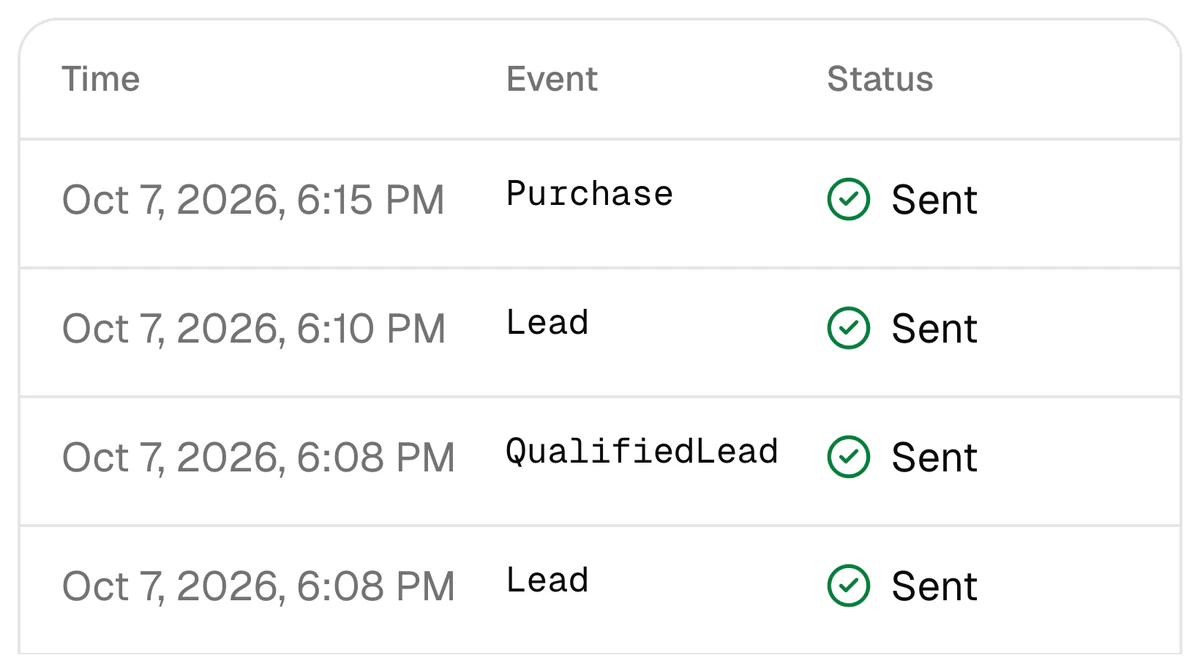
How do you give the platform access to Meta?
Access is given with a system user token. You create it in Meta Business Settings (System users → Generate token) and assign the ad account, the Page and the dataset to that system user. The token is entered on the platform’s Connections page and stored encrypted. It needs these permissions.
| Permission | What it is for |
|---|---|
ads_read | Reading spend and statistics |
leads_retrieval | Reading lead-form leads |
pages_show_list | The list of Pages |
pages_read_engagement | Page data |
pages_manage_ads | The Page’s ads and lead forms |
ads_management | Pausing and enabling ads from the report; sending signals with this same token |
pages_manage_metadata | Taking a lead in at once (Meta’s webhook) |
The Dataset (Pixel) ID is in Events Manager, under Data sources. Without pages_manage_metadata leads still arrive: the platform checks the forms itself every minute. For signals you can also enter a separate CAPI token generated in Events Manager. An agency’s token can serve several projects inside one organisation — more on the page for agencies.
What connects besides the CRM and Meta?
A Telegram chat
Add the bot to a group, or open it in a private chat, and send /connect CODE there; the code is valid for 15 minutes. The chat gets a daily, weekly or monthly report and, if you switch them on, a notice of every new lead and alerts when something breaks.
Learn moreA website form
Your site posts each request to the project’s form address, as JSON or as a plain HTML form. In capiCRM the request becomes a lead at once; into Bitrix24 it is written through the same queue as Meta leads. Website requests are not sent to amoCRM.
A tracking code for the site
One script keeps UTM tags,
fbclid,_fbcand_fbpin the visitor’s browser for 90 days and adds them to every form as hidden fields. It reads no personal data and sends nothing anywhere.
How does a website form reach the CRM?
The platform gives every site its own address: capip.uz/api/forms/ followed by a key. The key is not a secret: like a Pixel ID it only names the project, and it can be renewed. Every request is validated, screened for bots and rate-limited per minute.
- 1
The site is added on the platform
You type the site’s name on the “Website forms” card. The platform shows the form address and a code sample.
- 2
The site posts its request to that address
A phone number or an e-mail is required; every other field is kept as an answer. With the tracking code on the site, UTM tags and
fbclidcome along with the request. - 3
The request lands in the CRM
In capiCRM a lead opens at once. For Bitrix24 the request is queued and written to the portal; if the CRM does not answer, the write is retried, and if it still fails, an alert goes to Telegram.
- 4
The request is tied to its ad
When the UTM tags name the ad, the request is counted under that creative in the report. In a Bitrix24 project the site can pass the
event_idof its Pixel’sLeadalong with the request: the platform then sends its ownLeadunder the same id, and Meta counts one event.
What works with which CRM?
Signals, the report and lead delivery work with all three CRMs. There is one difference: requests from website forms are not sent to amoCRM.
| Feature | Bitrix24 | amoCRM (Kommo) | capiCRM |
|---|---|---|---|
CRM stage → Meta signal: Lead, QualifiedLead, Purchase | Yes | Yes | Yes |
| Meta lead-form leads delivered into the CRM | Yes | Yes | Yes |
| What a lead-form lead becomes | A lead, or a deal with a contact | A deal with a contact | A lead or a deal |
| Requests from website forms | Yes | No | Yes |
| Report per creative: spend → lead → qualified lead → sale | Yes | Yes | Yes |
| Reports and alerts in Telegram | Yes | Yes | Yes |
| Last 30 days of history loaded into the report on connection | Yes | Yes | Not needed: the leads live on the platform |
| How it connects | Inbound webhook, crm scope | Long-lived token | Switched on with one button |
| How a stage change reaches the platform | Outgoing webhook; the platform can register it itself | Webhook, added in amoCRM’s settings | At once: the CRM is inside the platform |
One project connects one CRM. Leads from the history go into the report only; they are not sent to Meta. More: Bitrix24 integration, amoCRM integration, capiCRM.
How long does an integration take?
Three days when we do it: $159 once, then $40 a month (pricing). You give access to the CRM and to the Meta ad account. If you connect it yourself the order is the same: sign-up is open through Google.
- 1
Day 1: the CRM is connected
Bitrix24 or amoCRM is connected and the last 30 days of history load into the report. Old leads are not sent to Meta.
- 2
Day 2: stages are tied to signals
Together with you we mark which stage means a qualified lead and which one a sale. The qualified-lead stage gets
QualifiedLead, the sale stage getsPurchase. - 3
Day 3: a test signal
A test signal goes to Meta, and after it the real ones start. Every signal and its result is in the log; one that fails is sent again at intervals from 1 minute up to 24 hours.
What does not connect?
The platform does not have these. Better to know before you connect.
- Other ad platforms. There is one ad source — Meta: Facebook and Instagram. Google Ads, TikTok and Yandex are not connected.
- Other CRMs. Only Bitrix24, amoCRM (Kommo) and capiCRM. If you have no CRM, capiCRM is switched on inside the platform.
- Website forms into amoCRM. Website requests are sent to Bitrix24 and capiCRM only.
- WhatsApp, Instagram Direct, Telegram chats and telephony. Leads from these channels show in the report by channel, but are not tied to an ad automatically. There is no call tracking.
- E-mail. The platform sends no e-mail: reports and alerts arrive in Telegram.
More on the integrations
Facebook lead ads and Bitrix24
Getting lead-form leads into Bitrix24: the ways and the steps.
amoCRM and the Conversions API
How amoCRM pipeline stages go to Meta as signals.
Lead delivery
How a lead-form lead reaches the CRM: retries, one record per lead, the log.
Pricing
Set-up is $159 once, then $40 a month.
Questions and answers
Which CRMs does CAPI Platform work with?
Bitrix24, amoCRM (Kommo accounts included) and capiCRM, the CRM inside CAPI Platform. One project connects one CRM; several businesses get separate projects. In all three, lead-form leads land in the CRM, a stage change sends a signal to Meta, and the report works.
Can I connect Google Ads, TikTok or Yandex?
No. Meta is the only ad platform: Facebook and Instagram. Spend and ads from Google Ads, TikTok or Yandex do not reach the report.
Do website form requests reach amoCRM?
No. Requests from website forms are sent to Bitrix24 and capiCRM only. In an amoCRM project Meta lead-form leads land in the CRM, and signals and the report work.
What do I need to connect Meta?
A system user token created in Meta Business Settings, and the Dataset (Pixel) ID. The ad account, the Page and the dataset must be assigned to that system user; the permissions are ads_read, leads_retrieval, pages_show_list, pages_read_engagement and pages_manage_ads. When we do the set-up, you give us access to the ad account.
I have no website, only lead forms. Will the integration work?
Yes. No website is needed: a lead-form lead lands in the CRM with its Meta lead ID, and the outcome signal goes to Meta with that ID and the hashed phone number. You still need a Dataset (Pixel) ID, because that is where signals arrive, but the Pixel does not have to be installed on a site. More: the Conversions API without a website.
How long does it take, and what does it cost?
Three days when we connect it: $159 once, then $40 a month for CAPI, the report, Telegram reports and lead delivery up to 4,000 leads a month. You give access to the CRM and to the Meta ad account. The terms are on the pricing page.
Where does my customers’ data go?
Meta receives phone numbers and e-mails only as SHA-256 hashes, and never a name. Contacts read from Bitrix24 or amoCRM are kept on the platform only as a hash and a partly masked phone number; connection keys and capiCRM contacts are kept encrypted. More: the privacy policy.
Shall we connect Meta and your CRM?
Sign up with your Google account, open a project and look at the connections from the inside. Or leave your name and phone number: we will get in touch and connect it in 3 days — $159 once, then $40 a month.