Bitrix24 + Meta Conversions API integration: leads in, deal stages back to Meta
CAPI Platform (capip.uz) connects Bitrix24 with Meta ads — Facebook and Instagram — in both directions. A lead-form lead lands in Bitrix24 within about a minute, with its answers, UTM tags, a responsible person and a source. When a stage changes in Bitrix24, a QualifiedLead or Purchase event goes to Meta through the Conversions API. In the classic Lead → Deal mode a lead and its deal count as one person.
- Lead form → Bitrix24: a lead or a deal with a contact, UTM tags, owner, source
- Bitrix24 stage → Meta: Lead, QualifiedLead, Purchase
- Lead → Deal mode: one person, one lead
- Connected by an inbound webhook with a single scope: crm
- Meta leads delivered into Bitrix24driving school, 25 Sep – 8 Oct 2026
- 1,790
- leads lostqueue 0, errors 0
- 0
- events sent to MetaLead, QualifiedLead, Purchase
- 3
- set-up$159 once, then $40 a month
- 3 days
How is Bitrix24 connected?
Bitrix24 is connected through an inbound webhook that needs one scope: CRM (crm). Stage changes reach the platform through an outbound webhook. On the Meta side the ad account, the Page, the lead forms and the dataset are connected. One project, one portal.
| What is connected | Where it comes from | What it is for |
|---|---|---|
| Inbound webhook | Bitrix24 → Developer resources → Other → Inbound webhook. Permission: CRM (crm) | The platform reads leads, deals, stages and UTM fields, and writes lead-form leads into the portal |
| Outbound webhook | The platform registers the events in Bitrix24 itself. If the portal refuses, by hand: ONCRMLEADADD, ONCRMLEADUPDATE, ONCRMDEALADD, ONCRMDEALUPDATE | A new lead or a stage change reaches the platform at once, and the event goes to Meta without waiting |
| Funnel mode | Detected automatically on connection: deals, leads, or Lead → Deal (both together) | In the classic mode a lead and the deal made from it are not counted twice |
| Meta ad account, Page and lead forms | A Meta system user token with ads_read, leads_retrieval and the Page permissions | Spend, ads and lead-form leads are read |
| Dataset (Pixel) ID | Meta Events Manager | Lead, QualifiedLead and Purchase events are sent to this dataset |
| Telegram chat (optional) | A chat is linked to the bot with a code | Reports, new-lead notices and alerts when something breaks |
On the day of connection the last 30 days of Bitrix24 leads and deals load into the report; they are not sent to Meta. If a webhook does not arrive, the change is not lost: the platform also asks Bitrix24 on a schedule what has changed. The webhook address and the Meta token are stored encrypted.
How do Facebook and Instagram lead ads reach Bitrix24?
A person who fills in a lead form appears in Bitrix24 within about a minute: as soon as Meta notifies the platform, or at the every-minute check if no notice comes. Each form is switched on and set up on its own.
A lead, or a deal with a contact
For each form you choose what a request becomes in Bitrix24: a lead, or a deal with a contact. The pipeline, the first stage, the responsible person and the source are set in the same place.
UTM tags and the exact ad
UTM tags are written into the record, and the lead is tied to the ad it came from. That is why the report shows leads, qualified leads and sales beside every creative.
Answers go into CRM fields
Every answer on the form is written into its own Bitrix24 field. The title is built from parts by a template, and fixed values can be added. Settings can be copied from another form.
A preview before anything is written
Preview shows how the form's last three real leads would be written into Bitrix24 with these settings: phones are masked and nothing is saved. There is a test-record button as well.
No duplicates, no silent losses
One Meta lead is one record. If Bitrix24 does not answer, delivery is retried at intervals from 1 minute up to 24 hours. Every record carries an origin mark (
ORIGINATOR_ID,ORIGIN_ID), so a retry does not open a second lead. A lead that has waited 15 minutes raises a Telegram alert.Website requests take the same road
Requests from the forms on your website are written into Bitrix24 through the same queue, with the same retries, log and alerts. The tracking code adds UTM tags and
fbclidto each request. More: lead delivery.
1,790 leads delivered into Bitrix24, none lost
The driving school runs Bitrix24 in the classic Lead → Deal mode. Its lead forms were connected to the platform on 25 September 2026; the figures are as of 8 October 2026.
- Meta leads delivered to the CRMsince 25 September 2026
- 1,790
- lead forms connected
- 5
- leads waiting in the queue
- 0
- leads left with an error
- 0
This is a measurement for the stated dates, not a guarantee. The second project, a learning centre, also runs on Bitrix24: 313 leads delivered since 5 October 2026, 0 errors. The two projects together: 2,103. More: cases.
Lead → Deal: one person is not counted twice
In Bitrix24's classic mode a request first lands as a Lead, and an operator converts it into a Deal. Track only deals and most ad leads are invisible; count both separately and one person appears twice. The platform detects this mode on connection and treats a Lead and the Deal made from it as one lead.
- When the Deal appears, the Lead's row continues: the creation date and the ad attribution stay from the Lead.
- The conversion takes the meaning of the successful status in the lead funnel — usually “qualified lead”, so
QualifiedLeadgoes to Meta. - On the Funnel page, leads and each deal pipeline have their own table.
- The driving school's week of 2–8 October 2026 was counted this way: 863 ad leads, 335 qualified (39%), 36 sales.
Bitrix24 deal stages go to Meta as Conversions API events
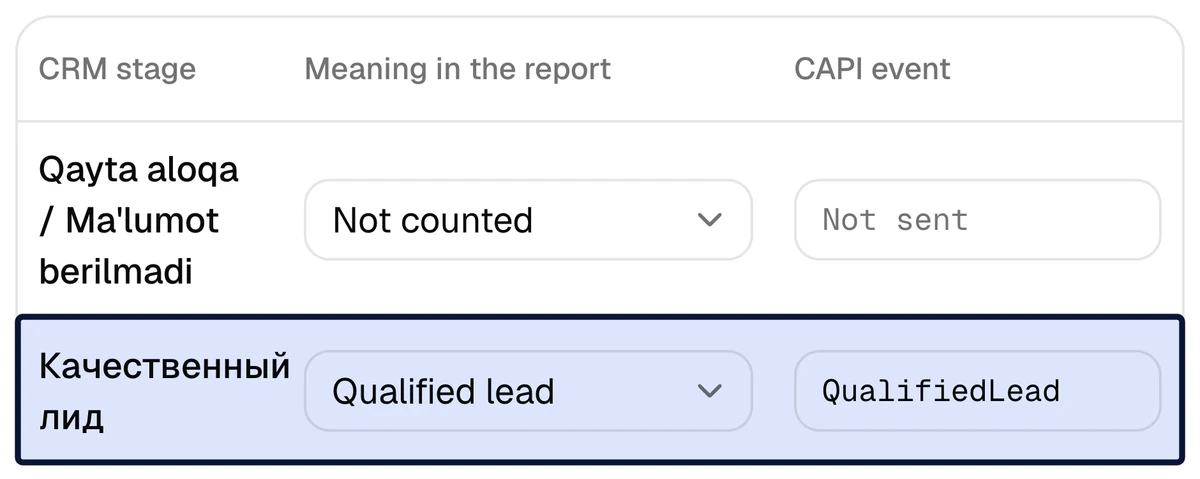
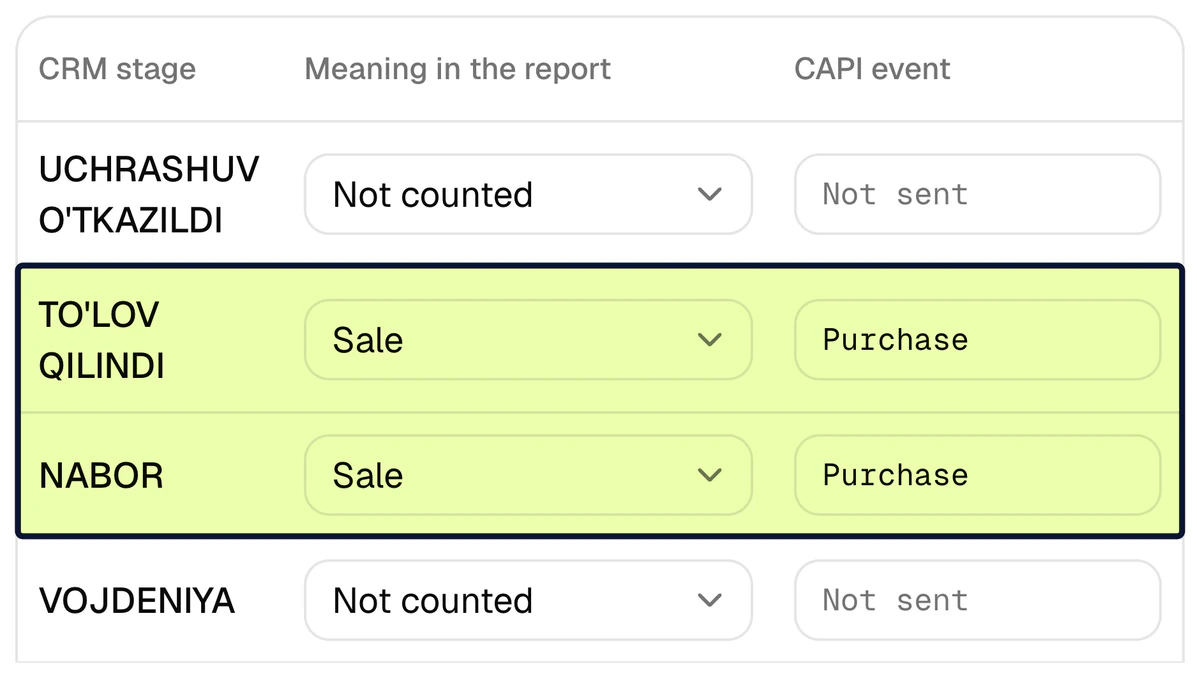
On the Funnel page every Bitrix24 stage gets two things: its meaning in the report (new lead, qualified lead, sale, junk lead or not counted) and the event to send to Meta. The moment a manager moves a deal into that stage, the event is sent — in the Conversion Leads format Meta defines for CRMs. Which stage means what is decided together with you, once.
- Several stages can mean a sale: on the screen two of them send
Purchase. A deal that passes both still sends it once. Purchasecarries the deal amount, converted to the ad account's currency. A deal with no amount sends the event without a value.- A deal closed straight to a sale sends
QualifiedLeadas well. - To optimise ads for quality, you create a custom conversion from
QualifiedLeadin Ads Manager — here is how.
How do you know an event reached Meta?
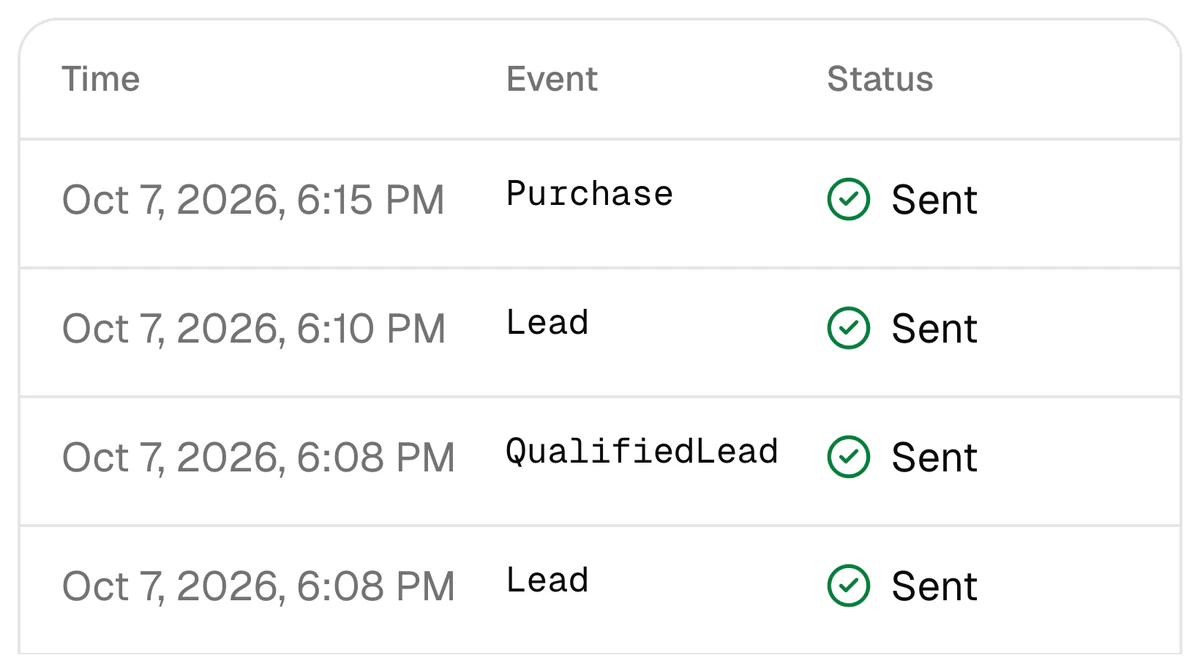
Every event sent to Meta stays in the CAPI events log with its time, name and status: queued, sent, failed or skipped. Next to it is a log of the webhooks that came in from Bitrix24 — if leads stop arriving, that is the first place to look.
What keeps a wrong signal from reaching Meta
- Once. One event name is sent once per lead, even if the deal moves back and forth between stages.
- No history. The 30 days of leads and deals loaded on connection go to the report only.
- Nothing stale. A lead first seen more than 24 hours after it was created sends nothing; Meta refuses events older than 7 days, so those are not sent.
- A lead with no identifier is skipped. With no phone, e-mail, Meta lead ID or
fbclid, no event is sent, and the log shows the reason. - Failures are retried. An event that did not go through is retried at intervals from 1 minute up to 24 hours.
How is the Bitrix24 integration set up in 3 days?
When we set it up, it takes 3 days: $159 once, with lead delivery included as a bonus, then $40 a month (pricing). We need two things from you: access to Bitrix24 and to the Meta ad account. The lead forms are set up and switched on within the same three days. If you connect it yourself, the order is the same.
- 1
Day 1: Bitrix24 is connected
The inbound webhook (scope
crm) is entered; the platform detects the funnel mode and registers the outbound webhook events. The last 30 days of leads and deals load into the report; old leads are not sent to Meta. - 2
Day 2: stages are tied to events
Together with you we decide which stage means a qualified lead and which means a sale — for leads and for each deal pipeline.
QualifiedLeadis tied to the qualified stage andPurchaseto the sale stages. - 3
Day 3: a test event, then the real ones
A test event is sent to Meta to check the token, the dataset and the whole path. After that the real events start flowing. Every event and its result is visible in the log.
What does Bitrix24's own Facebook integration do?
Bitrix24 has its own Facebook Lead Ads integration, which brings leads into the CRM. The middle column is what Bitrix24's own pages say (as of October 2026); the right column is what CAPI Platform does.
| Task | Bitrix24's own tool | CAPI Platform |
|---|---|---|
| Bring a lead-form request into the CRM | The Facebook Lead Ads integration imports leads into the CRM and stores the campaign, ad set and ad IDs | The request is written as a lead or as a deal with a contact; pipeline, stage, responsible person, source, UTM tags and fields are set per form |
| Send CRM outcomes back to Meta | The “Send customer actions to Facebook” tool builds ad audiences. Its help article names no events, no deal-stage triggers and no reporting back | On a stage change Lead, QualifiedLead or Purchase is sent through the Conversions API; every event is visible in the log |
| A report from spend to sale | The end-to-end analytics page lists Yandex.Direct, VK and Google as ad sources, and it is not available on every plan | Meta spend → lead → qualified lead → sale for every creative. Meta only: Google Ads, TikTok and Yandex are not connected |
Bitrix24's tools may differ by plan — check in your own portal; the sources are below. If Bitrix24's own integration brings your leads in today, you can keep it: events and the report still work, and a lead is tied to its ad by the Meta lead ID, the ad ID or the phone hash. Just do not let two integrations deliver the same form at once — every lead would arrive twice.
Sources
The driving school's and the learning centre's figures come from CAPI Platform's report and delivery log as of 8 October 2026; project names are withheld. What is said about Bitrix24 comes from its own pages, and Meta's test from Meta's page.
- 1Facebook Lead Ads integration — Bitrix24
- 2Send customer actions to Facebook (help article) — Bitrix24 Helpdesk
- 3End-to-end analytics in the CRM (in Russian) — Bitrix24
- 4Conversions API for CRM — Meta
- 5Conversion Leads integration — Meta for Developers
What works together with this integration
Lead delivery
Lead-form and website requests into the CRM: settings, the log, and how to switch from another integration.
Conversions API
A CRM stage goes back to Meta as an event: Lead, QualifiedLead, Purchase.
Report
Spend → lead → qualified lead → sale for every creative.
Facebook lead ads to Bitrix24
Connecting a lead form to Bitrix24: the options and a step-by-step guide.
amoCRM integration
If your CRM is amoCRM (Kommo): the same chain, connected by a token.
Pricing
Set-up is $159 once, then $40 a month.
Questions about the Bitrix24 integration
How do I connect Facebook and Instagram lead ads to Bitrix24?
In CAPI Platform the order is: create an inbound webhook with the crm scope in Bitrix24, connect the Meta ad account and the Page, then switch on each lead form separately. A request is written as a lead or as a deal with a contact, into the pipeline and stage you chose, with a responsible person and a source. Other ways are compared in the article Facebook lead ads to Bitrix24.
Does Bitrix24 send conversions to Meta through the Conversions API by itself?
According to Bitrix24's help article, its “Send customer actions to Facebook” tool builds ad audiences; the article names no events, no deal-stage triggers and no reporting back. Its Facebook Lead Ads integration brings leads into the CRM and stores the campaign, ad set and ad IDs. CAPI Platform sends QualifiedLead and Purchase events when a stage changes and shows each one in a log.
Our requests land as Leads and are then converted into Deals. Does that break the numbers?
No. That is Bitrix24's classic mode, and the platform detects it on connection. A Lead and the Deal made from it are tracked as one lead: the creation date and the ad attribution stay from the Lead, and the sale is read from the deal stage. Nobody is counted twice, and ad leads do not drop out of the report.
Another integration delivers our leads today. Will any be lost or doubled when we switch?
The old integration is switched off first, then the form is switched on in the platform. When switching on you choose the starting point: from now, or from one of the form's leads of the last 3 days — the first one the old integration did not deliver. That way the requests that came in between also reach the CRM. If both run at once, every lead is written twice, which is why the old one goes off first.
Are old Bitrix24 leads and deals sent to Meta?
No. The last 30 days of history loaded on connection go to the report only; those outcomes are not sent to Meta. Events are sent for stage changes that happen after connection. A lead first seen more than 24 hours after it was created sends nothing either.
What access to Bitrix24 is needed, and where is customer data kept?
One inbound webhook with one scope: CRM (crm). The webhook address is stored encrypted. Phones and e-mails read from Bitrix24 are never stored in the clear — only a SHA-256 hash and a partly masked number. Lead-form answers are kept encrypted for 7 days for retries, then erased. Meta receives hashes only, never a name. More: privacy policy.
How much does the Bitrix24 integration cost and how long does set-up take?
Set-up is $159 once: in 3 days Bitrix24 is connected, stages are tied to events and a test event is sent; lead delivery is included in that price as a bonus. Then $40 a month: the Conversions API, the report, Telegram reports and lead delivery for up to 4,000 leads a month. More: pricing.
Connect your Bitrix24 to Meta ads
Sign up with Google and connect Bitrix24 and Meta yourself, or leave a request and we will set it up in 3 days. Set-up is $159 once, then $40 a month.