Meta ads reporting for agencies: every client gets its own project
CAPI Platform (capip.uz) is a reporting system for agencies that run Meta ads: every client is opened as a separate project. A project has its own ad account, CRM (Bitrix24, amoCRM or capiCRM), spend-to-sale report, CAPI signals and Telegram chats. The owner sees every project; everyone else, admins included, sees the ones opened to them: a client’s staff only their own, a sales manager only capiCRM. One Meta system-user token serves the projects inside one organisation.
- Every client has its own ad account, CRM, report and Telegram chat
- A client sees only its own project, never another client’s
- One Meta system-user token for the projects of one organisation
- The report does not stop at the lead: qualified leads, sales, CAC and ROAS
The client asks about sales. You only have Ads Manager
The agency sees the ad account; the client’s sales team sees the CRM. The monthly report turns into gluing the two together by hand: screenshots from Ads Manager and an Excel export from the CRM.
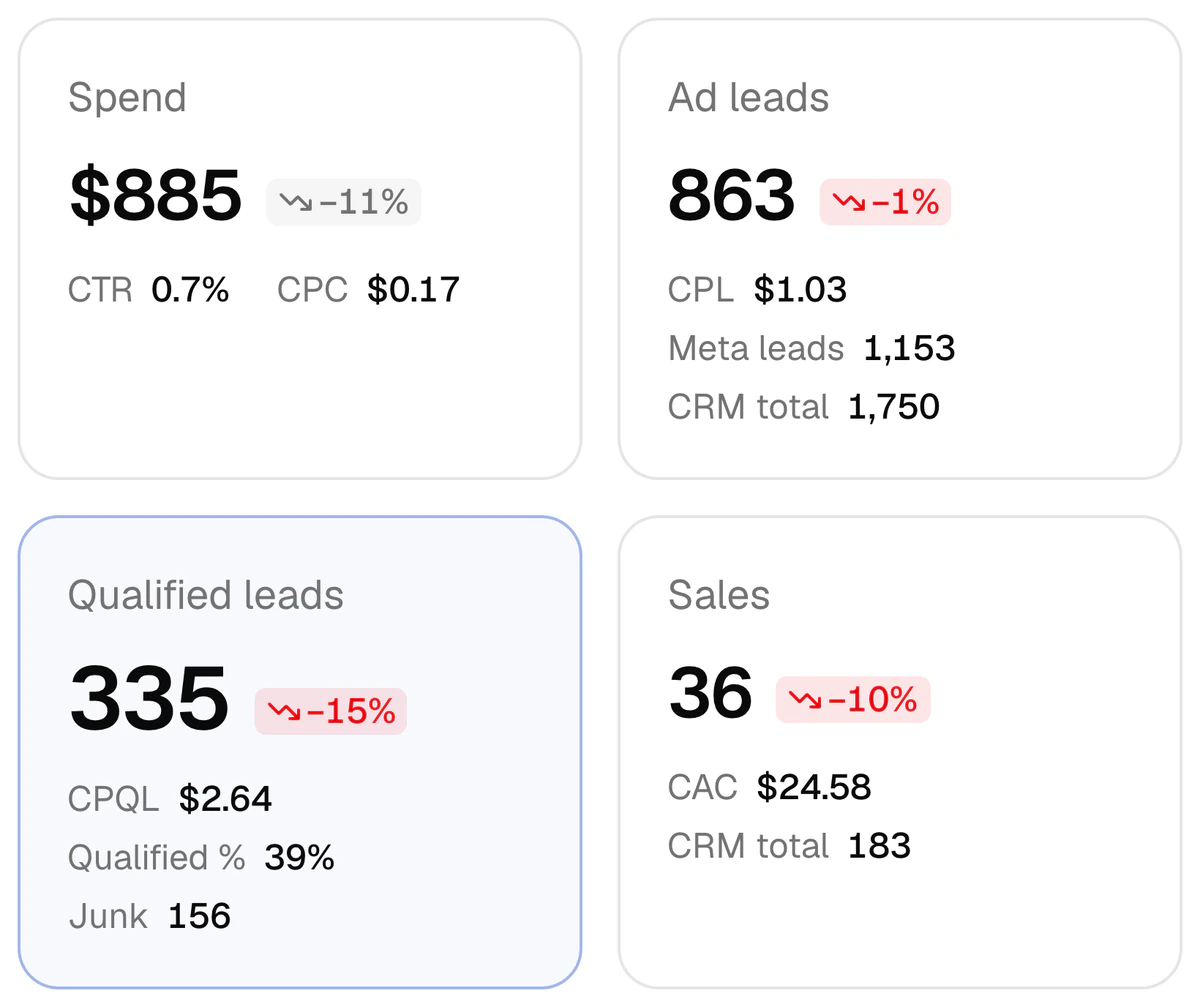
The chat is an illustration; the numbers are from a real report (a driving school, 2–8 October 2026). That week the CRM had 36 sales; on its own, Meta saw 863 leads and none of the sales. Once a client is connected as a project, the agency and the client answer this question from the same report.
- Your report says 863 leads. I don’t see them in my sales.
- Cost per lead is $1.03. How many of them bought is in the CRM. Can you export it?
- The managers are busy. Aren’t you the ones who should tell me which ad sells?
- For that, the CRM outcome has to sit next to the ad.
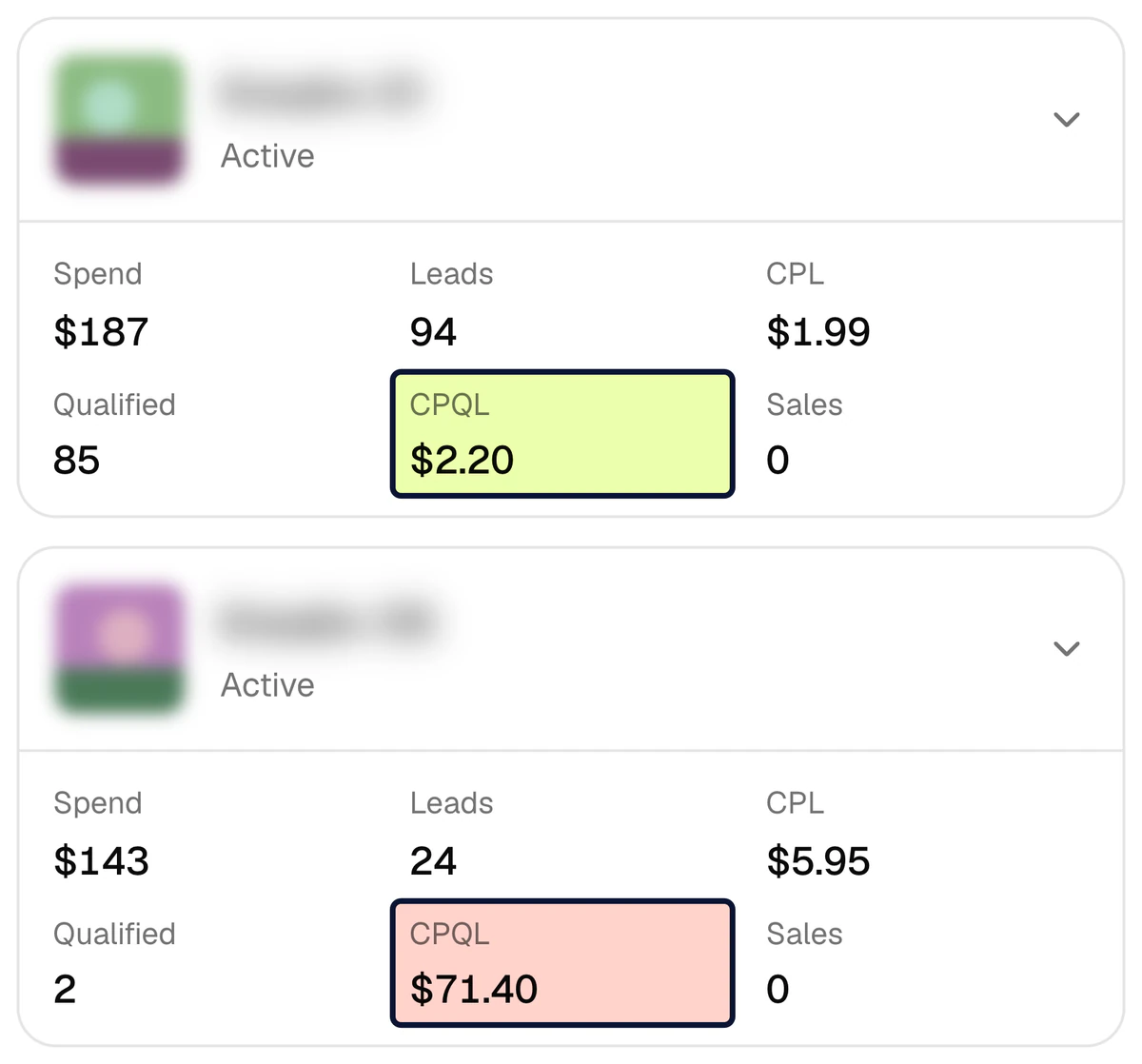
A qualified lead costs $2.20 in one creative and $71.40 in another
The second project is a learning centre. In the same week it spent $2,470 and got 685 leads (CPL $3.61): 330 qualified (48%) and 134 junk. In Ads Manager both creatives simply bring “leads”. Add the CRM stage and the gap is 32 times: a qualified lead costs $2.20 in one creative and $71.40 in another. The weekly call with the client is no longer about the number of leads; it is about this table.
- Whether a lead is qualified is decided by a CRM stage, not by the agency or the client. The stage is set separately in every project.
- Two creatives with almost the same cost per lead ($2.79 and $2.97): 0 qualified out of 14 leads in one, 18 out of 24 in the other.
- You move budget by qualified leads and sales, not by cost per lead — and the client can see why.
What does each project keep to itself?
A project is the space of one business. The organisation is your agency’s workspace on the platform: the team and all its projects live in it. Numbers, leads and chats never mix between projects; the one thing that can be shared is the agency’s Meta token, covered below.
Ad account
The client’s Meta ad account, Page and dataset (Pixel) are connected to the project. With two or more ad accounts, each gets a direction label, so creatives of the same name in different accounts stay separate rows in the report.
CRM
Bitrix24, amoCRM (Kommo) or capiCRM, the platform’s own CRM; one CRM per project. On the day it is connected, the last 30 days of history load into the report; old leads are not sent to Meta.
Learn moreReport
Spend → lead → qualified lead → sale for every creative. The currency, the time zone, the monthly budget and the campaigns left out of the report are set per project.
Learn moreCAPI signals
Which stage means QualifiedLead and which means Purchase follows the client’s own funnel. The signal goes to the dataset set in that project, and every project has its own event log.
Learn moreLead forms
Leads from the client’s Meta lead forms land in the client’s CRM by themselves. Every form is switched on and set up separately: pipeline, stage, responsible person.
Learn moreTelegram chats
A project can have several chats, each with its own schedule and language: a weekly report to the client’s group, a daily report and alerts to the agency’s internal chat.
Learn more
One Meta token, several clients
When one agency system user serves every client, there is no need to paste its token into each project again: connecting a new project, you choose “another project’s token in the organisation”. The token is stored encrypted and never leaves the organisation.
- One condition: the client’s ad account and Page must be assigned to that system user.
- The token is used only by projects of one organisation; it never reaches another organisation.
- Which ad account and Page a project gets is chosen only by people who see every project. A team member limited to one client cannot attach another client’s account.
- A signal goes to the dataset set in its own project: each client’s sales reach that client’s own Pixel.
Who sees what?
A role is given for the whole organisation; the list of projects is a separate setting. Only the owner always sees every project; for everyone else, admins included, the “Projects” button opens all of them or only the ones they need.
| Role | Which projects | What they can do | Usually given to |
|---|---|---|---|
| Owner | All | Everything, including assigning roles | The head of the agency |
| Admin | All, or only those opened to them | Settings, connections, managing ads; invites and removes members if every project is open to them | Lead media buyer, account director |
| Member | All, or only those opened to them | Changes settings; does not pause or enable ads | The media buyer who runs the project |
| Viewer | All, or only those opened to them | Read only | The client’s director or marketer |
| Sales manager | All, or only those opened to them | capiCRM only: leads, deals, tasks. No ads, no reports | The client’s sales team, if the client works in capiCRM |
Pausing and enabling ads from the table is open to owners and admins only (the Meta token needs the ads_management permission); the log keeps who paused what. A new project is created by the owner, or by an admin or a member who has all projects open. Phones and e-mails read from an outside CRM are kept only as a hash and a masked number, so nobody sees a full number in the report, whatever their role.
Give the client their own project instead of screenshots
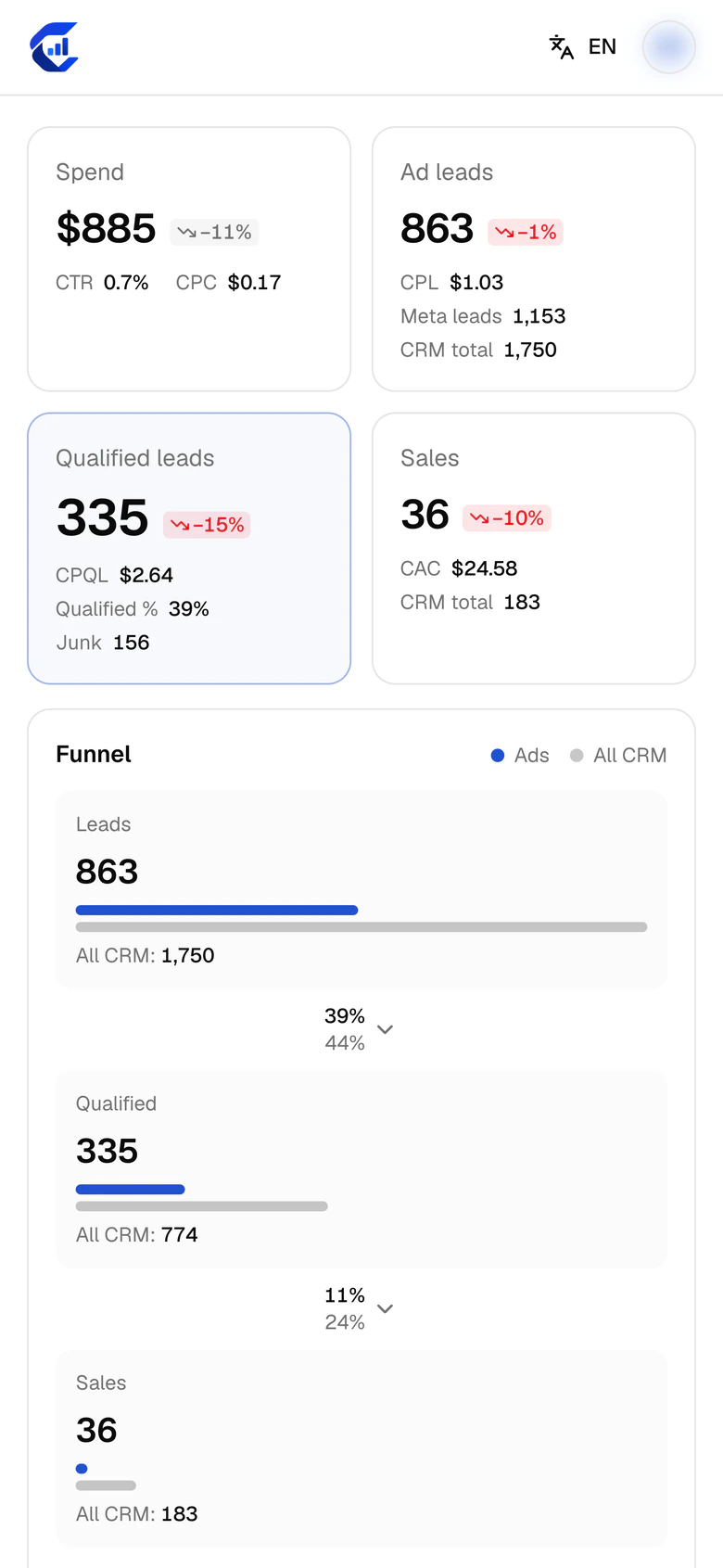
You invite the client’s director as a viewer and open only their project. On their own phone they see the same report you do: spend, leads, qualified leads, sales, CAC. Your other clients do not exist for them — not in the project list, not in the report. The screen shows the driving school project’s report for the week of 2–8 October 2026.
- The invitation is a link: it is tied to the invited e-mail address and valid for 14 days, and you send it yourself.
- Someone without an account signs up with that address through Google; someone with an account signs in and accepts.
- If the client works in capiCRM, its managers get the sales manager role and see only the CRM, at crm.capip.uz.
- The report opens in a browser, with no separate app to install; the interface is in Uzbek, Russian and English.
How do you add a new client?
The order is the same for every client, and the three days of set-up consist of these same steps. Do it yourself, or leave a request and we will do it.
- 1
Create a project
Name it after the client. Set the report currency, the time zone and the monthly ad budget.
- 2
Connect Meta
Paste a token or choose the token of another project in the organisation. Then pick this client’s ad account, Page and dataset (Pixel).
- 3
Connect the CRM — day 1
Bitrix24 needs an inbound webhook URL, amoCRM a long-lived token; a client with no CRM gets capiCRM. The last 30 days of history load into the report; old leads are not sent to Meta.
- 4
Tie stages to signals — day 2
Which stage is a qualified lead and which is a sale is decided together with the client. That definition is what you later rely on in any argument about lead quality.
- 5
Send a test signal — day 3
It checks the token, the dataset and the path. After that
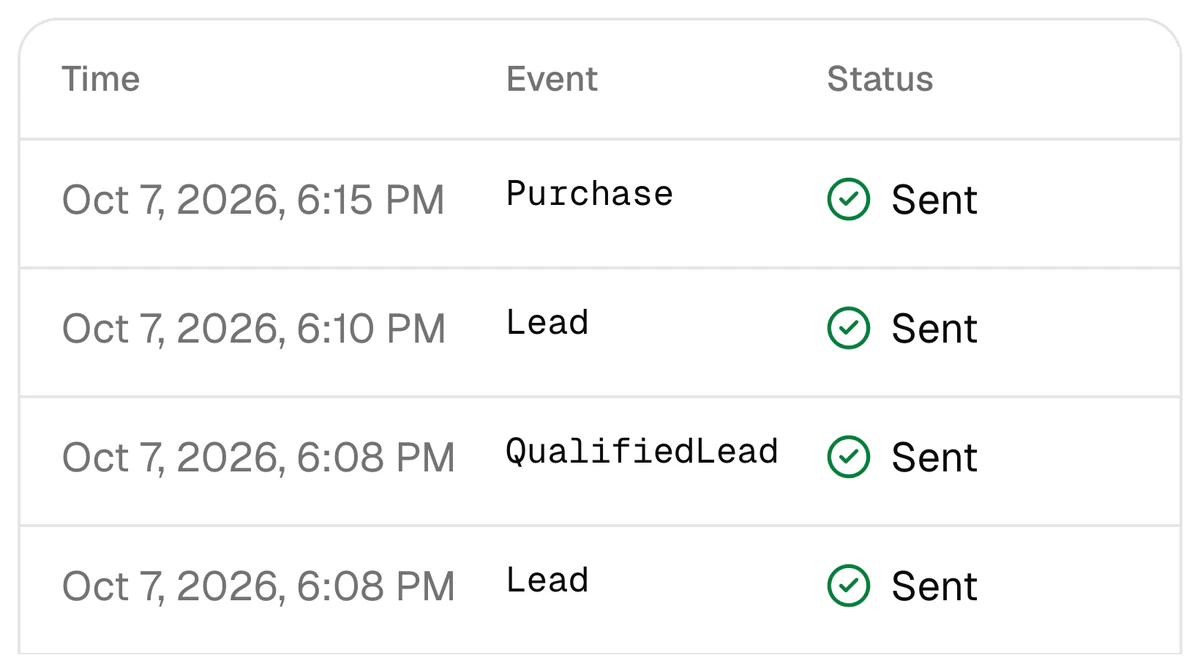
Lead,QualifiedLeadandPurchasego to Meta by themselves, each visible in the log with its status. - 6
Add the chats and the people
Connect the weekly report to the client’s group, and the daily report and alerts to your own internal chat. Invite the client’s staff by link and open only this project to them.
Two projects together: $13,613 of spend, 15,613 CRM leads
Two projects have been running on the platform since September 2026: a driving school and a learning centre. Each is a separate project with its own CRM and its own ad account. Below are their numbers for 9 September – 8 October 2026, added together.
- projectsa driving school and a learning centre
- 2
- ad spend in the report$4,528 + $9,085
- $13,613
- CRM leads in the report
- 15,613
- qualified leads1,840 + 1,138
- 2,978
- Meta leads delivered to the CRMlost 0, queue 0, errors 0
- 2,103
Period: 9 September – 8 October 2026. Lead delivery has run for the driving school since 25 September (1,790 leads) and for the learning centre since 5 October (313); “lost 0” is a measurement for those dates, not a guarantee. The two projects’ economics differ: an ad lead costs $1.07 at the driving school and $3.80 at the learning centre, and the qualified share is 44% and 48%. That is why every project has its own report. Names are hidden; each project’s own figures are on the cases page.
What runs in every project
Report
Spend → lead → qualified lead → sale for every creative.
Conversions API
CRM outcomes go back to Meta as QualifiedLead and Purchase signals.
Lead delivery
A lead from a Meta lead form lands in the client’s CRM by itself.
Telegram reports
Daily, weekly or monthly — to the client’s group and to your own chat.
capiCRM
For a client with no CRM: leads, deals and tasks.
For media buyers
If you run your clients on your own.
Questions agencies ask
Can one client see another client’s numbers?
No. Everyone except the owner, admins included, gets only the projects opened to them with the “Projects” button: a client’s staff member sees their own project in the project list and in the report, and nothing else. For the same reason, do not give a client’s staff the owner role — the owner always sees every project.
Do I need a separate Meta token for every client?
Not necessarily. When one agency system user serves all clients, a new project can take the token of another project in the organisation. The client’s ad account and Page must be assigned to that system user. The token is stored encrypted and never leaves the organisation. If a client gives you its own token, you can paste that into the client’s project instead. The list of permissions is on the integrations page.
My clients use different CRMs. Is that a problem?
No. Every project connects its own CRM: Bitrix24 for one client, amoCRM (Kommo) for another, and capiCRM, the platform’s own CRM, for a client that has none. One CRM per project. Stages are mapped per project too, because a qualified lead means one thing at a driving school and another at a learning centre. One limit: website form requests are delivered to Bitrix24 and capiCRM only, not to amoCRM.
Can I see all my clients on one screen?
The project list shows a card per client with the last 7 days: spend, leads, qualified leads, CPQL, sales and revenue. A card carries a warning when a connection has an error or the CRM has been silent for more than 24 hours. There is no roll-up report that adds several projects into one table: every project has its own currency, its own funnel and its own definition of a qualified lead.
What if an employee leaves, or we stop working with a client?
Remove the person from the team and they no longer see the projects; an invitation that has not been accepted yet can be revoked. When work with a client ends, archive the project: it leaves the list and webhooks from its CRM are no longer accepted.
Is it Meta only? What about Google Ads or TikTok?
Meta only: Facebook and Instagram. Google Ads, TikTok and Yandex are not connected. Leads that reach the CRM from other sources appear in the report by channel, but spend and the per-creative breakdown exist for Meta ads only.
How is client data stored?
Phones and e-mails read from Bitrix24 or amoCRM are kept only as a SHA-256 hash and a masked number. Meta, CRM and Telegram credentials and capiCRM’s contacts are kept encrypted. Meta receives phones and e-mails only as hashes, and never a name. More in the privacy policy.
What does it cost, and what if I have several clients?
The published price: set-up is $159 once (3 days, with lead integration included as a bonus), then $40 a month for the Conversions API signals, the report, Telegram reports and lead integration up to 4,000 leads a month. Every client’s CRM and funnel are connected separately, so if you come with several clients, leave a request and ask how it adds up for your number of projects. More: pricing.
Open your first client as a separate project
Sign up with Google, create a project and connect Meta and the CRM yourself — or leave a request and we will set it up in 3 days. Set-up is $159 once, then $40 a month.