Meta Pixel vs Conversions API: what’s the difference, and do you need both?
Sardor Rakhmonkulov7 min read
The Meta Pixel is website code: it runs in the browser and sees what happens on the page. The Conversions API (CAPI) runs on a server and sends Meta the outcome from the CRM — a qualified lead, a sale. Neither replaces the other: with a website you run both. A sale closed in the CRM reaches Meta only through CAPI; with lead forms alone, CAPI is enough.
In short
- The Pixel runs in the browser and sees actions on a website. The Conversions API runs on a server and sends the outcome from the CRM.
- The sale closes in the CRM. In one week at a driving school Meta counted 863 leads; the 36 sales happened where no Pixel lives.
- With a website you need both. With lead forms only, CAPI is enough.
- When both send the same event, the event name and
event_idmust match — otherwise the lead is counted twice. - Meta’s test: with CAPI for CRM and optimisation for qualified leads, cost per quality lead was 19% lower on average (567 advertisers, January 2025).
The Meta Pixel vs Conversions API difference comes down to what each one can see. The Pixel sees actions on a website. The Conversions API tells Meta what happened later, in the sales department, inside the CRM. So a business that already has a Pixel still needs CAPI.
What is the Meta Pixel, and what does it see?
The Meta Pixel is JavaScript code placed on a website’s pages: it runs in the visitor’s browser and sends Meta events about what happens there — a page view, a button click, a submitted form. Meta uses those events to measure and optimise Facebook and Instagram ads.
The Pixel recognises a person by browser cookies: _fbp and _fbc. That is also its limit: it sees only the page it sits on. A lead form filled in inside Facebook or Instagram, a manager’s call, a payment at the office — the Pixel is in none of them. More on the term: Meta Pixel.
What is the Conversions API (CAPI)?
The Conversions API is Meta’s server-side interface: a business sends events from its website, app or CRM — a lead, a qualified lead, a sale — straight from its own server, with no browser involved.
CAPI does two jobs. CAPI for a website repeats the Pixel’s events through a server, so a signal the browser lost still reaches Meta. CAPI for a CRM sends an outcome that never happens on a website: the lead turned out qualified, the deal closed as a sale.
This article is mostly about the second: a lead-based business closes its sales in the CRM, not on the site. In full: what the Conversions API is.
Meta Pixel vs Conversions API: what is the difference?
The main difference is where the signal leaves from: the Pixel sends it from the customer’s browser, the Conversions API from the business’s server or CRM.
| Criterion | Meta Pixel | Conversions API |
|---|---|---|
| Where it runs | In the customer’s browser, on a web page | On a server: the website’s or the CRM’s side |
| What it sees | Page views, clicks, forms sent on the site | What the server or CRM knows: lead, qualified lead, sale and its amount |
| What stops it | Ad blockers, browser cookie limits | Not the browser. A messy CRM: no stage change, no signal |
| What it needs | A website with the code installed | A Meta token, the Dataset (Pixel) ID, a CRM connection. No website |
| Events | On-site actions: PageView, Lead for a website form | CRM stages: Lead, QualifiedLead, Purchase (with amount and currency) |
| Deduplication | Sends the event with an event_id | Same event name and event_id: Meta counts the two as one |
The browser signal has two weak spots. Safari caps cookies set through JavaScript at seven days (WebKit, 2019): a person who returns more than a week later has no cookie left. And 29.5% of internet users use an ad blocker at least sometimes, according to GWI (Q2 2025); a blocker can keep the Pixel’s code from loading. Neither affects a signal sent from a server.
CAPI for a CRM recognises the person by other keys: the Meta lead ID and SHA-256 hashes of phone and e-mail. Phone and e-mail reach Meta only as hashes; a name is never sent.
Why is the Pixel alone not enough?
Because the sale closes where there is no Pixel. A driving school, the week of 2–8 October 2026: $885 spent on ads, 863 leads counted by Meta at $1.03 each. In the same week 36 sales closed in the CRM — after a call, a meeting and a payment, where the Pixel does not reach.
- leads counted by Meta
- 863
- sales closed in the CRMcustomer acquisition cost (CAC): $24.58
- 36
- sales a Pixel could seepayment is taken in the sales department, not on a website
- 0
Meta knows only what it has been told. Told about leads alone, it looks for people who fill in forms and treats the creative with the cheapest lead as the best. That week one creative brought 79 leads at $0.87 each and no sales; another brought 77 leads at $1.28 each and 5 sales. The CRM sees that difference; the Pixel does not.
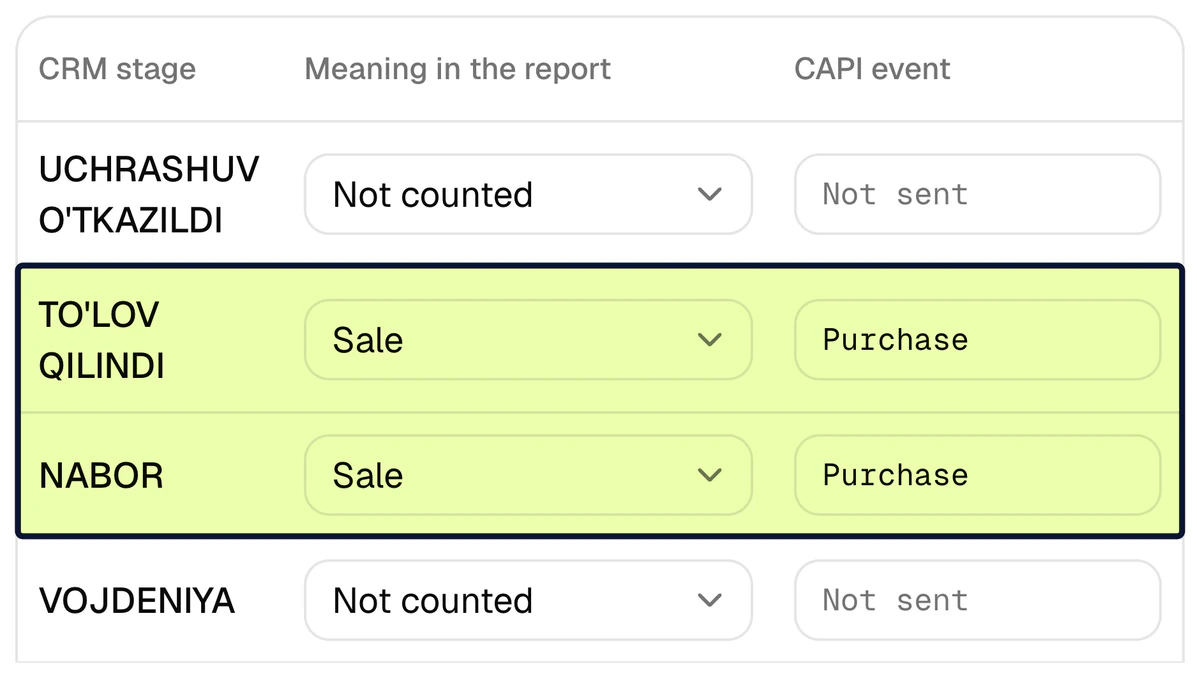
CAPI for a CRM carries that outcome to Meta: a deal moved to the sale stage sends Purchase — with the amount, if the deal has one.
I have the Pixel. Do I need the Conversions API too?
Yes — with a website you need both. They write to the same dataset and do different jobs: the Pixel shows what a person from the ad did on the site, CAPI whether that person became a customer. Which one is essential depends on where the sale closes.
| What you have | Pixel | Conversions API |
|---|---|---|
| A website; a manager closes the sale in the CRM | Needed: sees the visit and the request | Needed: sends the qualified lead and the sale from the CRM |
| No website; leads come from Meta lead forms | Nowhere to put it | Needed: a lead form and a CRM are enough |
| An online shop; payment on the site | Needed | Needed: CAPI for the website repeats the Pixel’s events through a server |
CAPI Platform covers the first two cases: it sends Meta the outcome from Bitrix24, amoCRM or its own capiCRM. CAPI for an online shop’s website is a different job; the platform does not do it.
How do you keep a lead from being counted twice?
When the Pixel and CAPI both send the same event, Meta counts them as one on two conditions: the same event name and the same event_id. That is deduplication. Break either and one request shows up as two leads — and the cost per lead looks lower than it is.
What does Meta itself report for the Conversions API?
In a test Meta has published, campaigns using the Conversions API for CRM and optimising for the number of qualified leads on instant forms had a 19% lower cost per quality lead on average. It was a budget-controlled A/B test: 567 advertisers, 13–27 January 2025. Source: Meta — Conversions API for CRM.
Read that figure with care. It was measured on other advertisers: it is not a CAPI Platform result and not a guarantee. And the test checked the signal together with a new goal, not the signal alone: campaigns were optimised for qualified leads, not for lead volume.
How do you add the Conversions API if you have a CRM?
You need neither a website nor a developer — only access to the CRM and to the Meta ad account. The order in CAPI Platform:
- 1
Connect Meta
Enter a System User token and the Dataset (Pixel) ID. The platform checks the token’s permissions on the spot.
- 2
Connect the CRM
Bitrix24 needs an inbound webhook address, amoCRM a long-lived token; with no CRM, use the platform’s own capiCRM. The last 30 days of history load into the report; old leads are not sent to Meta.
- 3
Tie stages to signals
On the Funnel page each CRM stage gets a meaning: new lead, qualified lead or sale.
Lead,QualifiedLeadandPurchaseare sent accordingly. - 4
Send a test event
The “Send a test event” button sends Meta one harmless event and shows that the token, the dataset and the path work. A Test event code field helps check it in Events Manager.
- 5
Watch the log
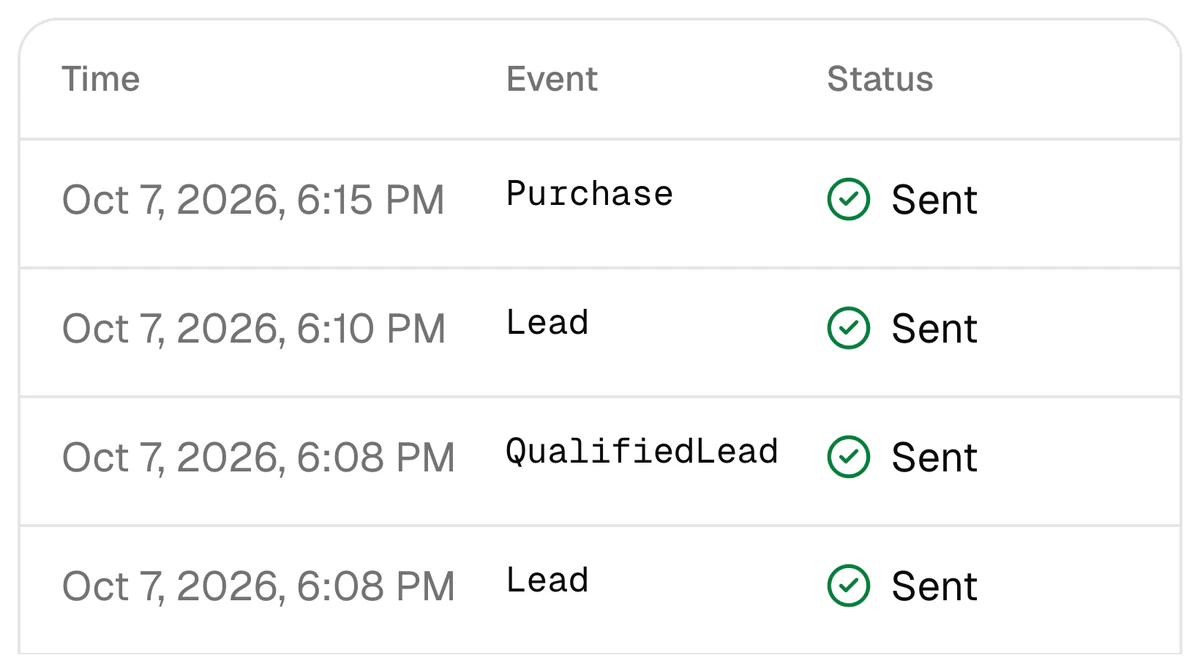
Every signal stays in the log with its time, event and status. A failed one is retried at intervals from 1 minute to 24 hours.
- 6
Teach the campaign quality
In Ads Manager, create a custom conversion from the
QualifiedLeadevent and optimise the campaign for it. Otherwise the signal reaches Meta while the campaign keeps chasing lead volume.
What mistakes are common with the Pixel and CAPI?
- Assuming Meta knows everything because the Pixel is installed. The Pixel does not see the sales department, and Meta knows only what it is told.
- Sending
Leadfrom both sides. With no sharedevent_id, one request counts as two leads. - Trying to upload old history to Meta. Meta does not accept events older than 7 days. History is for the report; signals are for new leads.
- Not keeping CRM stages up to date. Until the deal reaches the sale stage, no
Purchasegoes out; with no amount entered, the sale goes without a value. - Expecting a signal for a lead with no contact details. With no phone, e-mail, Meta lead ID or fbclid there is nobody to match: the signal is skipped and the log says why.
Send your CRM’s sales to Meta
Sign up with Google and connect Meta and your CRM yourself — or leave a request and we set it up in 3 days. Set-up is $159 once, then $40 a month.
FAQ
If I already have the Meta Pixel, do I need the Conversions API?
Yes. The Pixel runs in the browser and sees only actions on a website. A qualified lead and a sale appear in the CRM, where there is no Pixel. The Conversions API sends that outcome to Meta, so the two do not replace each other — they work together.
I have no website, only lead forms. Do I need a Pixel?
A lead form opens inside Facebook and Instagram, so there is no page to put a Pixel on. In that case the Conversions API for CRM works alone: the lead is recognised by the Meta lead ID and a hash of the phone number. The signal goes to a Meta dataset; in the platform the field is called “Dataset (Pixel) ID”.
Can I turn the Pixel off once CAPI is connected?
No. If you have a website, the Pixel sees the visit and the request on it, and CAPI for a CRM reports what became of the lead afterwards. Remove either one and Meta stops seeing part of the funnel.
If the Pixel and CAPI send the same event, is the lead counted twice?
Not if the event name and the event_id match: Meta then counts them as one. If they do not match, yes. So when the Pixel on a site already sends Lead, the Lead event on the CRM side either goes out with the same event_id or is switched off.
What customer data does the Conversions API send to Meta?
CAPI Platform sends Meta the phone number and e-mail only as SHA-256 hashes, together with the Meta lead ID, a hashed internal ID, _fbc and _fbp when they exist, the event name, the time and — for a sale — the amount and currency. The customer’s name is not sent.
How long does it take to add CAPI, and what does it cost?
Three days: on day 1 the CRM is connected, on day 2 stages are tied to signals together with you, on day 3 a test signal goes out. Set-up is $159 once, then $40 a month. Details: pricing.
Sources
- 1Conversions API for CRM — Meta
- 2Deduplicate Pixel and Server Events — Meta for Developers
- 3Intelligent Tracking Prevention 2.1 — WebKit
- 4Ad blocker usage statistics (GWI, Q2 2025) — Backlinko
Read next
- CAPI
Conversions API without a website: CAPI for lead forms and a CRM
No website, only lead forms and a CRM? The Conversions API still works: the Meta lead ID is the key, the CRM stage is the signal. Meta’s requirements, the steps and the timing.
7 min read
- Lead quality
How to optimize Meta lead ads for qualified leads, not lead volume
Moving a Meta campaign from lead volume to qualified leads: the stage, the custom conversion, signal volume, the numbers.
8 min read
- Lead quality
Cheap Facebook leads but no sales: why low-quality leads happen and how to fix them
Why a cheap lead does not sell: two creatives from a real report, causes on three sides and a seven-step fix.
7 min read