Conversions API without a website: CAPI for lead forms and a CRM
Sardor Rakhmonkulov7 min read
Yes: the Conversions API works without a website. Each lead from an instant form reaches the CRM with a Meta lead ID — the key Meta recognises it by. When a manager moves the lead to a qualified or sale stage, CAPI for CRM sends that outcome to Meta. No site, Pixel code or developer is needed: a CRM, a Meta ad account and a dataset are enough.
In short
- No website needed: every lead from an instant form carries a 15–17 digit Meta lead ID, and Meta recognises the lead by it.
- The signal is the CRM stage: when a lead reaches the qualified or sale stage,
QualifiedLeadorPurchasegoes to Meta. - You need no Pixel code, but you do need a dataset: events are written to it in Events Manager.
- Meta’s test: with CAPI for CRM and the qualified-leads goal, cost per quality lead was 19% lower on average (567 advertisers, January 2025).
- Meta’s two pages differ on volume: one names at least 200 leads a month, the other says there is no minimum.
Guides to the Conversions API tend to start from a website: Pixel, server, cookies. Many businesses have none: the ad opens a lead form, the request lands in a CRM, a manager closes the sale by phone. The Conversions API without a website is for exactly that case. Below: how CAPI for CRM lead ads works, what Meta asks for, the steps and the timing.
Does the Conversions API work without a website?
It does. The Conversions API does two jobs. CAPI for a website repeats through a server the events a Pixel sees, so it needs a site. CAPI for CRM sends an outcome that never happens on a site: a lead turned out qualified, a deal closed as a sale. A business on lead forms needs the second, and that one needs no site. More: what the Conversions API is.
The Conversions API for CRM sends Meta the outcome from a CRM — a new lead, a qualified lead, a sale — straight from a server. The lead is recognised by its Meta lead ID and a hashed phone or e-mail, so no website, Pixel code or cookie is needed.
| Criterion | CAPI for a website | CAPI for CRM |
|---|---|---|
| What it sends | Actions on a site: a page opened, a form submitted | Outcomes from the CRM: new lead, qualified lead, sale |
| How the person is recognised | Mostly browser cookies: _fbp, _fbc | Meta lead ID, hashed phone and e-mail |
| What you need | A site, a Pixel and a server side | A CRM, a Meta token and a Dataset ID |
How does Meta recognise the lead?
The key is the Meta lead ID. A lead form (Meta’s name: instant form) is filled in inside Facebook or Instagram, and Meta gives each submission a 15–17 digit number. Meta’s developer documentation says to store this ID for CRM events and, without it, to send a click ID, phone or e-mail. A website’s _fbp and _fbc cookies do not exist here and are not needed.
So the first condition: the lead must reach the CRM with its ID. In CAPI Platform lead delivery does that: the form’s lead is written into Bitrix24, amoCRM or capiCRM with name, phone and answers, tied to its ad. At the driving school, 1,790 leads from 5 lead forms reached the CRM between 25 September and 8 October 2026: queue 0, errors 0 — a measurement for those dates, not a guarantee.
Another service may deliver the leads instead: the platform then matches a CRM record to its form lead by the Meta lead ID or, failing that, by hashed phone or e-mail among form leads of the previous 72 hours.
What goes to Meta: the Meta lead ID, SHA-256 hashes of phone and e-mail, the event name and time; for a sale, amount and currency. A name is never sent. The event follows the shape of Meta’s CRM integration: action_source: system_generated, event_source: crm.
What is the signal: which CRM stage goes to Meta?
The signal is a stage change in the CRM. On the Funnel page each stage gets a meaning: new lead, qualified lead, sale or junk lead. When a lead enters a marked stage, the CRM’s webhook tells the platform, which sends the event to Meta at once.
| What happened in the CRM | Event sent to Meta | Note |
|---|---|---|
| The lead landed in the CRM | Lead | Every new lead from the form |
| A manager marked the lead as qualified | QualifiedLead | The business decides which stage means “qualified” |
| The deal closed as a sale | Purchase | With amount and currency, when the deal has them |
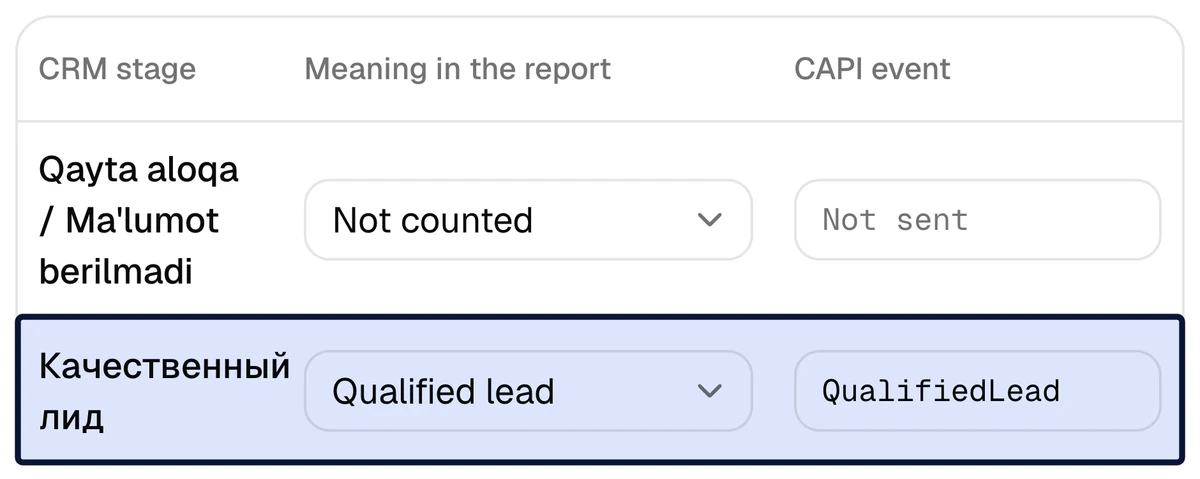
The lead form alone gives Meta only a lead count. A driving school, 2–8 October 2026: Meta counted 863 leads; that week the CRM recorded 335 qualified leads (39%) and 36 sales. Only the CRM knows which leads were good and who paid — the signal carries that to Meta.
Which stage to pick? Meta’s developer documentation gives a guide: 1–40% of leads should reach the stage, within 28 days. A stage every lead passes (“Contacted”) does not tell good leads from bad; one that fewer than one in a hundred reach gives too few examples.
What does Meta require and what does it recommend?
Meta’s developer documentation calls optimising a lead-form campaign on CRM events Conversion Leads; its newer “Conversions API for CRM” page speaks of the “maximize number of qualified leads” goal. Neither page asks for a website: the optimisation is described for instant forms.
| Criterion | What Meta says | Where |
|---|---|---|
| Lead volume | At least 200 leads a month | Developer documentation |
| Lead volume | No minimum; 200 or more leads is a recommendation | “Conversions API for CRM” page |
| Target stage | 1–40% of leads reach it, within 28 days | Developer documentation |
| Upload frequency | Events are sent at least once a day | Developer documentation |
| Lead key | The 15–17 digit Meta lead ID is stored and sent with the event | Developer documentation |
The set-up covers the technical rows: CAPI Platform sends an event the moment a stage changes, and takes the lead ID from the form. Volume and the choice of stage stay with the business.
What result has Meta itself reported?
In a test Meta has published, campaigns that used the Conversions API for CRM and optimised for the number of qualified leads on instant forms had a 19% lower cost per quality lead on average. It was a budget-controlled A/B test: 567 advertisers, 13–27 January 2025. Source: Meta — Conversions API for CRM.
Instant forms are exactly the no-website case. But the figure was measured on other advertisers: it is neither a CAPI Platform result nor a guarantee. Nor is sending the signal enough: the campaign has to be optimised for qualified leads, not for lead count.
How do you set up the Conversions API without a website?
No developer is needed — only access to the CRM and the Meta ad account. In CAPI Platform the order is:
- 1
Connect Meta
Enter a System User token and the Dataset (Pixel) ID. The platform checks the token’s permissions on the spot; reading lead forms needs
leads_retrieval. - 2
Connect the CRM
Bitrix24 needs an inbound webhook URL, amoCRM a long-lived token. With no CRM, use the platform’s own, capiCRM. The last 30 days of history load into the report; old leads are not sent to Meta.
- 3
Switch on the lead forms
For each form, choose the pipeline and stage its leads land in. Delivery starts from the moment of switching on. Turn the previous integration off, or each lead lands twice.
- 4
Tie stages to signals
On the Funnel page, mark which stage is a new lead, which a qualified lead and which a sale.
Lead,QualifiedLeadandPurchasefollow from that. - 5
Send a test event
The “Send a test event” button sends Meta one harmless event and shows that the token, dataset and path work. A Test event code field serves checks in Events Manager.
- 6
Teach the campaign quality
In Ads Manager, create a custom conversion from the
QualifiedLeadevent and optimise the lead-form campaign for it. Without that the signal reaches Meta while the campaign still chases lead count.
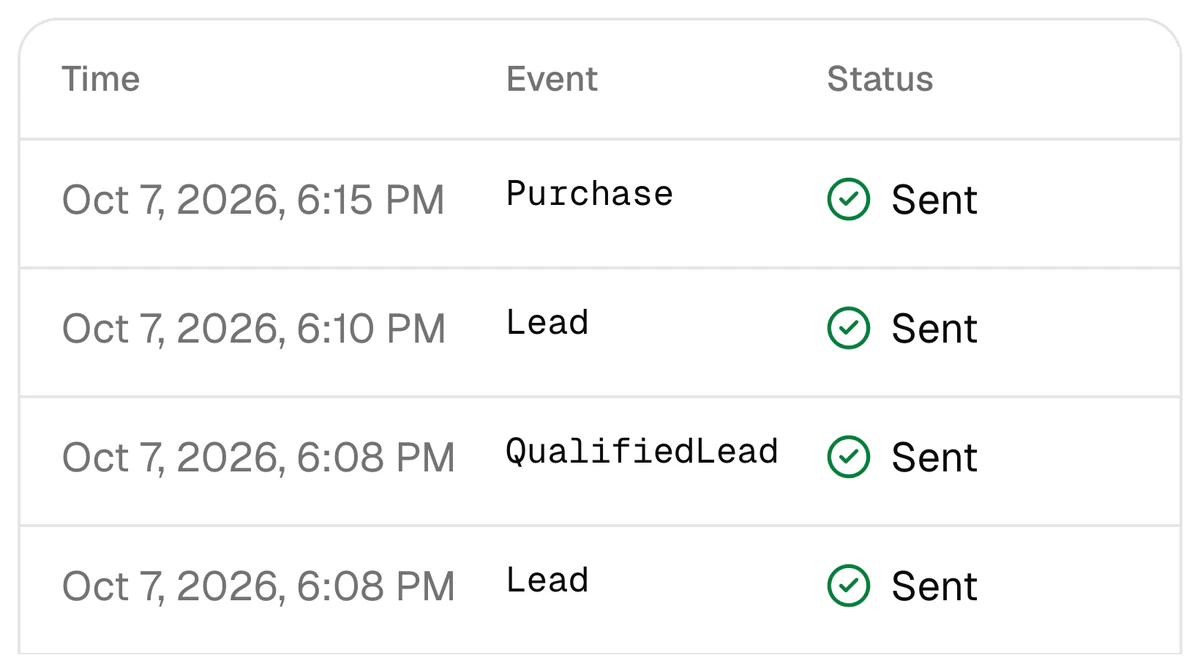
Every signal stays in the log with its time, event and status. A failed one is retried at intervals from 1 minute to 24 hours.
When will CAPI show a result, and how do you measure it?
| When | What happens |
|---|---|
| Days 1–3 | Set-up: the CRM is connected, stages are tied to signals, a test signal goes out |
| From day 3 | Every stage change goes to Meta at once. The report works straight away: spend → lead → qualified lead → sale, per creative |
| Following weeks | Meta learns from the new signal. The developer documentation names a learning phase of 2–4 weeks; other Meta pages mention longer |
So judge no earlier than a month in, and by cost per qualified lead, not cost per lead.
CPQL = ad spend ÷ qualified leads
Example: Driving school, 2–8 October 2026: $885 ÷ 335 = $2.64. Cost per lead that week was $1.03.
Cost per lead may rise — that is not a bad sign. In that week a creative with 79 leads at $0.87 brought no sales, while one with 77 leads at $1.28 brought 5.
CAPI does not fix CRM discipline: if managers do not move leads through the stages, there is no signal. A lead with no phone, e-mail, Meta lead ID or fbclid is skipped, and the log shows why.
Send CRM outcomes to Meta — no website needed
Sign up with Google and connect Meta and your CRM yourself — or leave a request and we set it up in 3 days. Set-up is $159 once, lead integration included; then $40 a month.
FAQ
Do I need to create a Pixel if I have no website?
You install no code — there is no page to put it on. But Meta needs a dataset for the CRM events to be written to. It is created in Events Manager, and its number goes into the “Dataset (Pixel) ID” field in CAPI Platform.
What if I have no CRM either?
Then you use the platform’s own CRM, capiCRM. Lead-form leads fall into it by themselves, a manager moves each lead through the stages, and every change goes to the report and, through the Conversions API, to Meta at once.
How many leads a month does CAPI for lead forms need?
Sending signals has no minimum, and the report works at any volume. Meta’s optimisation for quality does need volume: its developer documentation names at least 200 leads a month, while the newer “Conversions API for CRM” page says there is no minimum and 200 or more leads is a recommendation. Both pages are in the sources.
Can old leads be uploaded to Meta?
No. When the CRM is connected, the last 30 days of history load into the report only and are not sent to Meta. Meta does not accept events older than 7 days. Signals go for leads that arrive after the connection.
What if leads come from Instagram Direct or WhatsApp?
The exact key this article relies on — the Meta lead ID — exists only for lead forms. Leads from Direct, WhatsApp or calls show in the report by channel, but they are not tied to a specific ad automatically.
How long does set-up take and what does it cost?
Three days: day 1 the CRM is connected, day 2 stages are tied to signals together with you, day 3 a test signal goes out. Set-up is $159 once (lead integration included), then $40 a month. Details: pricing.
Sources
- 1Conversions API for CRM — Meta
- 2Conversion Leads Integration — Meta for Developers
Read next
- CAPI
Meta Pixel vs Conversions API: what’s the difference, and do you need both?
The Pixel sees actions on a website; the Conversions API sends the sale from the CRM. A comparison table, one driving school’s week in numbers, and the steps to add CAPI when you have a CRM.
7 min read
- Lead quality
How to optimize Meta lead ads for qualified leads, not lead volume
Moving a Meta campaign from lead volume to qualified leads: the stage, the custom conversion, signal volume, the numbers.
8 min read
- Bitrix24
Facebook Lead Ads to Bitrix24 integration: three ways to connect, step by step
Three ways compared, five things a delivery must do, setup steps, and the half most setups skip: sending Bitrix24 stages back to Meta.
7 min read