amoCRM (Kommo) and the Meta Conversions API: how to send pipeline stages to Meta
Sardor Rakhmonkulov7 min read
To set up the Conversions API for amoCRM (Kommo), you tie a pipeline stage to a Meta event: a deal entering the qualified-lead stage sends QualifiedLead, one entering the sale stage sends Purchase with its amount. It takes an amoCRM token and webhook, a Meta token and a Dataset ID. Meta matches the lead by lead ID and hashed phone or e-mail. Old deals are not sent.
In short
- A stage becomes an event: when a deal enters a mapped stage, one signal goes to Meta —
Lead,QualifiedLeadorPurchase. QualifiedLeadis the first stage where a manager confirmed a real prospect;Purchaseis the payment stage, sent with the deal’s amount.- Kommo’s native CAPI integration, per its documentation, works for Instagram, Messenger and WhatsApp sources and sends two events; that article does not mention lead forms.
- Meta matches a lead by its lead ID and by a hashed phone or e-mail; a name is never sent.
- Three mistakes to avoid: sending history, repeating an event, optimising for an event that is too rare.
An amoCRM (Kommo) Conversions API setup solves one task: the sales are in amoCRM, and Meta does not know about them. Ads Manager sees a filled-in lead form — who answered the phone, who came to the meeting and who paid stays in the CRM. So the algorithm looks for people who fill in forms, not people who buy.
In the week of 2–8 October 2026 a driving school’s ads brought 863 leads; 335 were qualified and 36 bought. On its own, Meta saw 863 leads and none of the 36 sales. The Conversions API (CAPI) closes that gap.
What does “a stage becomes an event” mean?
A Meta event is assigned to an amoCRM pipeline stage. When a deal enters that stage, amoCRM fires a webhook and one event for that lead goes to Meta through the Conversions API: a name, a time and the hashed data Meta matches the person by.
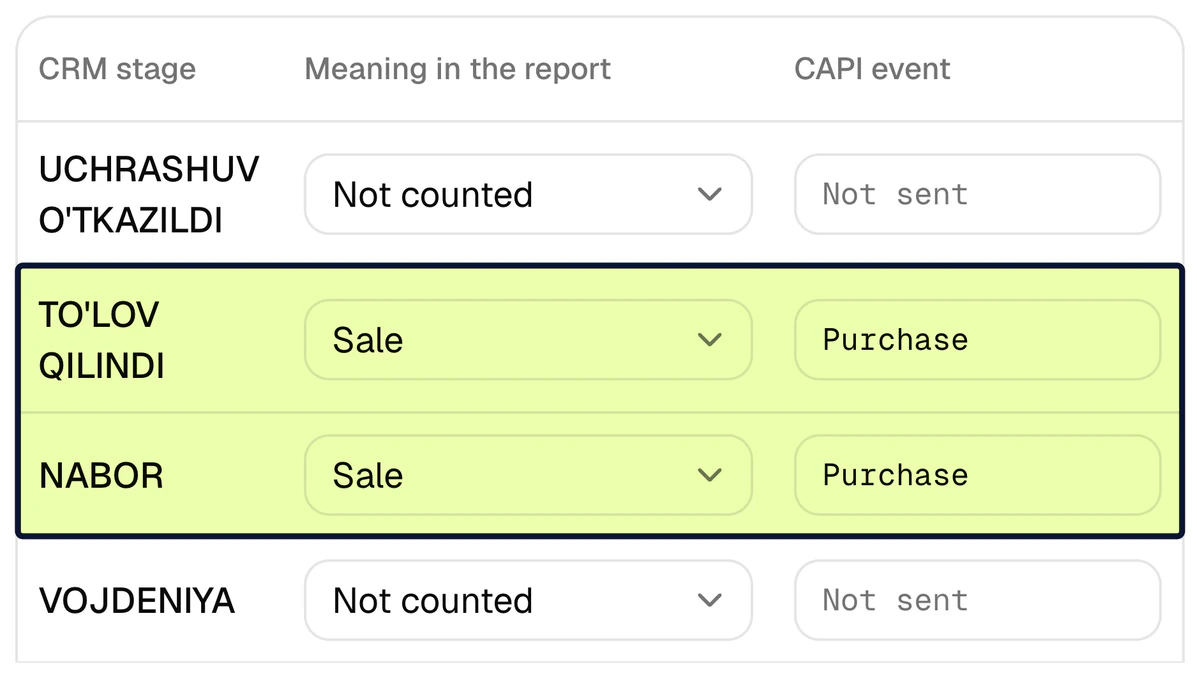
In CAPI Platform (capip.uz) this is the Funnel page: each amoCRM pipeline is a table of its stages. A stage gets its meaning in the report (new lead, qualified lead, sale, junk lead) and, where needed, an event for Meta: Lead, QualifiedLead or Purchase. Each event is sent once per lead, even if the deal moves back and forth between stages.
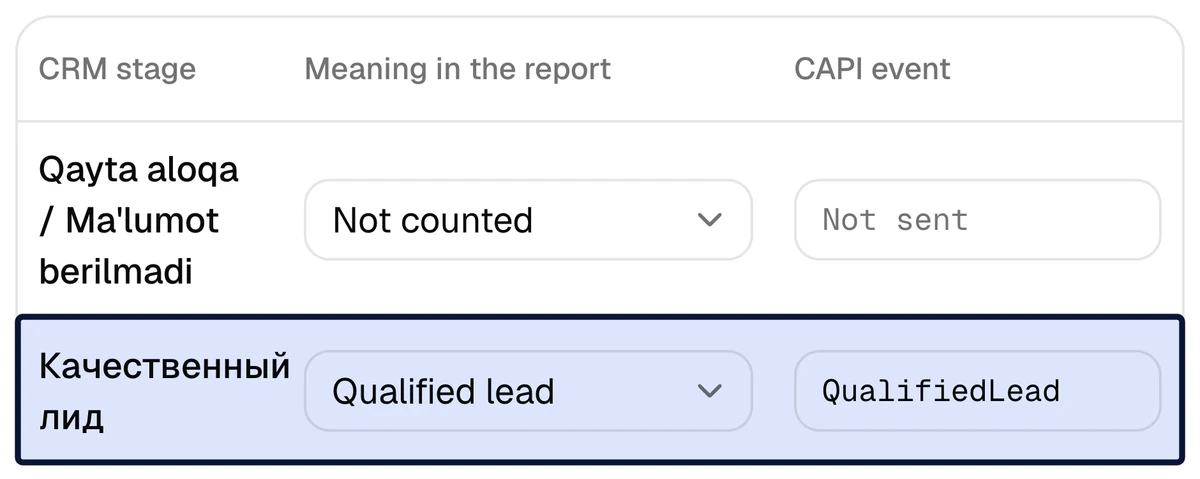
Which amoCRM stages should send QualifiedLead and Purchase?
| Event | Which stage | Question to check |
|---|---|---|
Lead | The pipeline’s first open stage, where a new request lands | Does every new lead land here? |
QualifiedLead | The first stage where a manager has confirmed a real prospect: “Meeting booked”, “Trial lesson booked” | Do only some of the leads reach it? |
Purchase | The stage where payment arrived — the pipeline’s won stage | Is the amount filled in on the deal? |
The platform makes the first guess: the first open stage is Lead, the won stage Purchase. The qualified-lead stage is yours to mark — only your sales team knows which stage that is. Mark the working stages after it as qualified too: if a manager skips a stage, the lead still counts and the event still goes once.
Meta’s developer documentation gives a guide: 1–40% of leads should reach the chosen stage, within 28 days. A stage every lead passes (“Contacted”) does not tell a qualified lead from a junk one; a stage one lead in a hundred reaches gives too few signals.
leads that reached the stage ÷ all leads × 100%
Example: Driving school, 2–8 October 2026: 335 ÷ 863 = 39% of leads reached the qualified-lead stage.
Purchase carries the deal’s amount, converted to the ad account’s currency; with no amount it goes without a value. A deal closed straight to a sale sends QualifiedLead too.
We promise no result. Meta reports that advertisers who connected a CRM through the Conversions API and optimised instant-form campaigns for qualified leads saw a 19% lower cost per quality lead on average (A/B test, 567 advertisers, 13–27 January 2025). That is Meta’s test, not a CAPI Platform result.
What does Kommo’s native CAPI integration cover?
amoCRM is sold internationally as Kommo, and Kommo has its own Meta Conversions API integration. This is what its help-centre article says (updated 19 May 2026, read 9 October 2026).
| Question | What Kommo’s article says |
|---|---|
| Which sources | Instagram, Messenger and WhatsApp Cloud API — conversation sources |
| Which events | Two: Lead and Purchase |
| What triggers an event | A pipeline stage or the Salesbot |
| Where the result is seen | In Meta Events Manager |
| Which plan | From 1 June, on the Pro plan only |
| Lead forms | Not mentioned in the CAPI article. Kommo’s integration page says it takes lead-form leads in natively, on all plans |
If your ads lead people into a conversation — Direct or WhatsApp — Kommo’s integration is built for that; CAPI Platform does not tie such leads to an ad automatically. For lead-form ads the article leaves two things unmentioned: a qualified-lead event between Lead and Purchase, and a report tied to ad spend. CAPI Platform does both: see the amoCRM integration page.
We have not checked whether amocrm.ru accounts have this integration. Confirm the plan and its terms on Kommo’s current pricing page.
What does Meta need to match the lead?
Delivery is not enough: Meta must connect the event to a person who saw the ad, so the event needs at least one key.
- The Meta lead ID — the 15–17-digit number every lead-form lead gets. For lead-form ads it is the most exact key.
- SHA-256 hashes of the phone and e-mail. The number is normalised first: a nine-digit Uzbek number gets the 998 prefix, then it is hashed.
- Click identifiers —
fbclid,_fbc,_fbp: when your own site writes the request into amoCRM and puts them on the deal. The platform’s website forms do not work with amoCRM.
A name is never sent to Meta. A deal with none of these keys is skipped, and the log shows why.
Where does the lead ID come from? If CAPI Platform itself delivers the lead into amoCRM, it already has the ID. If another integration wrote the lead, the platform reads the connected Pages’ form leads from Meta and looks for the deal among them: by the ID if a deal field holds it, otherwise by the phone or e-mail hash (deals created within 72 hours after the form was submitted). The fuller the keys, the higher the event match quality.
How to set up the Conversions API for amoCRM in 7 steps
Three days when we do it: amoCRM on day one, stages tied to events with you on day two, a test signal on day three. Doing it yourself, the order is the same.
- 1
Get a long-lived token in amoCRM
amoCRM → Settings → Integrations → create a private integration → Keys and scopes → Long-lived token. The token is kept encrypted.
- 2
Connect amoCRM to the project
On the Connections page enter the account address (company.amocrm.ru; amocrm.com and kommo.com work too) and the token. Pipelines are read; the last 30 days of history load into the report.
- 3
Add the webhook in amoCRM
Settings → Integrations → Webhooks: add the address the platform shows and tick three events — Lead added, Lead edited, Lead status changed (amoCRM calls a deal a lead). Stage changes then reach the platform at once.
- 4
Connect Meta
A Meta system user token and the Dataset (Pixel) ID from Events Manager → Data sources. Permissions are checked as you connect.
- 5
Tie stages to events
On the Funnel page mark which stage means a qualified lead and which a sale — once, two or three stages.
- 6
Send a test event
One harmless
CapiPlatformTestevent: if Meta accepts it, the token, the dataset and the path work. - 7
Create a custom conversion in Ads Manager
Build it from the
QualifiedLeadevent: it lets a campaign optimise for qualified leads.
How do you check the events in Events Manager?
- In Events Manager open Test events, copy the test code and paste it into the platform’s Test event code field.
- Press “Send a test event”:
CapiPlatformTestappears under Test events. - Clear the code. While it is set, events go only to the test view.
- When the first new deal reaches the qualified-lead stage, the platform’s CAPI events log shows
QualifiedLeadas Sent and an event of that name appears in Events Manager.
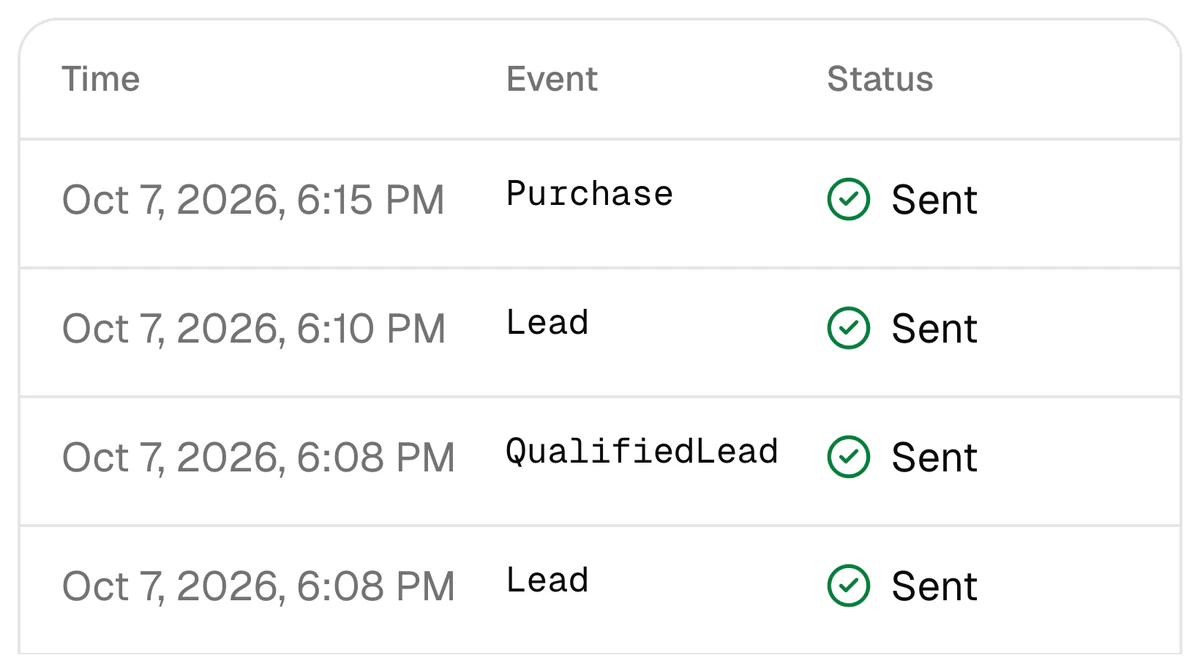
Do not test with an old deal: deals created before the connection send no events. The log has four statuses — Queued, Sent, Failed, Skipped; a failed event is retried, from 1 minute to 24 hours apart. The same page logs amoCRM’s incoming webhooks: if events stop, look there first.
Which mistakes are most common?
| Mistake | What happens | What to do instead |
|---|---|---|
| Sending history | Months-old deals arrive as today’s results; Meta refuses events older than 7 days anyway | History is for the report only: the platform sends nothing for deals from before the connection, or for leads first seen over 24 hours after they were created |
| Repeating an event | A deal returns to a stage, or the site’s Pixel also sends Lead — one person is counted twice | One lead, one event. If the Pixel sends Lead, take Lead off the stage |
| An event that is too rare | Ten or twenty Purchase events a week give the algorithm few examples | Optimise the campaign for QualifiedLead; keep sending Purchase with its amount |
In the week of 2–8 October 2026 a learning centre had 330 qualified leads and 18 sales: a campaign optimised for QualifiedLead gives Meta 330 examples a week instead of 18.
Send your amoCRM stages back to Meta
Sign up with Google and connect amoCRM and Meta yourself — or leave a request and we will connect it in 3 days. $159 once for the set-up, then $40 a month.
FAQ
Do amocrm.ru and Kommo accounts both work?
Yes. amocrm.ru, amocrm.com and kommo.com addresses are accepted. You need the account address and a long-lived token; the platform keeps the token encrypted. One account connects to one project.
Are old amoCRM deals sent to Meta?
No. On connection the last 30 days of history load into the report only. Events go for deals that enter a mapped stage after the connection. Events older than 7 days are not sent at all — Meta refuses them.
Is QualifiedLead a standard Meta event?
No. It is sent under its own name in Meta’s CRM format, Conversion Leads. To optimise a campaign for it you create a custom conversion from it in Ads Manager. You can give the event another name: Latin letters, digits and underscores.
Kommo has its own CAPI integration. Do I need anything else?
It depends on your channel. Per Kommo’s documentation, its integration works for Instagram, Messenger and WhatsApp Cloud API sources and sends Lead and Purchase; that article does not mention lead-form leads. If your lead-form ads need QualifiedLead and a report per creative, CAPI Platform does that.
How many leads a month does amoCRM need for the Conversions API to make sense?
Sending events has no minimum: each stage change goes on its own, and the report works at any volume. Meta’s optimisation for quality needs volume: its developer documentation says at least 200 leads a month, while the newer Conversions API for CRM page says there is no minimum and 200 or more is a recommendation. Both pages are in the sources.
How long does connecting amoCRM take, and what does it cost?
Three days when we do it. $159 once for the set-up (lead integration is included in that price), then $40 a month: CAPI, the report, Telegram reports and lead integration for up to 4,000 leads a month. You give access to amoCRM and to the Meta ad account. Details: pricing.
Sources
- 1Set up Meta Conversions API (CAPI) — Kommo help centre — Kommo
- 2Facebook lead forms integration — Kommo
- 3Conversion Leads integration — Meta for Developers
- 4Conversions API for CRM — Meta
Read next
- Lead quality
How to optimize Meta lead ads for qualified leads, not lead volume
Moving a Meta campaign from lead volume to qualified leads: the stage, the custom conversion, signal volume, the numbers.
8 min read
- CAPI
Conversions API without a website: CAPI for lead forms and a CRM
No website, only lead forms and a CRM? The Conversions API still works: the Meta lead ID is the key, the CRM stage is the signal. Meta’s requirements, the steps and the timing.
7 min read
- Bitrix24
Facebook Lead Ads to Bitrix24 integration: three ways to connect, step by step
Three ways compared, five things a delivery must do, setup steps, and the half most setups skip: sending Bitrix24 stages back to Meta.
7 min read