Meta Pixel (Facebook Pixel)
The Meta Pixel (formerly the Facebook Pixel) is a piece of JavaScript placed on a website’s pages: it runs in the visitor’s browser and sends what happens on the site — a page view, a button click, a form submission — to Meta as events. What happens off the site, the Pixel does not see.
Also written: Meta Pixel, Facebook Pixel, FB Pixel, Instagram pixel, pixel, pixel code, tracking pixel, Meta Pixel ID, пиксель, piksel
How does the Meta Pixel work?
The code goes on every page of the site. When a person opens a page, the Pixel starts in their browser and sends Meta an event: a page was viewed, a form was submitted (Lead), a purchase was made (Purchase). It recognises the person by browser cookies: _fbp for the browser, _fbc for the ad click. Meta uses these events to measure and optimise the ads.
What can the Pixel not see?
The Pixel sees only what happens on the page it sits on. In a business that works with leads, the main result happens off the site.
| What happens | Where | Does the Pixel see it |
|---|---|---|
| A form on the website is submitted | On a page of the site | Yes |
| A lead form is filled in | Inside Facebook or Instagram | No |
| A manager marks the lead as qualified | In the CRM | No |
| The customer pays | At the office, in the CRM | No |
Even on the site the Pixel does not see everything. Safari caps cookies set through JavaScript at seven days (WebKit, 2019). According to GWI, 29.5% of internet users use an ad blocker at least sometimes (Q2 2025), and a blocker can keep the Pixel’s code from loading.
Example: 36 sales where there is no Pixel
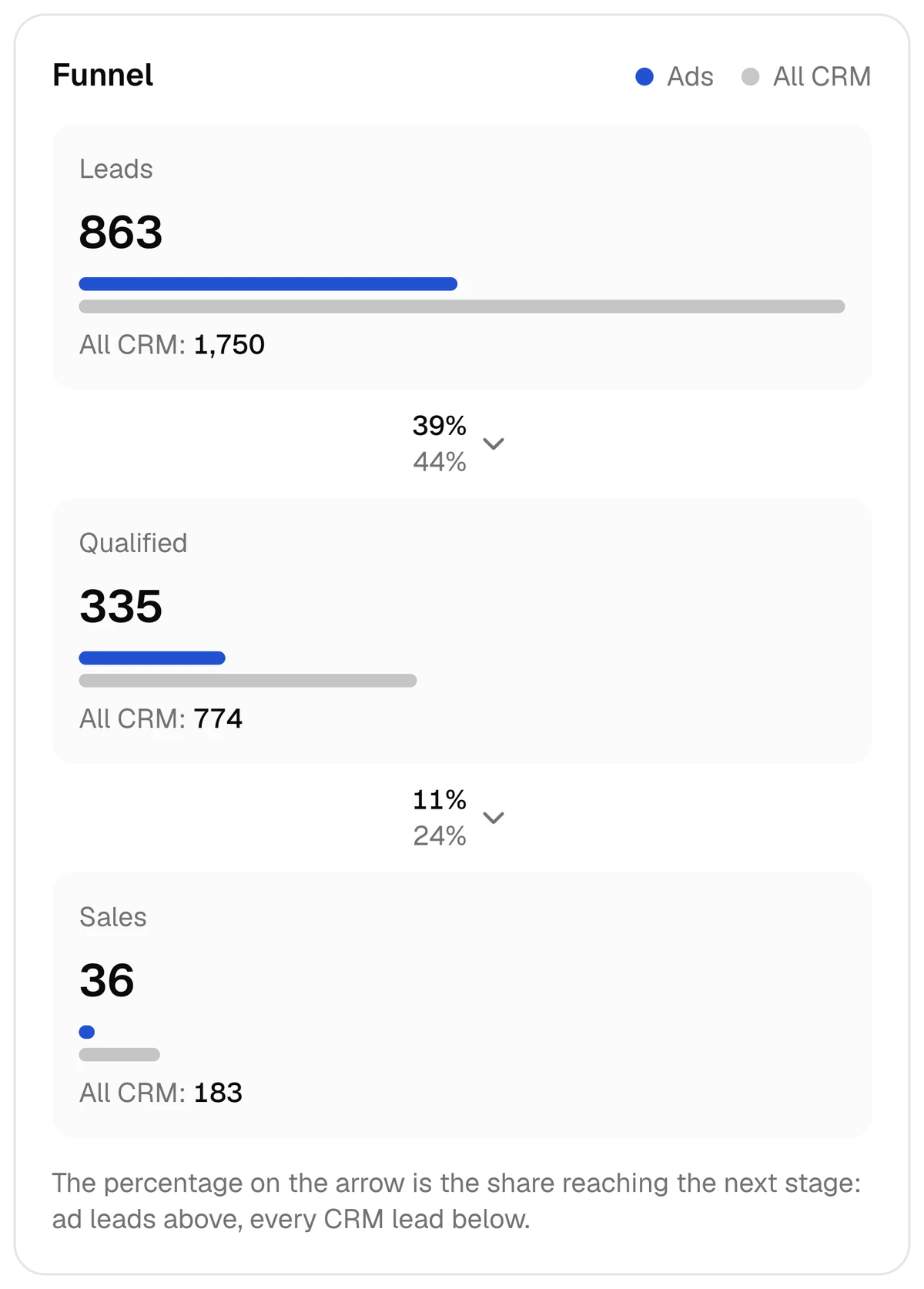
A driving school, 2–8 October 2026: 863 ad leads, 335 of them qualified, 36 sales. Both the qualified lead and the sale were recorded in the CRM, where no Pixel runs.
In the same week one creative brought 79 leads at $0.87 and not a single sale; another brought 77 leads at $1.28 and 5 sales. That difference, too, shows only in the CRM. The result reaches Meta through the Conversions API, which works from a server, not from the browser.
FAQ
Do I need the Pixel if I have no website?
You need no Pixel code — there is no page to put it on. But a dataset is created in Meta Events Manager, and the events from the CRM are written to it. CAPI Platform calls that field “Dataset (Pixel) ID”. The steps are in Conversions API without a website.
What is the difference between the Pixel and the Conversions API?
The Pixel sends its signal from the customer’s browser and sees on-site actions. The Conversions API sends its signal from a server and carries the CRM’s outcome — a qualified lead, a sale. With a website, the two work together: see the comparison table.
Are the Facebook Pixel and the Meta Pixel the same thing?
Yes. Facebook Pixel is the old name, Meta Pixel the current one. The code and the job are the same: sending what happens on a website to Meta.
Related terms and pages
- Conversions API (CAPI)The Conversions API (CAPI) is Meta’s server-side interface: a business sends events from its website or CRM — a lead, a qualified lead, a sale — straight from a server to Meta, with no browser involved. Meta uses these signals to measure and optimise Facebook and Instagram ads.
- Event Match Quality (EMQ)Event Match Quality (EMQ) is Meta’s score, out of 10, of how effective the customer information sent with a server event may be at matching that event to a Meta account. It is shown in Meta Events Manager and measures matching, not the quality of a lead.
- Lead form (Meta instant form)A lead form (Meta instant form) is a request form that opens inside a Facebook or Instagram ad: a person leaves a name, a phone number and answers to questions without visiting a website. Meta stores every submission under its own lead ID.
- Attribution (tying a lead to its ad)Attribution is tying a lead or a sale to the ad that brought it: the campaign, the ad set and the ad. Without it, spend sits in the ad account, sales sit in the CRM, and nobody can see which creative brings in money.
- Meta Pixel vs Conversions API: what’s the difference, and do you need both?The Pixel sees actions on a website; the Conversions API sends the sale from the CRM. A comparison table, one driving school’s week in numbers, and the steps to add CAPI when you have a CRM.
- Conversions API without a website: CAPI for lead forms and a CRMNo website, only lead forms and a CRM? The Conversions API still works: the Meta lead ID is the key, the CRM stage is the signal. Meta’s requirements, the steps and the timing.
- Conversions APIWhat the Meta Conversions API (CAPI) is, how it differs from the Pixel, and how qualified leads and sales from a CRM reach Facebook and Instagram. With numbers.
Updated:
We set CAPI up in 3 days
$159 once, then $40 a month. Lead integration is included.