Facebook Lead Ads to Bitrix24 integration: three ways to connect, step by step
Sardor Rakhmonkulov7 min read
A Facebook Lead Ads to Bitrix24 integration can be built three ways: Bitrix24's own connector, an integration builder (Albato, Zapier, Make), or a platform that also sends outcomes back to Meta. All three put the lead in the CRM. The difference comes after: does each lead arrive once, with UTM tags and a responsible person — and does Meta learn it became a qualified lead or a sale?
In short
- Three ways: Bitrix24's own connector, an integration builder (Albato, Zapier, Make), or a platform that also sends outcomes back to Meta.
- A good delivery does five things: no doubles, no losses, UTM tags and the ad in the record, a responsible person, and about a minute from form to CRM.
- CAPI Platform has delivered 2,103 Meta leads into the CRM across two projects: 0 lost, 0 queued, 0 errors (as of 8 October 2026).
- Switch a new integration on before the old one is off, and every lead lands in Bitrix24 twice.
- A lead in the CRM is half the job: until stages go back to Meta as
QualifiedLeadandPurchase, Meta knows only the lead count.
Teams usually look for a Facebook Lead Ads to Bitrix24 integration in one situation: the lead is in Ads Manager, and the sales team sees it late or not at all. This guide covers the three ways to connect the two, what a delivery must do, the steps with CAPI Platform (capip.uz), how to check the first leads, and sending Bitrix24 stages back to Meta.
A lead form is a Meta form that opens inside a Facebook or Instagram ad: a person leaves a name and a phone number without visiting a website. The answers stay in Meta; an integration carries them into the CRM — without one, the lead stays in the ad account.
An Instagram lead form needs no separate integration with Bitrix24: Facebook and Instagram show the same form, and a lead takes the same road whichever placement it came from.
What are the ways to send Facebook leads to Bitrix24?
There are three. What is said about other vendors comes from their own pages as of October 2026; the links are at the end.
| Way | Lead into Bitrix24 | Stage back to Meta | Price and setup |
|---|---|---|---|
| Bitrix24's own connector (Facebook Lead Ads) | Imports leads into the CRM and stores the campaign, ad set and ad IDs | The “Send customer actions to Facebook” tool builds ad audiences. Its help article names no events, no stage triggers and no reporting back | No separate service. Check in your own portal which plan includes it |
| An integration builder (Albato, Zapier, Make) | You build the scenario yourself: trigger, field mapping, filter. On Zapier, Facebook Lead Ads is a premium app and needs a paid plan | Possible, and also yours to build. Albato: a Bitrix24 trigger (“Deal changing”, “New lead”) → the “Send event” action. Make: the “Create a Lead Event” module. A once-per-lead guard is yours to add | Albato: 100 transactions free, Pro from $22 a month. Make Core: $9 a month. Zapier Pro: $19.99 a month, billed annually. Albato also offers a setup service |
| A platform that sends outcomes back (CAPI Platform) | Each form is set up on its own: a lead or a deal with a contact, pipeline, stage, responsible person, UTM tags. One Meta lead, one record | On a stage change, Lead, QualifiedLead or Purchase goes to Meta through the Conversions API. A per-creative report sits beside it | $159 once — we set it up in 3 days; then $40 a month (up to 4,000 leads). Meta ads only |
On price, CAPI Platform is not the cheapest: the builders start lower. The difference is what you build yourself and what arrives ready. Other tools send Bitrix24 stages back to Meta as well: LeadsBridge (Bitrix24 → Conversions API, filtered by deal stage) and Datahash (Bitrix24 deals → Meta Conversion Leads; no price on its site).
What must a good lead delivery do?
Whichever way you choose, test the integration against five requirements. Beside each: how CAPI Platform handles it (more on the lead delivery page).
- No doubles. One Meta lead is one record in Bitrix24. Each Meta lead ID is registered once, and the record carries an origin mark (
ORIGINATOR_ID,ORIGIN_ID): a retry finds the first record instead of creating a second. - No losses. If Bitrix24 does not answer, the lead stays in the queue and is sent again after 1, 5, 15, 60, 180, 720 and 1,440 minutes. A lead that has waited 15 minutes raises a Telegram alert.
- UTM tags and the ad in the record. The record gets UTM tags, and the lead is tied to the exact ad it came from. Without that, nobody can say which creative sold.
- A responsible person. Pipeline, first stage, responsible person and source are chosen per form; the form's answers go into their own Bitrix24 fields.
- Speed. Meta's webhook hands the lead over at once; a check every minute backs it up. The lead appears in Bitrix24 within about a minute.
- Meta leads delivered into the CRMtwo projects, as of 8 October 2026
- 2,103
- lost
- 0
- waiting in the queue
- 0
- left with an error
- 0
How do you connect lead forms to Bitrix24 with CAPI Platform?
If we set it up, you provide two things: access to Bitrix24 and to the Meta ad account. If you do it yourself, the order is the same; connection details are on the Bitrix24 integration page.
- 1
Connect Bitrix24
Create an inbound webhook in Bitrix24; it needs one scope, CRM (
crm). On the day it is connected, the last 30 days of leads and deals load into the report; they are not sent to Meta. - 2
Connect Meta
The ad account, the Page and its lead forms are connected. To read leads, the Meta token needs the
leads_retrievalpermission; for leads to arrive instantly,pages_manage_metadata. - 3
Set the route for each form
Choose what a request becomes: a lead, or a deal with a contact. Then set the pipeline, first stage, responsible person, source, title template, UTM tags and which answer goes into which Bitrix24 field. Settings can be copied from another form.
- 4
Preview before switching on
“Preview” shows how the form's last 3 real leads would be written with these settings: phones are masked, nothing is saved. “Test” creates one test record without a phone number in Bitrix24, so you can open the card.
- 5
Switch the old integration off, then the form on
First stop this form in Albato or whichever service delivers it now, then switch it on in the platform. Leads are delivered from the moment of switching on. If a lead missed the CRM in between, pick the first such lead — at most 3 days back.
How do you check the first leads?
Once the form is on, check the first 5–10 leads by hand: thousands more will arrive with the same settings.
- The log. The delivery log holds the last 50 leads; each should read “Delivered”. A lead left with an error is resent with one button.
- The count. Each form shows two numbers: how many leads Meta has since switching on, and how many reached the CRM. They should match.
- The card. Open the lead in Bitrix24: title, responsible person, source, UTM fields and the form's answers should all be in place. One person, one record.
- The time. Compare the time the form was submitted with the time the record was created in Bitrix24: the gap is about a minute.
- The ad. In the platform's lead list, each lead stands beside the ad it came from.
The second half: how do you send Bitrix24 stages back to Meta?
A lead in Bitrix24 is half the job. So far Meta knows one thing: a form was filled in. One week at a driving school (2–8 October 2026): Meta counted 863 leads; the CRM closed 36 sales that week, and on its own Meta saw none of them — a sale closes in the sales team, not on a website. Meta knows only what it is told: until the CRM’s stages reach it, it keeps looking for people who fill in forms.
The Conversions API fixes that. On CAPI Platform's Funnel page each Bitrix24 stage gets a meaning — a qualified lead or a sale, for example — and the event that goes to Meta. You mark which stage means a qualified lead and which means a sale once.
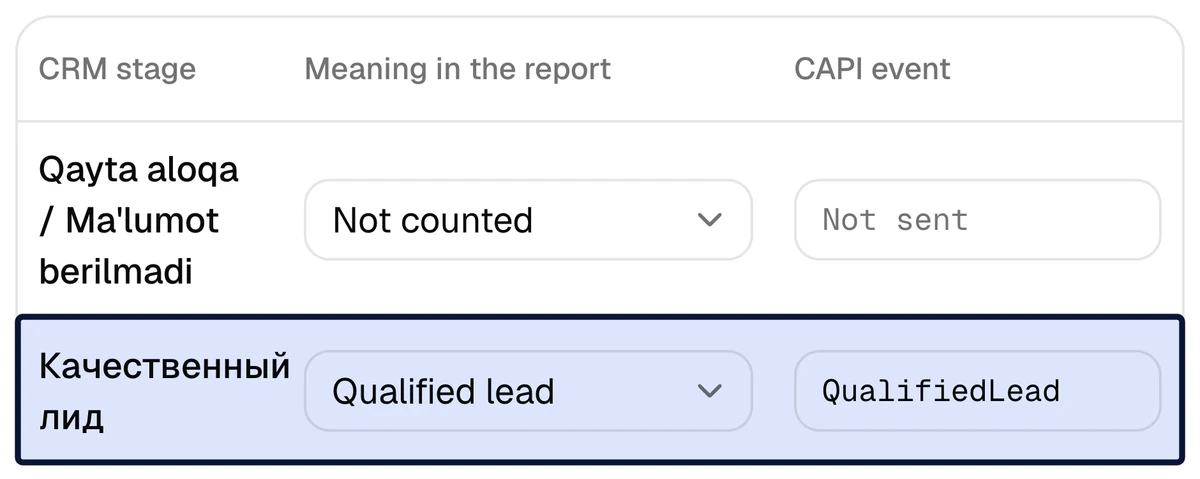
The moment a manager moves a lead into such a stage, the event is queued and sent: Lead, QualifiedLead or Purchase. Meta recognises a lead-form lead by its own lead ID; phone and e-mail go only as SHA-256 hashes, and names are never sent. Purchase carries the deal amount, when there is one, in the ad account's currency. One event name is sent once per lead, and the history loaded on connection is not sent to Meta.
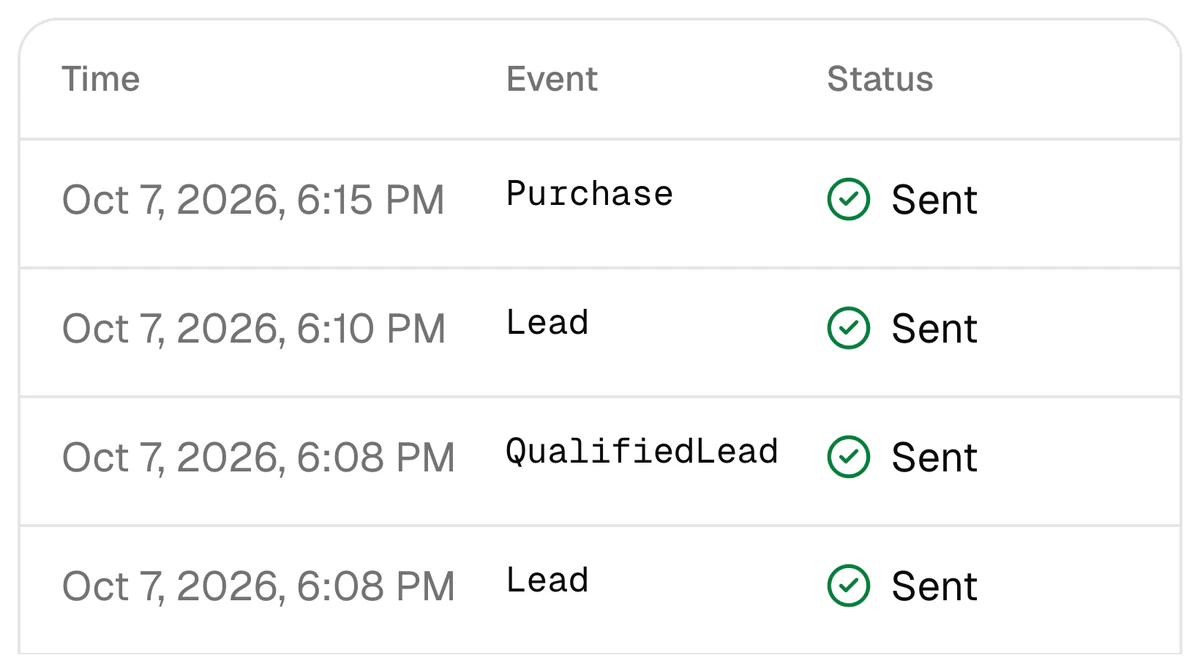
To optimise ads for qualified leads, you create a custom conversion from the QualifiedLead event in Ads Manager — covered in a separate article.
Setup takes 3 days: Bitrix24 is connected on day one, stages are tied to signals on day two, a test signal goes out on day three. The price is $159 once, with lead delivery included as a bonus; then $40 a month for the Conversions API, the report, Telegram reports and up to 4,000 leads a month. See pricing.
Your lead forms connected to Bitrix24 in 3 days
Sign up with Google, or leave a request: give access to Bitrix24 and the Meta ad account, and we do the rest.
FAQ
Do Instagram lead form leads reach Bitrix24 too?
Yes. Facebook and Instagram use the same Meta lead form: wherever the ad is shown, the lead lands in one form and takes one road to Bitrix24. Instagram needs no separate integration.
If Bitrix24's own Facebook connector is already running, do I have to switch it off?
No. Bitrix24's connector can keep bringing the leads in — the form then stays switched off in the platform. The signals and the report still work: a lead is tied to its ad by the Meta lead ID, the ad ID or the phone hash. One rule: two integrations must not deliver the same form at the same time.
Can a lead land in Bitrix24 twice?
Not from the platform's side: each Meta lead ID is registered once, the Bitrix24 record carries an origin mark, and a retry does not create a second record. Doubles come from elsewhere — two integrations delivering one form. That is why the old integration goes off first.
Are old leads from before the connection moved over?
No. A form's leads are delivered from the moment it is switched on; when moving from another integration you can go back at most 3 days, to a lead you pick. The last 30 days of Bitrix24 leads and deals load into the report but are not sent to Meta.
What happens to a lead if Bitrix24 does not respond?
It stays in the queue and is resent 7 times, at intervals from 1 minute to 24 hours. After 15 minutes of waiting, a Telegram alert goes out. The form's answers are kept encrypted for 7 days for those retries, then erased.
Does it work with Bitrix24's Lead → Deal mode?
Yes. When a lead is converted into a deal, the platform treats the two as one person, so the report does not count them twice. Whether a form's request is written as a lead or straight away as a deal with a contact is your choice per form.
Sources
- 1Facebook Lead Ads integration — Bitrix24
- 2Send customer actions to Facebook (help article) — Bitrix24 Helpdesk
- 3Bitrix24 and Facebook Conversions API integration — Albato
- 4Albato pricing — Albato
- 5Can I connect Facebook leads without a paid plan? (community answer) — Zapier Community
- 6Zapier pricing — Zapier
- 7Facebook Conversion Leads and Bitrix24 integration — Make
- 8Make pricing — Make
- 9Bitrix24 → Facebook Conversions API — LeadsBridge
- 10Bitrix24 → Meta CAPI for CRM — Datahash
- 11Conversions API for CRM — Meta
Read next
- amoCRM
amoCRM (Kommo) and the Meta Conversions API: how to send pipeline stages to Meta
How an amoCRM stage becomes a Meta event: choosing stages for QualifiedLead and Purchase, the limits of Kommo’s native CAPI integration, seven set-up steps and the usual mistakes.
7 min read
- CAPI
Conversions API without a website: CAPI for lead forms and a CRM
No website, only lead forms and a CRM? The Conversions API still works: the Meta lead ID is the key, the CRM stage is the signal. Meta’s requirements, the steps and the timing.
7 min read
- Lead quality
How to optimize Meta lead ads for qualified leads, not lead volume
Moving a Meta campaign from lead volume to qualified leads: the stage, the custom conversion, signal volume, the numbers.
8 min read